
API documentation lives and dies by its code samples. If a reader can’t quickly find the right endpoint, copy a working request, and see what comes back, the manual has failed at its one job. ClickHelp is a help authoring tool built with this in mind, and over the past few years it has picked up a set of features aimed specifically at API docs: OpenAPI/Swagger import, interactive request testing, and a set of ready-made building blocks for writing reference topics by hand.
This article covers four of them: importing an OpenAPI/Swagger definition to generate reference docs automatically, letting readers test API calls from the browser, building API topics by hand with ready-made Quick Parts, and highlighting code samples in multiple languages.
Generating API Docs From an OpenAPI/Swagger Definition
If your API already has an OpenAPI or Swagger definition file, you don’t need to write the reference manually. ClickHelp reads the file and builds the documentation for you.
Supported formats: Swagger 2.0, OpenAPI 3.0, and OpenAPI 3.1, as .json, .yaml, or .yml.
To import one:
- Click Import on the Projects page, or at the bottom-left of the Topic Editor.
- Select OpenAPI in the Import Wizard.
- Point to the definition file — either upload it or paste a URL. The file needs to be publicly reachable and not password-protected.
- Choose how to split the content:
- As a single topic — every method in one page.
- Group methods by resource — one topic per resource, all its methods listed inside.
- Methods as separate topics — one topic per method, grouped by tag.
- Let ClickHelp process the file, then open the project or finish the wizard.
Take the public Swagger Petstore definition as an example: importing it with Group methods by resource produces separate topics for /pet, /store, and /user, each with its methods, parameters, request/response schemas, and sample payloads already laid out — no manual formatting needed.
The resulting pages are auto-topics, so when the API changes, you don’t rewrite anything. Open the topic (or its mount point), click Update, point to the new version of the definition file, and ClickHelp rebuilds the content from the updated spec while keeping the topic in place in your TOC.
Interactive API Documentation: Letting Readers Test Requests

Static examples only get a reader so far. ClickHelp’s generated API topics include a Test Request button that lets readers send a real call to your API straight from the browser — no Postman, no curl, no copy-pasting into a terminal.
A reader clicks Test Request, fills in parameters, headers, and an authorization value if the endpoint needs one, and hits Send. ClickHelp calls the address specified as the host in your OpenAPI definition and shows the response right there in the same window. Authorization works the same way Swagger UI handles it — readers enter the auth header value, and scopes or other auth fields appear if your definition requires them.
For a getting-started guide, this changes the experience: instead of reading that an endpoint returns a 200 with a JSON body, a developer can fire the request against a sandbox and see the actual response.
Since February 2025, new portals render this with an updated engine that also generates code examples for the request automatically and lets you pick which server to test against; portals created earlier can choose between this and the previous (legacy) rendering when importing or updating a definition.
Building API Topics by Hand: API Docs Quick Parts
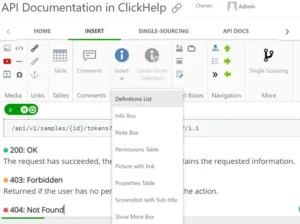
Not every API needs a full OpenAPI file, and not every writer wants to generate reference pages automatically. For manually written API topics, ClickHelp ships a set of Quick Parts made specifically for this — available both from the regular Insert Quick Part menu and as buttons on a dedicated API Docs tab on the ribbon.
These are prebuilt content blocks you drop into a topic and fill in — things like a member table for listing request parameters or response fields, so you’re not rebuilding the same table structure from scratch for every endpoint. Because they’re Quick Parts, you can edit the HTML and CSS behind them, so the tables and boxes match your documentation’s styling instead of looking bolted on.
Example: documenting a POST /users endpoint by hand, you’d insert the Member Table quick part once for the request body fields, and again for the response fields — same layout, same styling, no manual table setup either time.
Code Samples and Syntax Highlighting
Whether you’re writing endpoint descriptions manually or annotating an auto-generated topic, code needs to be readable. ClickHelp’s Code Sample element highlights syntax for dozens of languages — JavaScript, Bash, HTML, XML, CSS, and more — and gives readers a Copy Code button so they don’t have to select and copy manually.
If your endpoint has client examples in more than one language, you can lay them out as tabs: insert a Tabs element, label each tab with a language name, and put a Code Sample block (using the Code only layout) inside each tab’s content cell. Readers switch between curl, Python, and JavaScript versions of the same call without leaving the page. In printed output, where the tabs’ JavaScript doesn’t apply, ClickHelp falls back to rendering them as a plain table so the content stays readable.
A companion article on API documentation guidelines covers the writing side of this in more depth.
Conclusion
Whether your API already has an OpenAPI definition or you’re documenting it by hand, ClickHelp gives you a path: import the spec and get interactive reference docs with almost no manual work, or build topics yourself with Quick Parts and code highlighting doing the repetitive formatting for you. Try it with a free 14-day trial — there are no functionality limits, so you can test the OpenAPI import against your own definition file directly.
Good luck with your technical writing!
ClickHelp Team
Author, host and deliver documentation across platforms and devices
FAQ
Which OpenAPI/Swagger versions does ClickHelp support?
Swagger 2.0, OpenAPI 3.0, and OpenAPI 3.1, in .json, .yaml, or .yml format.
Can readers test API calls directly on the documentation page?
Yes. Generated API topics include a Test Request button that sends a real call to the host specified in your OpenAPI definition and displays the response inline, with support for authorization headers and scopes.
What happens to my API docs when the underlying API changes?
Since the topics are auto-topics, you open the topic (or its mount point) and click Update, then point to the new definition file. ClickHelp regenerates the content in place — no need to recreate the topic or rebuild your TOC.
Do I have to use OpenAPI/Swagger to document an API in ClickHelp?
No. You can write API topics manually using the API Docs Quick Parts — a set of ready-made blocks like member tables, along with the Code Sample element for highlighted, copyable code.