

Understanding the distinction between process and user documentation is crucial. One guides internal workflows; the other empowers end-users. Both are essential, but they serve different purposes. — Elmira Abbyasova, Head of Content at ClickHelp
Technical documents are a broad category of written materials designed to convey complex information in a clear and concise manner.Have you ever created a resume for a job, prepared a presentation, or written an email to your boss? Then you’ve already written technical documents. In project management and roadmaps, such documentation plays a crucial role in communicating plans, work, and scope effectively.
Technical writing includes a wide range of documents. They include instructions, reviews, reports, newsletters, presentations, web pages, brochures, proposals, letters, fliers, graphics, memos, press releases, handbooks, specifications, style guides, agendas, and so on. There are so many documentation templates, that in order to understand the differences between them, we need to break them up into categories, roadmaps, and strategies. In this article, we will make an attempt to do that and check how each section fits into the bigger picture.
General Classification
One of the main requirements for a technical document is its orientation for the intended audience. According to the target audience, technical documentation is divided into two main types:
Process Documents. These describe the development, testing, maintenance, and improvement of systems. , including high-level roadmaps and strategies for the work being done. Process documents are used by stakeholders, managers, engineers, testers, and marketing professionals. These documents contain technical terms and industry-specific jargon. Examples of this type of documents include API, SDK, and code documentation; internal development documentation, etc.
User Documents. This type of documentation provides customers with the information they need in order to use the product. User documents contain primarily instructional and explanatory materials that explain the scope of a product or service and how to navigate its functions. These documents use everyday terms instead of technical jargon so that they are clear, concise, and helpful even to novice readers. Step-by-step walkthroughs, user guides, user instructions, troubleshooting documentation may serve as examples.
Our Classification
There are so many different types of technical documents that it’s impossible to list all of them. However, we attempted to sort them out into several categories.
We‘ve come up with the following scheme:
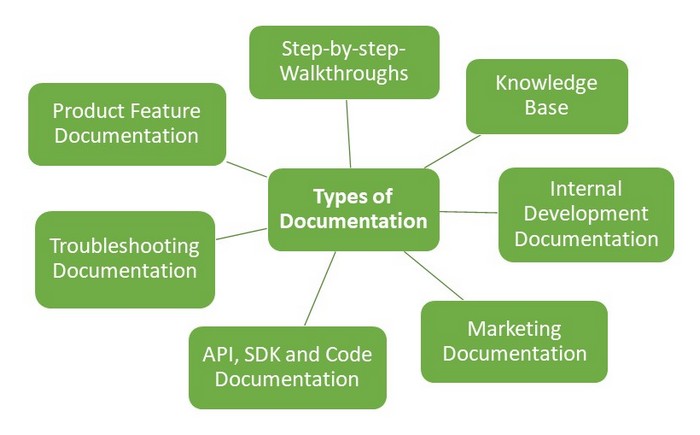
What do you think of it? Did we miss something?
Advanced Examples of Technical Documentation
The number of classifications and lists of technical documents is endless. While the creation of presentations or general reports requires no specific knowledge, some technical documents are rather complicated. Below we’ve listed some of the most advanced and widespread, in our opinion, examples for you to learn a bit about them:
User Guide (Manual)
A User Guide (or manual) is a crucial document designed to assist users in understanding and effectively using a product or system. Primarily, user guides focus on tasks that users can perform through a product’s graphical user interface (GUI). The language used is tailored to the target audience, with technical jargon minimized or thoroughly explained to ensure that even novice users can follow along. A user guide typically includes step-by-step instructions, troubleshooting tips, and clear explanations of the system’s features.
Key Features:
- Step-by-step instructions for performing tasks.
- Language suited to the target audience, avoiding unnecessary jargon.
- Often includes illustrations or screenshots to enhance understanding.

Release Notes
Release Notes are technical documents accompanying software updates or product releases. They provide information on new features, enhancements, and bug fixes. Typically shared with end-users, customers, or clients, release notes ensure that all parties are aware of what changes have been made to the software, and how these changes affect its performance or functionality.
Key Features:
- Lists new features, updates, and bug fixes.
- Shared with customers, developers, and internal teams.
- Explains the impact of changes to the software and any actions required by the user.
API Documentation
API Documentation is essential for developers, detailing what services an API offers and how to use them effectively. It provides the necessary instructions for interacting with an API, including the functions, methods, and parameters available. This documentation is typically used by developers to integrate APIs into applications, and it often includes code examples, best practices, and potential pitfalls.
Key Features:
- Describes API endpoints, methods, and data structures.
- Includes code examples and explanations of parameters.
- Aimed at developers and often found in documentation files, blogs, or forums.

Troubleshooting Documentation
Troubleshooting Documentation provides users with guidance on how to identify and solve problems they might encounter with a product. This type of documentation is vital for customer support, as it helps users resolve issues independently. Troubleshooting documents often include step-by-step procedures, common problem scenarios, and explanations of error messages. It’s essential that the document explains technical terms clearly, making it accessible even to users without a technical background.
Key Features:
- Detailed steps for diagnosing and resolving issues.
- Explanations of common problems and errors.
- Designed to be clear and user-friendly, minimizing technical jargon.
Knowledge Base Documentation
A Knowledge Base is an online repository that contains a collection of articles, FAQs, how-to guides, and troubleshooting resources. Knowledge base documentation is designed to be a self-service tool, allowing users to solve their problems without needing to contact customer support. An effective knowledge base improves customer satisfaction by providing quick and accessible answers to common issues.
Key Features:
- Includes FAQs, how-to guides, and troubleshooting tips.
- Aims to reduce the need for direct customer support.
- Easily accessible online, often organized by categories.

SDK (Software Development Kit) Documentation
SDK Documentation provides developers with the tools and instructions necessary to create applications or extend the functionality of a platform. It typically includes a set of APIs, libraries, and other utilities designed to simplify the development process. SDK documentation is essential for developers looking to build software for a specific platform or system.
Key Features:
- Provides APIs, tools, and libraries for application development.
- Includes examples and instructions for using the SDK effectively.
- Helps developers integrate new features or create applications on a specific platform.
Market Requirements Document (MRD)
The Market Requirements Document (MRD) outlines the customer’s needs and expectations for a product or service. It serves as a guide for product development teams, detailing the features, functionality, and market conditions necessary for the product’s success. The MRD typically includes information about the target audience, competitor analysis, and potential market opportunities.
Key Features:
- Describes customer needs, market analysis, and competitive products.
- Guides the product development process, ensuring the product meets market demands.
- Used by product managers and development teams to align on goals and objectives.
User Requirements Document (URD)
The User Requirements Document (URD) details the specific features and functionalities that a software product must have, as requested by the user. The URD is a critical document in the development lifecycle, as it clearly defines what is expected from the software and ensures that both the customer and the developer are aligned. The URD often becomes part of the contractual agreement, and it serves as a benchmark for the development process.
Key Features:
- Specifies detailed user expectations for software functionality.
- Becomes part of the contractual agreement between the customer and developer.
- Ensures that the final product meets user requirements and expectations.
Other examples of advanced technical documents may include Architecture and Engineering Documents (A&E Docs), help files, Standard Operation Procedure (SOP) manuals, installation guides, troubleshooting guides, system configuration guides, code documentation, how to’s, reference sheets, white papers, FAQs, Q&As, reference sheets, etc.
The following table provides an overview of the different types of technical documents, their descriptions, and examples.
| Category | Description | Examples |
|---|
| Technical Documents | Documents that convey complex information clearly and concisely. | User guides, manuals, reports, presentations, proposals. |
| Process Documents | Documents focused on technical systems development, testing, and maintenance. Used by professionals. | API, SDK, internal development documentation, code docs. |
| User Documents | Documents designed to help customers use a product, written in clear, non-technical language. | User guides, troubleshooting documentation, step-by-step instructions. |
| Advanced Examples | Complex, detailed documents that require specialized knowledge and often target specific users. | Release notes, API documentation, SDK documentation, MRD, URD, Knowledge base. |
| User Guide (Manual) | A document to assist users with product usage, often focusing on tasks via GUI. | Guides that explain how to use software or products. |
| Release Notes | A document that details software updates, bug fixes, and new features. | Software updates with features and fixes listed. |
| API Documentation | Describes API services and how to use them, offering detailed technical instructions. | Documentation on how to interact with software APIs. |
| Troubleshooting Documentation | Helps users solve issues with a product by offering clear instructions. | Guides for diagnosing and solving common issues. |
| Knowledge Base | A collection of online documentation answering common questions and providing solutions. | FAQs, how-to guides, troubleshooting articles. |
| SDK Documentation | Provides developers with tools and APIs needed to create applications for specific platforms. | Documentation for software development kits (SDKs). |
| Market Requirements Document (MRD) | Outlines the customer’s needs and expectations for a product or service. | Customer wants, product competition, and market analysis. |
| User Requirements Document (URD) | Specifies the exact features and functionalities expected by users for a software product. | Detailed specification of software requirements. |
| Other Advanced Examples | Various other complex documentation types used in technical fields. | SOP manuals, installation guides, white papers, code documentation, Q&As. |
Conclusion
Technical documentation is a critical element of business and product development, customer support, and system management. The types of technical documents range from basic user guides and release notes to more complex documents like API documentation, SDK manuals, and market requirements specifications. Each document type plays a unique role in ensuring that users, developers, and teams can effectively interact with, understand, and troubleshoot products and systems.
By categorizing these documents, we can better grasp their specific purposes and tailor them to the needs of different audiences. Whether you’re a user looking for a simple guide or a developer seeking detailed integration instructions, technical documentation is essential for delivering clear and actionable information.
Good luck with your technical writing!
ClickHelp Team
Author, host and deliver documentation across platforms and devices
FAQ
What is a technical document?
A technical document is a written material that conveys complex information in a clear and concise manner. Examples include user guides, manuals, reports, proposals, presentations, and much more. Technical writing is designed to help users understand and apply technical information efficiently.
What types of technical documents exist?
Technical documents can be broadly classified into two main categories: Process Documents and User Documents.
Can technical documents be categorized further?
Yes, technical documentation can include even more specific types, such as architecture and engineering documents, Standard Operating Procedures (SOPs), installation guides, white papers, reference sheets, and more.
What makes a good technical document?
A good technical document is clear, concise, and written with the target audience in mind. It simplifies complex concepts, uses plain language when possible, and includes visuals to enhance understanding. Regular updates and feedback from users also ensure the document remains relevant and useful.
What is SDK Documentation?
SDK (Software Development Kit) Documentation provides developers with the tools and APIs needed to create applications for a particular platform. It contains detailed technical information on how to interact with the platform’s features and build software.