
What Are Product Specifications?
In practice, a product specification is a structured document (or set of documents) that defines what a product must do and how it should behave. It answers core questions such as:
- What problem does the product solve?
- What are its main features and capabilities?
- What are the technical requirements (performance, integrations, security, etc.)?
- What constraints apply (budget, timeline, platform, regulatory rules)?
A specification acts as a single source of truth during design, development, and testing. It helps teams avoid misunderstandings, scope creep, and costly rework by aligning stakeholders around clear, testable requirements.
How Detailed Should Product Specifications Be?
A common question for product managers — especially in early-stage software teams — is how detailed a product specification should be. Many frameworks suggest that product managers focus on the problem space (what and why), while engineers and designers focus on the solution space (how). In reality, specs often sit between these two.
The right level of detail typically includes:
- High-level clarity: The spec should clearly describe the user problem, desired outcomes, and key acceptance criteria — what “done” looks like.
- Behavioral coverage: It should cover important user flows and meaningful edge cases (for example, what happens when a user presses ESC during loading or navigates back), without documenting every micro-interaction unless it affects business logic or risk.
- Team-aware granularity: Small cross-functional teams can rely on leaner specs supported by prototypes and discussions. Larger or distributed teams usually need more explicit detail to prevent ambiguity.
A good rule of thumb: the spec should be detailed enough for implementation and testing without constant clarification, but not so detailed that it dictates every UI pixel or low-level technical choice. Pairing concise specs with mockups or clickable prototypes often improves shared understanding while keeping documents manageable.
Product Specification Sheets and Templates
Specification sheets and templates are standardized formats that help teams consistently capture and communicate requirements. A spec sheet usually condenses essential information — goals, scope, requirements, constraints, and success metrics — into a compact, scannable structure.
Templates provide a reusable pattern so each new feature or release follows the same logic, which reduces onboarding time and confusion.
Common elements in a specification template include:
- Overview and objectives
- Target users and use cases
- Functional requirements (what the system should do)
- Non-functional requirements (performance, security, reliability)
- User flows and key screens
- Acceptance criteria and testable conditions
- Dependencies, risks, and open questions
Many software teams combine lightweight spec sheets with deeper linked documentation stored in a central knowledge base so that high-level decisions remain easy to scan while detailed technical or UX notes live in dedicated pages.
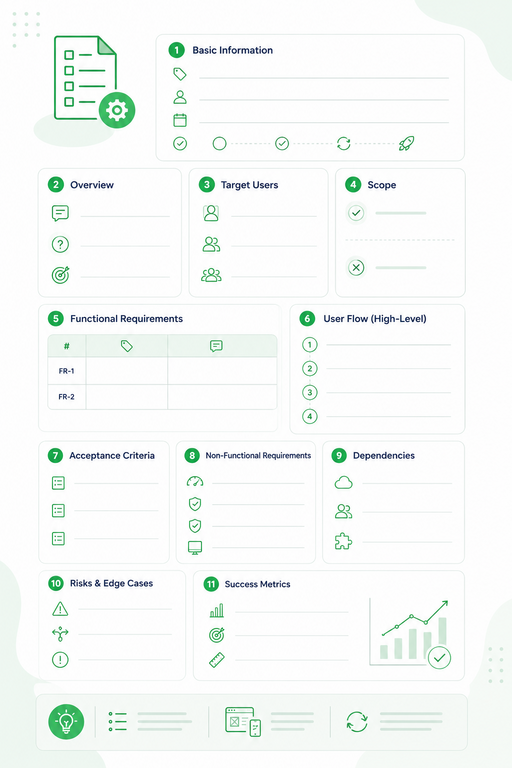
Template: Lightweight Product Specification Sheet (Feature-Level)
Purpose: Capture essential information about a feature quickly and consistently. Ideal for small features, MVPs, or iterative improvements in SaaS products.
1. Basic Information
- Feature Name:
- Owner / Author:
- Date / Version:
- Status: Draft / Approved / In Development / Released
2. Overview
- Short Description:
A concise summary of the feature and its purpose. - Problem Statement:
Which user or business problem does this feature solve? - Business Goal:
What metric or outcome is this feature expected to improve?
3. Target Users
- Primary Users:
- Secondary Users:
- Key Use Cases:
4. Scope
- In Scope:
- Out of Scope:
5. Functional Requirements
| ID | Requirement | Description |
| FR-1 | ||
| FR-2 |
6. User Flow (High-Level)
Step-by-step description:
- User does …
- System responds …
- User sees …
- Result / Output …
7. Acceptance Criteria
- Criterion 1
- Criterion 2
- Criterion 3
(Optional format: Given / When / Then for Agile teams)
8. Non-Functional Requirements
- Performance:
- Security:
- Reliability:
- Compatibility:
9. Dependencies
- External Services / APIs:
- Team Dependencies:
- Integrations:
10. Risks & Edge Cases
- Risk:
- Edge Case:
- Error Scenario:
11. Success Metrics
- KPI / Metric:
- Target Value:
- Measurement Method:
✅ Notes / Tips:
- Keep this sheet concise — 1–2 pages per feature is ideal.
- Use this template alongside sketches, mockups, or clickable prototypes for better context.
- Update versioning when requirements change.
The Process for Writing Specifications
Effective product specifications start with clarity of purpose and audience. A strong spec is not about volume — it is about precision and alignment across engineering, design, QA, and business stakeholders.
A practical spec writing process often includes:
- Define the problem and desired outcome. Clearly state the user problem or business opportunity and how solving it supports product goals.
- Gather and synthesize requirements. Collect input from stakeholders and teams (engineering, design, support, sales, marketing) and distill it into coherent objectives and boundaries.
- Research and benchmark. Review competitors and existing solutions to ground requirements in market reality.
- Define user personas and scenarios. Clarify who will use the feature and in what context so requirements reflect real usage.
- Prioritize scope and features. Use prioritization frameworks such as RICE, MoSCoW, or Kano to keep scope realistic.
- Write user stories and acceptance criteria. Attach testable acceptance criteria to each story so requirements are actionable.
- Create wireframes or mockups. Visual artifacts reduce ambiguity and surface edge cases early.
- Include technical considerations. Capture constraints, dependencies, performance targets, security needs, and integrations with engineering input.
- Define success metrics. Identify KPIs that will measure success after release.
- Review and iterate. Treat the spec as a living document refined through reviews and backlog grooming.
How User Manuals Complement Specifications
While product specifications are aimed primarily at internal stakeholders, user manuals are written for end users. They translate technical specs into step‑by‑step instructions, explanations, and best‑practice guidance so customers can actually use the product effectively and safely.
User manuals typically include:
- Installation and setup instructions
- Core workflows and common tasks
- Troubleshooting guidance
- Error explanations
- Safety and compliance notes
- Practical usage tips
In short, specifications define what the product must do, while user manuals explain how to use it effectively. Manuals turn abstract requirements into concrete, user-friendly actions.
Why Online User Manuals Are the Best Format
Online user manuals are now the preferred format for modern software products because they offer clear operational advantages:
- Always up to date: Content can be revised immediately when features or requirements change.
- Accessible anywhere: Users can access help from any device without relying on a static file.
- Searchable: Full-text search dramatically reduces time to find answers.
- Rich media support: Online guides can include screenshots, video, interactive tours, and embedded help.
- Contextual delivery: Help can be integrated directly into the product UI.
- Cost and eco efficiency: No printing, packaging, or physical distribution required.
For modern digital products, web-based documentation is typically more effective than printed manuals or static PDFs.
Limitations of Specifications
Product specifications are essential — but they are not sufficient on their own.
Key limitations include:
- They do not teach users: Specs describe behavior and requirements, not step-by-step usage or training.
- They can become outdated: Without strong change management, specs may lag behind the actual product.
- They emphasize “what,” not user understanding: They often lack user-centric explanations, mental models, and practical context.
- They are often too technical for end users: Specs are rarely written in user-friendly language.
Because of these limits, user manuals and online help systems are necessary complements that bridge the gap between defined behavior and real-world usage.
Using ClickHelp for Specifications and Manuals in SaaS
For digital products, documentation platforms such as ClickHelp can support both user manuals and specification-style documentation in a centralized environment. Teams can structure, version, and publish internal and external documentation while maintaining consistency.
With ClickHelp, teams can:
- Organize requirements, feature descriptions, and technical notes in structured topic trees
- Link internal spec content to user-facing guides
- Control access with roles and permissions
- Publish responsive, searchable online manuals integrated with product UI
Rapid Specification Generation with Automation
Automation is increasingly influencing not only coding and testing, but also the way product specifications are created. Modern AI-powered and template-driven tools can generate structured draft specifications based on short inputs such as feature ideas, user stories, tickets, or product briefs. Instead of starting from a blank page, teams can begin with a machine-generated outline and refine it collaboratively.
In practice, automated spec generation usually works by transforming source inputs — product ideas, backlog items, customer requests, or requirement lists — into a structured document that includes goals, scope, functional requirements, user flows, and acceptance criteria. Some tools can also suggest edge cases, validation rules, and test scenarios based on common product patterns.
This approach provides several practical advantages:
- Faster first drafts: Teams can produce a structured specification outline in minutes instead of hours or days.
- Consistency of structure: Generated specs tend to follow repeatable formats and templates, which improves readability and review speed.
- Better coverage prompts: Automation can suggest commonly forgotten sections such as edge cases, error states, or non-functional requirements.
- Improved collaboration: A draft artifact makes it easier for product, engineering, and design to react, comment, and iterate together.
At the same time, automated specification generation has important limitations. Generated content may sound complete while still missing domain-specific nuances, hidden dependencies, regulatory constraints, or complex workflow exceptions. AI systems typically rely on generalized patterns and may produce plausible but incorrect assumptions about user behavior or technical feasibility.
Because of this, automated specs should be treated as accelerators, not authorities. The most effective workflow is draft → expert review → refinement → validation. Product managers and engineers should verify assumptions, adjust scope, and add context drawn from real users and system architecture.
When used thoughtfully, automation helps planning speed move closer to delivery speed. It reduces documentation friction while preserving rigor — as long as teams keep human judgment, stakeholder review, and real user feedback at the center of the specification process.
Conclusion
Product specifications are indispensable for defining what a product should do and aligning teams around requirements. However, they are not learning tools and cannot replace user guidance. Clear, practical user manuals — especially in online format — are essential to translate specifications into successful real-world usage. Combining strong specs with modern online documentation platforms ensures both internal clarity and external usability.
Good luck with your technical writing!
Author, host and deliver documentation across platforms and devices
FAQ
What is the difference between product specifications and user manuals?
Product specifications describe what a product must do, how it should behave, and what requirements it must meet. User manuals explain how end users should use the product in practice, with step-by-step guidance and examples.
Who writes product specifications?
Product specifications are usually written by product managers, business analysts, or system architects in collaboration with engineering, design, and QA teams.
Are product specifications only for large teams?
No. Even small teams benefit from lightweight specifications. The format can be simpler, but documenting goals, scope, and acceptance criteria still reduces misunderstandings and rework.
Why can’t specifications replace user manuals?
Specifications are written for internal stakeholders and focus on requirements and behavior. They are not designed as learning or training materials and usually lack step-by-step usage guidance.
Why are online user manuals better than PDFs or printed guides?
Online manuals are easier to update, searchable, accessible from any device, and can include multimedia and interactive help. This makes them more effective for modern software products.
Can the same tool be used for both specs and manuals?
Yes. Modern documentation platforms such as ClickHelp allow teams to manage internal specifications and external user manuals in one structured, versioned environment.