Ask how to make an AI documentation assistant answer better, and most people will say: use a better model. Our tests say otherwise.
Building a chatbot for your documentation now takes an afternoon. Point a RAG framework at your docs, connect a model, and the demo looks great. Then real users start asking real questions.
At ClickHelp, we build AnswerGenius, the AI assistant inside our documentation platform. We kept coming back to one question: when a docs assistant gets an answer wrong, what actually went wrong? The framework? The model? Something else?
So we ran an experiment. We compared AnswerGenius with the two most popular open-source RAG frameworks, Haystack and LlamaIndex. Our goal wasn’t to win a benchmark. We wanted to see what drives answer quality when you put the options side by side. Here’s what we found, and what it means if you’re deciding whether to build your own assistant or use one that’s already built.
What actually decides answer quality in a docs AI assistant?
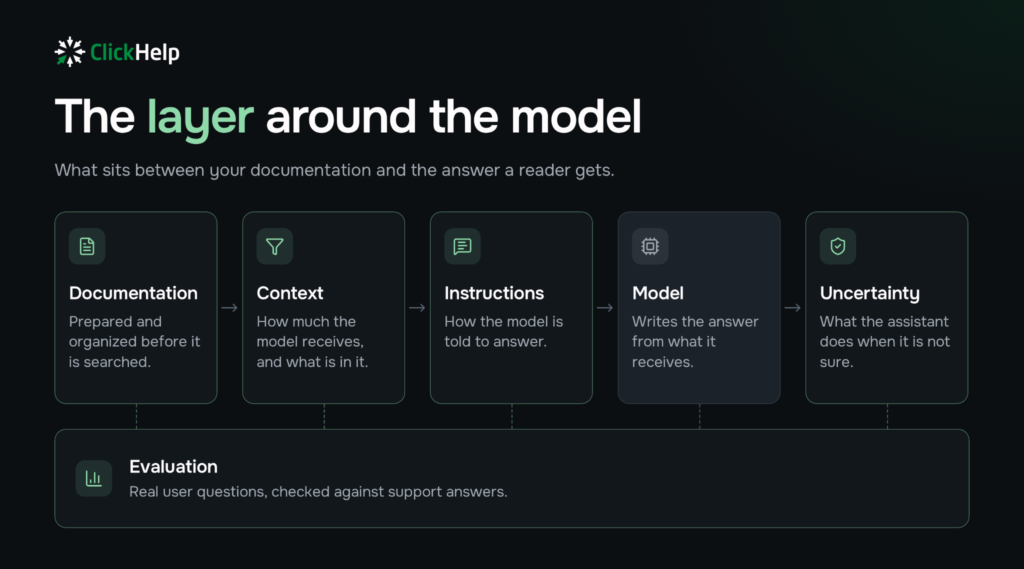
Not the framework, and not the model. Answer quality is decided by the engineering layer around the model. Here are the five comparisons we ran and what each one showed:
| What we tested | What we found |
| Haystack and LlamaIndex with default settings vs AnswerGenius | AnswerGenius gave noticeably better answers on far more questions |
| The same frameworks with our layer on top | The same answer quality as AnswerGenius, within measurement noise |
| Adding a reranker | No improvement in any of four comparisons |
| A larger model on the same layer | The same answer quality |
| Our entire website added to the assistant’s knowledge | Answer quality unchanged |
Below, we walk through each of these findings.
How did we test it?
We used 50 questions our users had actually asked, with our support team’s replies as the answer key, and ran 14 configurations on the same model.
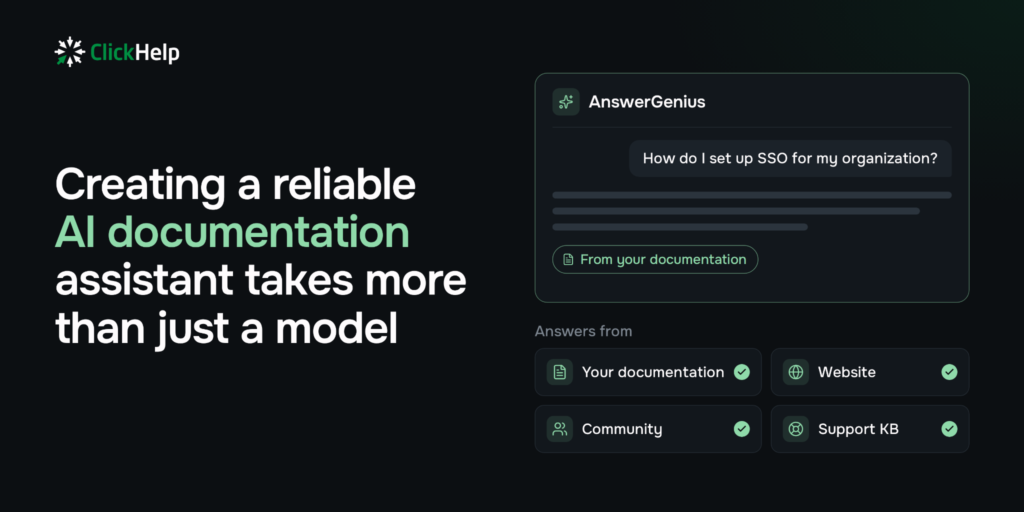
Demo questions are easy. Real ones aren’t: they’re vague, mix topics, arrive in other languages, or ask about things the docs don’t cover. So we didn’t write test questions ourselves. Our test setup:
- 50 real user questions, including 7 not in English and 4 about our website rather than the product docs.
- A real support answer as the reference for every question.
- The same model in every configuration, so any difference comes from the system around it.
- Automated scoring with RAGAS, an open-source toolkit for evaluating RAG answers, plus a blind side-by-side comparison of answers by AI evaluators.
This was one test on our own documentation, not an industry benchmark. Your docs and questions will differ, which is why the last section shows how to run the same test yourself.
What happens when you run Haystack and LlamaIndex out of the box?
They fell behind, and mostly for one reason: the model often never saw the article that held the answer.
“Out of the box” is how most teams start: follow the tutorial, keep the defaults. In both Haystack and LlamaIndex, that means vector search only, with 10 text fragments (Haystack) or just 2 (LlamaIndex) passed to the model. Here’s how the default setups compared with AnswerGenius, question by question:
- Against Haystack: AnswerGenius gave a noticeably better answer on 19 of 50 questions, Haystack on 8, and the remaining 23 were close.
- Against LlamaIndex: AnswerGenius was noticeably better on 26 questions, LlamaIndex on 9, and 15 were close.
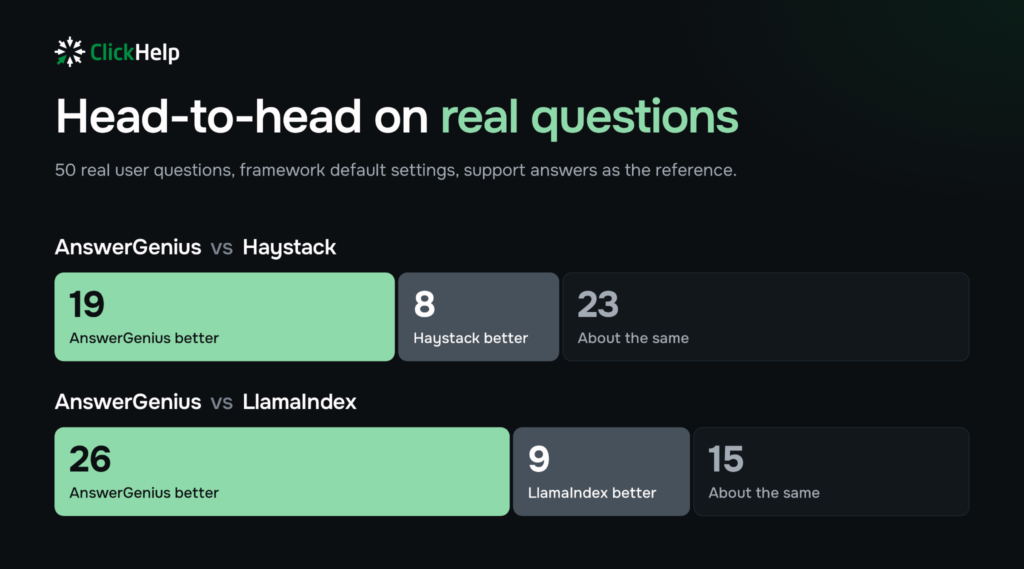
The biggest loss happened before the model wrote a word. With LlamaIndex defaults, the model didn’t receive the right article for more than half of the questions. With so little to work from, it filled the gaps on its own.
One user asked how to tell through our API that a publication is ready and how to get its link. The default LlamaIndex setup said the link comes back right away, in the response to the publish request. It doesn’t. AnswerGenius described how it actually works: start the publication, get a task ID, and check the task status until it’s done.
What closed the gap?
The layer around the model. When we connected our layer to the same two frameworks, they matched AnswerGenius within measurement noise. The engine wasn’t the deciding factor. The engineering around it was.
We didn’t need to reinvent retrieval: mature search engines have converged, and ours is in line with them. So we put our engineering effort where answer quality is actually decided. Four things decide it:
- How the documentation is prepared before it’s searched.
- How much context the model gets, and what’s in it.
- How the model is instructed to answer.
- What the assistant does when it isn’t sure.
Context is a deliberate trade-off. Our layer gives the model around 25,000 tokens of context per question; the default setups give it 1,600 to 4,500. More context costs more, and in our tests it paid for itself in answer quality.
This layer is where we’ve spent our engineering time in AnswerGenius, and it’s what our customers get without building it themselves. Instructions are part of it, and no single set of instructions fits every domain. That’s why AnswerGenius has custom prompts for your terminology, product context and answer rules. We use them on our own portal.
Do popular fixes help?
Not necessarily. Two of the most common pieces of RAG advice, adding a reranker and switching to a bigger model, didn’t improve answer quality in our setup. Here’s what happened with each:
- A reranker. It re-sorts the retrieved fragments with a separate model and drops the weaker ones. In four comparisons it didn’t improve answers once, and it sometimes dropped the fragment that held the answer. We tested it with a large context; with a small one, the result may differ.
- A bigger model. A larger model on the same layer gave the same answer quality. Switching isn’t free either: the layer is tuned to the model, so a new model means retuning it.
One example. A user asked to be connected to a live agent. With the reranker, the assistant built its answer from a blog post and guessed at escalation options. Without it, the assistant explained that the chat can’t hand over to a person and listed the support channels that actually exist. We didn’t ship the reranker.
What else makes docs assistants hard to get right?
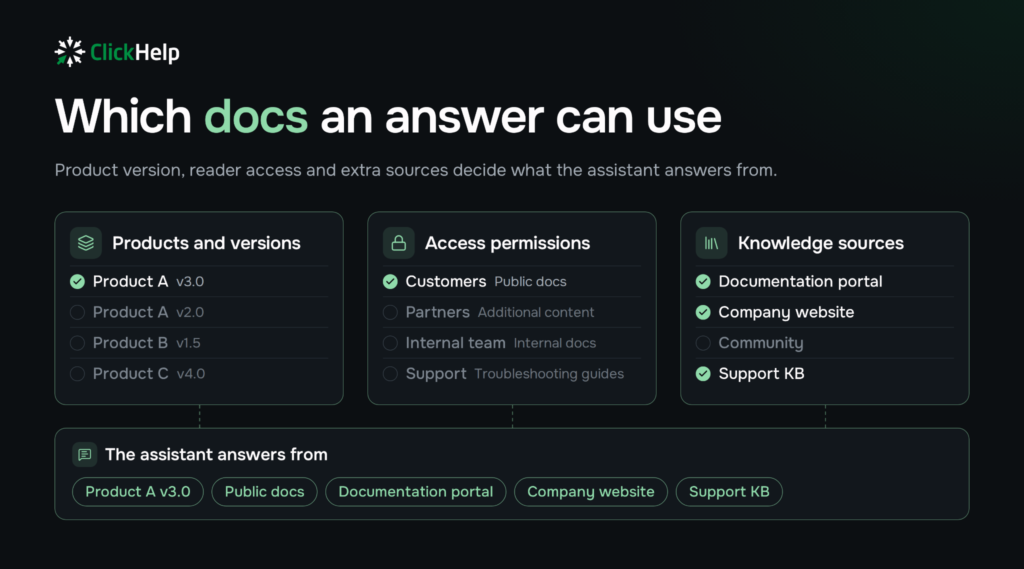
In our experience, three things: similar product versions, readers with different access rights, and knowledge that lives outside the docs. These come from our work with customers rather than from the experiment, except for the last one, which we tested.
- Similar versions and editions. An assistant can give a correct answer for the wrong version. Separate Documentation Sites let it answer from the right product only.
- Different access rights. Partners, customers on different plans and internal teams should get answers only from the docs they’re allowed to see. In ClickHelp, restricted publications and Power Reader access groups handle this, and AnswerGenius follows the same rules.
- Knowledge outside the docs. Useful answers often live on your website, in a community forum or in a support knowledge base. AnswerGenius can draw on these sources through Federated Search.
When you have several products or versions, even a technically correct answer can be misleading if it comes from the wrong documentation. That’s why we pay attention to which publications an assistant can search and what each reader is allowed to access. You shouldn’t rely on a prompt to enforce access restrictions. Ian, Product Manager at ClickHelp
The last point raises a fair worry: will extra content confuse the assistant? We tested that by adding our entire website to the assistant’s knowledge, alongside the docs. Website pages took up about a third of the context, and answer quality didn’t change.
Should you build your own docs assistant or buy one?
Build it if you’re ready to own the layer around the model for the long term. Use one that’s already built if your team’s job is the documentation, not the AI pipeline. Either way, test it on your own questions. Here’s how building on a RAG framework compares with using an assistant built into your docs platform, on answer quality, upkeep, access control and team fit:
| Criterion | Build on a RAG framework | Use an assistant built into your docs platform |
| Answer quality on real questions | Depends on the layer you build; the defaults fell behind in our test | Depends on the vendor’s layer; test it on your questions |
| What you build and maintain | Document preparation, context, model instructions, uncertainty handling, a test set, retuning when the model changes | Configuration: which content it answers from, domain-specific prompts |
| Product and access separation | You build it | Comes from the docs platform |
| Control | Full | Within the platform’s settings |
| Fits teams that | Have engineers to own an AI pipeline long term | Want the docs team to own answer quality |
Both paths get you a working demo in days. The difference is what comes after: who keeps the answers accurate as your docs grow, your products multiply and models change.
How do you test any option on your own questions?
Collect real questions from support, use your support team’s answers as the reference, and compare the options question by question on the same model. A five-step test you can run this month:
- Collect 30–50 real questions from support, including hard ones and ones not in English.
- Use your support team’s answers as the reference for each question.
- Run every option on the same model.
- Compare the answers question by question, not only by an average score.
- Ask who maintains the layer around the model when the model changes.
There’s a bonus for documentation teams. Questions that every option answers poorly usually point to gaps in the docs themselves. We found five of those in our own documentation.
Building a docs assistant takes days. Making its answers reliable is ongoing engineering work, and it’s the part a demo never shows. That’s the work we’ve put into AnswerGenius, and we measure it the way we described here. If you’re weighing your options, run the five-step test on your own docs, or talk to our team and we’ll go through your documentation with you.
Good luck with your technical writing!
Author, host and deliver documentation across platforms and devices
FAQ
Does a bigger model make a documentation AI assistant answer better?
Not in our tests. A larger model running on the same engineering layer gave the same answer quality. Switching models also has a cost: the layer is tuned to a specific model, so a new one means retuning it.
Why do Haystack and LlamaIndex with default settings give weaker answers?
Mostly because of retrieval. By default, both use vector search only and pass the model 10 text fragments (Haystack) or 2 (LlamaIndex). With LlamaIndex defaults, the model didn’t receive the article with the answer for more than half of our 50 questions, and filled the gaps on its own.
How much context should a docs assistant get per question?
It’s a trade-off between cost and quality. Our layer gives the model about 25,000 tokens per question, compared with 1,600–4,500 in the default setups. More context costs more, and in our tests it paid off in answer quality.
Should I add a reranker to my RAG pipeline?
Only if it improves answers on your own questions. In four comparisons, a reranker didn’t improve answers once and sometimes dropped the fragment that held the answer. We tested it with a large context; with a small one, the result may differ.
Will adding website content to the assistant’s knowledge make answers worse?
In our test, no. We added our entire website alongside the documentation. Website pages took up about a third of the context, and answer quality didn’t change.
How does AnswerGenius handle different product versions and access rights?
Separate documentation sites keep answers tied to the right product or version. Restricted publications and Power Reader access groups control which docs each reader can see, and AnswerGenius follows the same rules instead of relying on a prompt to enforce them.
How can I test a docs AI assistant before choosing one?
Collect 30–50 real questions from support, including hard ones and ones not in English. Use your support team’s answers as the reference, run every option on the same model, and compare answers question by question rather than by average score. Then ask who maintains the layer around the model when the model changes.