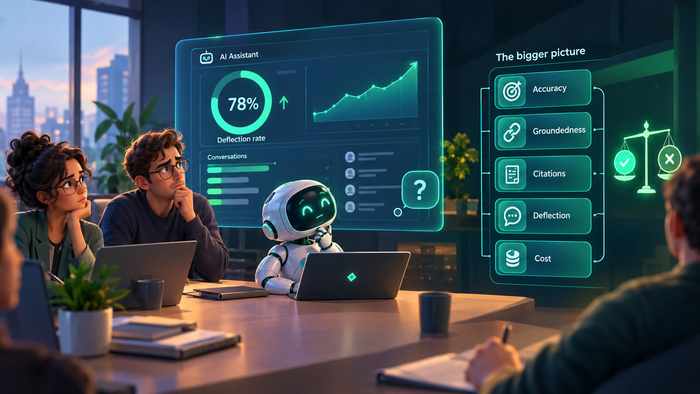
At a planning meeting, someone says, “We need AI in our documentation.” Three people in the room start thinking about three different things. One thinks about autocomplete while writing. Another pictures a chatbot answering users’ questions. The third person thinks of an agent that updates documentation automatically at every release.
The conversation actually stalls after this phrase. It happens not because the idea is bad, but because there is no common concept or understanding of how autonomous the AI should be.
This is the same problem that the self-driving car industry has already solved by introducing levels of autonomy (from zero and partial driving automation to full automation without the usage of either steering wheel or pedals). Documentation needs its own version.
Why “AI in Documentation” Isn’t One Thing
The phrase “AI in documentation” implies a whole range of things. At one end, there is a tool that suggests a clearer sentence while you type. At the other, there is an agent that monitors product changes, detects conflicts between documents and reality, and publishes updates without human approval. These are not variations of the same thing. They are fundamentally different operating models with different risks, costs, and governance requirements.
This difference is the cause of real problems. Teams can’t compare tools because vendors use the same marketing language for different capabilities. They can’t set meaningful goals because “add AI” doesn’t specify what it implies in practice. And they can’t assess risk, because the cost of an error at a stage when a human approves every phrase cannot be compared to the cost of an error when the system publishes documentation on its own. The term “AI-powered documentation” doesn’t incorporate this distinction.
The Framework: 5 Levels of AI Autonomy in Documentation
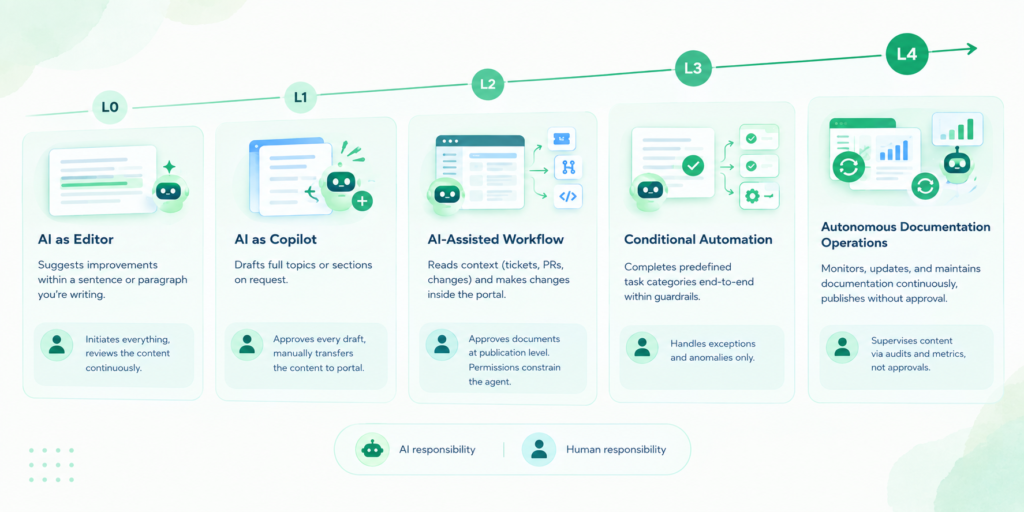
Here is the full scale of AI involvement in documentation management and creation. Each level describes how much the AI does independently and where human control comes in.
| Level | Name | What the AI Does | Human Role |
| L0 | AI as Editor | Suggests improvements within a sentence or paragraph you’re writing | Initiates everything, reviews the content continuously |
| L1 | AI as Copilot | Drafts full topics or sections on request | Approves every draft, manually transfers the content to the portal |
| L2 | AI-Assisted Workflow | Reads context (tickets, PRs, changes) and makes changes inside the portal | Approves documents at publication level. Permissions constrain the agent |
| L3 | Conditional Automation | Completes predefined task categories end-to-end within guardrails | Handles exceptions and anomalies only |
| L4 | Autonomous Documentation Operations | Monitors, updates, and maintains documentation continuously, publishes without approval | Supervises content via audits and metrics, not approvals |
Each level includes the capabilities of the ones below it, but teams aren’t required to climb the scale. Staying at a lower level is possible, and it should not be looked upon as a failure to progress. Within a single team, different content types can exist at different levels at the same time: release notes might be automated, while compliance documentation stays under full human review.
L0 – AI as Editor
At L0, AI works at the sentence or paragraph level inside the content a human is already writing. This concerns inline suggestions, improved phrasing, as well as grammar and style checks. Importantly, it is the human who initiates every action, at every step. Because the AI never publishes anything and never decides anything on its own, human review happens continuously by definition. A typical example is a tool that suggests a clearer phrasing of a sentence while the author is typing it.
This level fits everywhere. It is the baseline with minimal risk. On the other hand, it means minimal time savings, as the human still has to choose or ignore suggestions and constantly review everything. It makes individual writers only slightly faster without changing any workflow, approval process, or governance structure. The AI never sees the portal, never touches published content, and never acts without human control — L0 is safe precisely because it changes almost nothing about how content actually gets produced.
There is a negative aspect worth mentioning: in certain cases, AI at this level can actually slow writers down. Every suggestion has to be read, evaluated, and either accepted or rejected. Such micro-decisions, repeated hundreds of times across a document, have a significant cognitive cost. For an experienced writer who already knows what to say, stopping to consider an AI’s alternative phrasing can interrupt the flow of drafting rather than support it. The tool is fast, but the consideration of every suggestion is not — so the value of L0 depends heavily on the writer and the task. It can be genuinely helpful for someone who is unsure of the right word or tone, and a distraction for someone who is already a fluent writer.
There is also a longer-term risk, sometimes called the deskilling paradox: when a tool consistently does some task for you, you stop practicing it and slowly lose the skill. An experienced writer who relies on AI for phrasing may find, months later, that they simply cannot produce such sentences without AI’s help. The tool made them faster in the moment while making them slower in the long run. None of this is a reason to reject L0 outright, but it is a reason to treat it as a trade-off rather than a pure win.

Instead of helping, AI can actually slow writers down, forcing them to consider every phrase suggestion.
L1 – AI as Copilot
At L1, the unit of work grows from a sentence to a whole topic or section. The AI drafts an entire fragment on request (for example, “Write a section on SSO setup based on this ticket”) but the result stays a draft until a human approves it. The key difference from L0 is that the AI works on request rather than line by line, and it produces complete content fragments rather than suggestions.
Approval is still required for every task. The AI has no access to the portal structure, no workflow integration, and no knowledge of what has already been published. A common example is a draft generated from a ticket that the author then manually copies into the portal — the reality for many teams today, and a typical friction point: the copy-paste cycle between an AI chat window and the actual documentation portal.
Every draft still requires a full manual cycle of transfer and integration into the existing structure. The AI can generate text quickly, but the human still does all the work of fitting it into the right place, at the right time, with the right metadata. L1 saves drafting time without saving workflow time.

Writers have to actually “assist” the AI (not vice versa) by manually copying content from AI chat window to the documentation portal.
L2 – AI-Assisted Workflow
At L2, AI connects directly to the workflow. It reads context (tickets, pull requests, product changes) and proposes or makes content changes inside the portal itself, not in a separate chat window.
MCP access lives at this level: reading, creating, and modifying content. The agent can search documentation, create and update topics, change the table of contents, and adjust workflow fields. Publishing, project visibility, and portal settings remain a task for humans, and permissions are inherited from the account the agent acts on behalf of — so even an agent with broad read/write access can’t do more than the account it’s running under is allowed to do.
The key difference from L1 is that AI now works inside the portal rather than in an isolated chat: it sees the structure, the existing content, and the workflow statuses, instead of producing text that someone then has to manually transfer. Approval shifts from the text level to the publication level — the agent might draft, restructure, and stage a whole batch of changes correctly, and still not be the one who makes any of it visible to a reader.
In our assessment, this is the realistic ceiling for most tools today, including MCP integrations like ClickHelp’s Authoring MCP Server. It’s a meaningful jump from L1: instead of a one-off draft handed over the wall, the AI is continuously aware of what already exists, which avoids duplicate topics, broken cross-references, and context the writer would otherwise have to re-explain every time. But the decisive step (making something public) still belongs to a person, which is what keeps L2 fundamentally different from L3.

AI now works inside the portal. It sees the structure, the existing content, and the workflow statuses.
L3 – Conditional Automation
At L3, AI independently completes certain predefined categories of tasks end-to-end, without per-task approval, but strictly within guardrails. Those guardrails mean specific content types, specific triggers, and built-in rollback on error. For example: automatic release notes updates when a release is tagged, automatic updates of all snippet occurrences when the source changes, or automatic flagging — and possibly draft correction — of topics that reference an outdated API version.
The control contour shifts here: human review moves from “every task” to “exceptions and anomalies.” People intervene when the system signals uncertainty or when a trigger falls outside a predefined scenario — a meaningful change in the human role, from approving each action to supervising a process.
What L3 requires is clear boundaries, and here most teams underestimate the work involved. It’s not enough to decide “snippet updates can run automatically” — someone has to define which snippet types qualify, what counts as a safe update versus one that needs a human look, and what the system does when it isn’t sure. Teams need explicit instructions on what is allowed without human involvement, and they need a working rollback mechanism, tested before it’s needed rather than after. Without these, L3 quickly becomes a source of accumulating errors: a tool can technically do something well before an organization has worked out the rules, processes, and safeguards for doing it safely. The capability arrives first, while the controls often arrive later — or never. That gap is where problems live.

At L3 (Conditional Automation Level), people intervene in AI’s work in the case of exceptions and anomalies.
L4 – Autonomous Documentation Operations
At L4, AI continuously monitors product changes, detects discrepancies between documentation and actual system behavior, and updates and publishes content. Humans don’t approve individual actions — they supervise the system through metrics and periodic audits, using signals like accuracy, groundedness, and citation quality to catch drift before it reaches a reader.
The autonomous-driving comparison is useful here precisely because it’s humbling: at L4, the human stops being a driver and becomes a supervisor who steps in only when something trips an alarm (a geofencing violation, a confidence threshold, an anomaly in the audit log) not someone reviewing every turn the system makes.
To be honest, there is almost no one at this level today, and that’s worth saying plainly rather than hedging around it. Just as in autonomous driving, L4 remains a horizon rather than a current reality. It’s not that the technology can’t do this in principle — the underlying models are already capable of drafting useful content at L2 and L3. What’s missing is the governance infrastructure that would make unattended publishing safe: a real audit trail, tested rollback, reliable quality metrics, and clear lines of responsibility when something goes wrong. Getting to L4 safely is less about a more capable model and more about an organization’s control systems catching up to what the model can already do.

L4 (Autonomous Documentation Operations) can be compared to autonomous driving: the human passenger doesn’t touch the wheel or pedals. Instead, they supervise the process and intervene only in the case of geofencing violation or when some other safety trigger is actuated.
How to Use This Framework
This is the practical part for decision-makers. The question isn’t “which level is best” but how to choose a target level for a specific team.
First, it’s important to understand that different content types can be at different levels simultaneously in one team. Release notes might be at L3 while legally sensitive sections are deliberately kept at L1, where human control is strongest. The framework is a portfolio tool, not a single global setting — asking “what level is our documentation at” is usually the wrong question; “what level is this content type at, and should it be” is the useful one.
Move up the scale gradually rather than jumping straight to L3 or L4. Each step up changes the control requirements, and skipping steps means skipping the validation that makes the next level safe — the guardrails and rollback a team builds for L3 are what makes a later, careful move toward L4 possible at all.
Evaluate a vendor or tool against this scale with a concrete, verifiable question: “What exactly does this system do without human involvement, and what happens if it fails at that level?” That’s far more useful than the vague “Do you have AI?” — it turns a marketing conversation into an engineering one, and it’s a question most vendors should be able to answer precisely if their tool actually operates at the level they’re claiming.
Common Mistakes When Adopting AI Autonomy in Documentation
Autonomy is usually understood as one decision — enable it or don’t. But the tools people call “autonomous” exist at different levels, and each level needs different controls. Most adoption failures come from getting the levels wrong.
- Mistaking L1 for L2/L3. Perceiving an L1 tool (drafting content fragments on request) as L2 or L3 automation.
- Jumping to L3 without control infrastructure. No guardrails, no audit trail, no rollback.
- Uniform autonomy regardless of risk. Allowing the same level of autonomy for all content, treating release notes and compliance documentation as if they carried the same cost of error.
- Confusing capability with process. Assuming “AI can technically do this” means “the organization has a process to do this safely.”
Each mistake has the same root cause: treating autonomy as a single switch rather than a graduated scale with distinct control requirements at each level.
Conclusion
The question isn’t “How autonomous should AI be in documentation” in general. It’s “What level of autonomy is justified for this content type, at this cost of error, and with this governance infrastructure.” The five-level framework is a way to map out the introduction of AI in documentation — it gives teams a shared language to discuss this concretely, rather than arguing about who has the “more advanced AI.”
Autonomy is not a destination. It is a design decision, one that should be made deliberately, with eyes open to both the capability and the control it demands.

Good luck with your technical writing!
Author, host and deliver documentation across platforms and devices
FAQ
Is L4 the goal every documentation team should work toward?
No. L4 is a horizon, not a universal target. Many teams will find L2 or L3 optimal for their content, risk profile, and governance maturity. The goal is the right level for your specific context.
Can different parts of the same documentation portal be at different levels?
Absolutely, and they often should be. Release notes may be at L3 while compliance documentation stays at L1, where human control is strongest.
Where does ClickHelp’s MCP server fit on this scale?
ClickHelp’s Authoring MCP Server operates at L2: an AI agent can read and search portal content and create or edit topics, workflow fields, and the table of contents, with the permissions of the account it acts on behalf of. Publishing content, changing project visibility, and modifying portal settings are not supported, so a person still makes the decisive step. We see this as the realistic ceiling for most tools on the market today.
What’s the biggest jump on this scale — L1 to L2, or L2 to L3?
L2 to L3 is the bigger jump. L1 to L2 is mainly an integration challenge; L2 to L3 is a governance challenge. Moving from “AI proposes, human publishes” to “AI publishes within guardrails” requires organizational infrastructure, not just technical capability.