AI already drafts, rewrites, and updates documentation. Sometimes, it even answers readers directly on a company’s behalf. The question “Who is responsible when AI gets it wrong?” is no longer theoretical. This article offers a practical AI documentation governance model: clear roles, review matched to AI autonomy and content risk, an audit trail, and a repeatable response playbook for errors.
“The AI Did It” Is Not an Answer
In the Moffatt v. Air Canada case, a customer asked Air Canada’s website chatbot whether he could book a full-fare flight for a funeral and request a bereavement fare afterward. The chatbot said he could, but the airline later told him the discount had to be requested before travel. The British Columbia Civil Resolution Tribunal found that Air Canada had not taken reasonable care to ensure its chatbot was accurate, rejected the argument that the chatbot was a separate entity, and awarded the customer CAD 812.02 in damages, interest, and fees.
The tribunal’s central point was simple: the chatbot was part of Air Canada’s website, so the company was responsible for the information it provided, whether that information came from a static page or an AI system. The case does not establish a universal legal rule for every jurisdiction, but it is a clear warning that “the AI said it” is unlikely to be a good excuse when customers rely on a company’s public content.
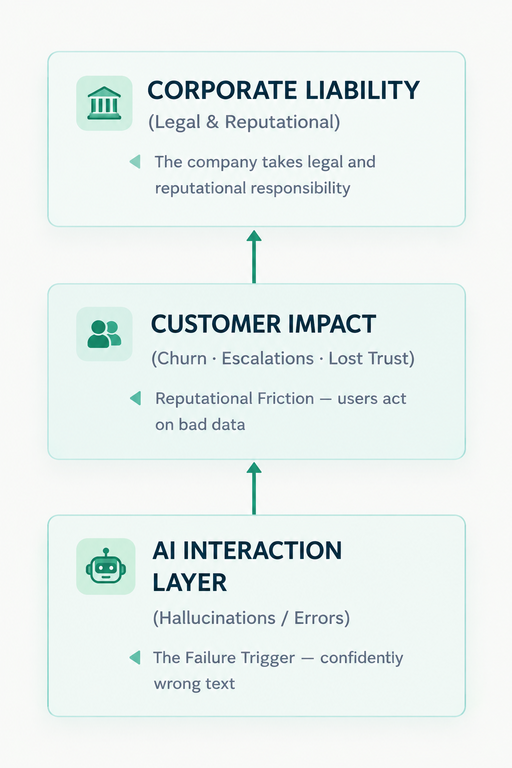
The pattern runs bottom to top: a wrong answer from the AI layer is translated into customer impact, and that impact lands on the company, which takes legal and reputational responsibility.
Cursor is another case. In 2025, its AI support assistant invented a company policy that supposedly prohibited using one account on multiple devices. The company later stated that no such policy existed and identified the response as an error from its front-line AI support bot. Even where no lawsuit follows, a confidently wrong answer can cause customers to cancel, escalate to support, or lose trust in both the product and its documentation.
None of this means teams should avoid AI. It means the company bears legal and reputational responsibility for what its AI says. Inside that company, responsibility must be assigned to identifiable people (not left to an unnamed model, vendor, or workflow).
Where AI Errors Enter the Documentation Lifecycle
AI mistakes are often defined as “hallucinations” that occur during generation, but that is only one failure point. An AI-assisted documentation system can fail because its sources are wrong, its review is superficial, its publication path bypasses approval, or its delivery layer misrepresents the content.
| Lifecycle stage | What goes wrong | Example |
| Source | AI relies on outdated or contradictory content | The knowledge base still contains a deprecated API version, so the agent recommends an endpoint that no longer exists |
| Generation | AI invents or extrapolates facts (“hallucinates”) | It adds a plausible-sounding request parameter, configuration option, or function that is not in the product |
| Review | Review is formal rather than substantive | A reviewer approves a draft after checking the tone and grammar but never verifies the technical claims |
| Publication | A change goes live without sign-off | An automated job updates a public page directly from an AI-generated draft |
| Delivery | A chatbot misrepresents accurate documentation | It combines two pages that apply to different product editions or plan tiers and produces an incorrect answer |
Each of these stages needs an owner. Source quality must be controlled by the people who maintain the product knowledge base. Generation quality depends on AI configuration and prompts. Review is the responsibility of subject-matter experts. Publication requires an accountable approver, and, finally, delivery requires monitoring of the channels through which AI interacts with users.
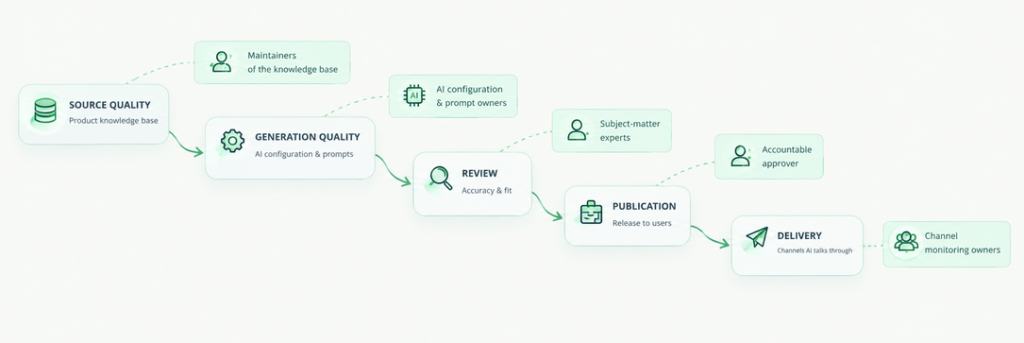
Each stage of the AI content pipeline needs a named owner – from the knowledge base through generation, review, publication, and delivery.
Without stage-level documentation ownership, teams tend to discover errors only after customers do. The purpose of governance is to make the failure point visible early enough to prevent publication – or to correct it quickly when prevention fails.
An AI Documentation Governance Model: Four Roles
A working model does not require a large documentation department. It requires that the four essential functions are covered, even if one person performs several of them.
Content owner
The content owner is accountable for the accuracy, completeness, and currency of a defined set of pages: a product area, API reference, onboarding guide, or compliance section. This person may not write every sentence, especially when AI produces first drafts, but they decide what “correct” means for that content and ensure that the right reviewers are involved.
The content owner also maintains the risk classification of their pages. A pricing page, a security configuration guide, and a release note describing an API change should not be treated the same way as a formatting update or a glossary entry. Ownership includes knowing when ordinary review is insufficient.
Subject-matter reviewer
The subject-matter expert (SME) verifies facts mentioned in the text against the product itself, source code, specifications, support history, or another authoritative source. In documentation, this role is often filled by an engineer, product manager, support specialist, security engineer, or legal/compliance colleague.
The SME’s job is to answer a critical question: Is this technically, commercially, or legally true for the intended audience and product version? A reviewer who approves only style has not performed this function.
Publisher or approver
The publisher gives the final sign-off for content to become visible to users. This role controls the last gate before publication: the correct page version, audience, locale, metadata, links, and release timing.
AI system owner
The AI system owner is accountable for how AI is configured and permitted to operate. This includes which sources the system can access, which repositories or knowledge bases it may read or modify, which user permissions an agent inherits, what prompts and rules govern its behavior, and what guardrails restrict high-risk actions.
This role is especially important when AI can act rather than merely suggest. An agent that can create or edit pages must operate within the permissions of an authorized user and within an existing workflow.
RACI for AI-assisted documentation
In this table, R means responsible for doing the work, A means accountable for the outcome, C means consulted, and I means informed.
| Activity | Content owner | SME reviewer | Publisher | AI system owner |
| AI-assisted draft | A | C | I | C |
| Fact check | A | R | I | – |
| Publication | C | – | A/R | I |
| AI sources, permissions, and rules | C | – | I | A/R |
| Post-publication error correction | A/R | C | R | C |
Every row has exactly one A. A small team may combine roles, but it should never leave a function without an owner.
Matching Human Oversight to AI Autonomy
AI autonomy exists on different levels. In the related article, From Copilot to Autopilot: 5 Levels of AI Autonomy in Documentation, these levels range from L0, where AI acts as an editor, to L4, where AI operates autonomously within defined boundaries.
Human oversight should correspond to these levels. Three participation patterns are useful:
- Human-in-the-loop: a person reviews and approves every change before it takes effect.
- Human-on-the-loop: AI acts on its own, while a person monitors activity and can intervene or stop it.
- Human-over-the-loop: people set policies, permissions, and boundaries, then periodically audit the system rather than inspect every action.
| Autonomy level | Human participation | Who gives sign-off | Minimum review |
| L0 – AI as editor | In the loop | Author | Author accepts or rejects suggested edits |
| L1 – AI as copilot | In the loop | Author & reviewer | Normal documentation review |
| L2 – AI-assisted workflow | In the loop | Publisher | Review of every change before publication |
| L3 – Conditional automation | On the loop | Content owner | Automation only within defined boundaries. Sampled checks. Mandatory review for high-risk content |
| L4 – Autonomous operations | Over the loop | AI system owner & content owner | Policies, audit trail, monitoring, alerting, and rapid rollback |
L0 through L2 are practical today in many documentation teams. L3 is possible where teams have reliable source grounding, strong permissions, and mature workflows. L4 (fully autonomous documentation operations) remains more of a design target than a common production practice.
The same principle appears in AI governance frameworks. The NIST AI Risk Management Framework asks organizations to document roles and responsibilities for managing AI risks (GOVERN 2.1) and to define roles for human-AI configurations and oversight of AI systems (GOVERN 3.2). The EU AI Act goes further for high-risk AI systems: Article 14 requires that people can effectively oversee such systems, with oversight measures commensurate with the system’s risks, level of autonomy, and context of use. Documentation tools usually fall outside the high-risk category, so for most documentation teams Article 14 is a reference point rather than a legal obligation. Its logic matches the table above: the more AI does on its own, the more deliberate human oversight must be.
Autonomy should be earned through evidence. As AI takes on more execution, humans shift from approving individual edits to defining boundaries, monitoring outcomes, and intervening when the system exceeds its mandate.
Risk-Based Review: Not Every Page Needs the Same Scrutiny
Autonomy is only half of the risk. The other half is the cost of being wrong. A typo in a glossary and an incorrect security instruction may both be “AI errors,” but they require very different controls in your AI content review workflow.
High-risk content should always require human approval. This includes safety information, legal terms, pricing and billing rules, security settings, compliance-related guidance, and breaking changes to APIs. For these pages, AI may draft or suggest, but a qualified human must verify the content before publication.
Medium-risk content can follow a standard review workflow. Examples include feature instructions, configuration guidance, UI descriptions, and routine release notes. The reviewer should check accuracy, completeness, audience fit, and version applicability.
Low-risk content may be eligible for sampled or post-publication review. This includes copyedits, formatting, broken-link fixes, metadata updates, and minor terminology normalization. Even here, automation should log what changed and preserve the ability to roll back.
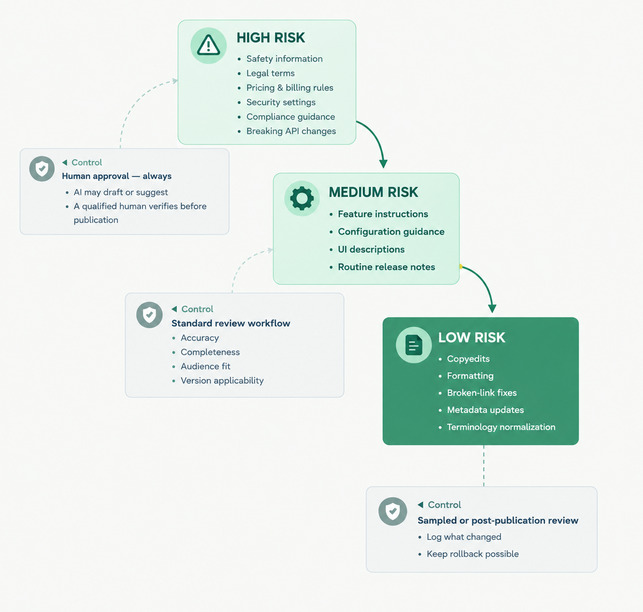
Three risk tiers (like ladder steps), three levels of scrutiny: high-risk content requires human approval before publication, medium-risk content follows a standard review workflow, and low-risk content may be sampled or reviewed after publication.
Classify risk in advance: tag sections, page types, or content collections as high, medium, or low risk, and attach review requirements to those classifications.
What to Log: The Audit Trail
Governance becomes enforceable only when teams can reconstruct what happened. An audit trail should answer, after an incident: What changed, why, on whose authority, and from what sources?
At minimum, log:
- What AI generated or changed, and what a human subsequently edited or approved.
- The sources the AI used, including retrieved documents, versions, timestamps, and links where feasible.
- Who reviewed the content, what type of review they performed, and who approved publication.
- The page version before and after the change, with a diff and rollback capability.
- The workflow status, permissions, and automation rules in effect at the time.
This record serves two purposes. First, it enables rapid diagnosis: a team can determine whether the failure originated in a stale source, a generation error, a missed review, or a delivery-layer synthesis problem. Second, it creates accountability without requiring every action to be manually inspected.
When AI Gets It Wrong: A Response Playbook
When an AI-related documentation error reaches users, response speed and traceability matter more than assigning individual blame.
- Correct the public surface immediately. Fix the published page and, where applicable, the chatbot or support-agent response path so users stop receiving the incorrect guidance.
- Trace the failure point. Use the lifecycle model and audit trail to determine whether the issue arose at source, generation, review, publication, or delivery.
- Repair the source, not only the output. If the AI relied on outdated, contradictory, or incomplete content, update or remove that source before treating the incident as closed.
- Update the controls. Adjust prompts, retrieval scope, permissions, risk classification, review requirements, or automation boundaries as appropriate.
- Notify affected users when warranted. If users have taken an action based on the wrong information (such as configuring security, purchasing, or migrating an integration), communicate the correction directly.
The response should focus on which part of the governance model failed: an unowned source, an overly broad permission, a review step treated as a formality, or a delivery system combining incompatible content.
How ClickHelp Supports AI Governance
A help authoring tool can turn these principles into day-to-day controls. In ClickHelp, approval runs through topic statuses and a custom workflow. An administrator defines which status transitions are allowed: for example, a topic cannot move straight from Draft to Ready and must first pass through Under Review, with a reviewer set in the Assignee field. Version history keeps the full record of changes to each topic, with the author and timestamp of every edit. You can compare any two versions side by side and restore a previous one, which supports both review and incident investigation.
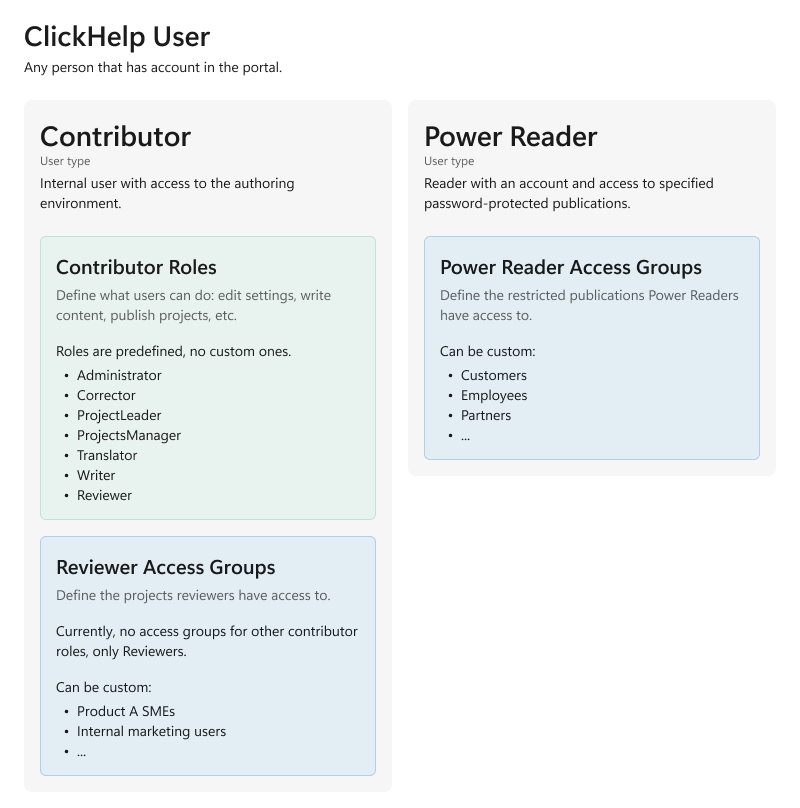
Roles and access rights help separate responsibilities. ClickHelp divides accounts into administrators, contributors, and reviewers, with a roles and permissions matrix and access groups on top, so final approval and publication can be restricted to specific trusted roles. This matters for AI because an agent should operate within the permissions of an authorized user (not as an unaccountable self-governing actor).
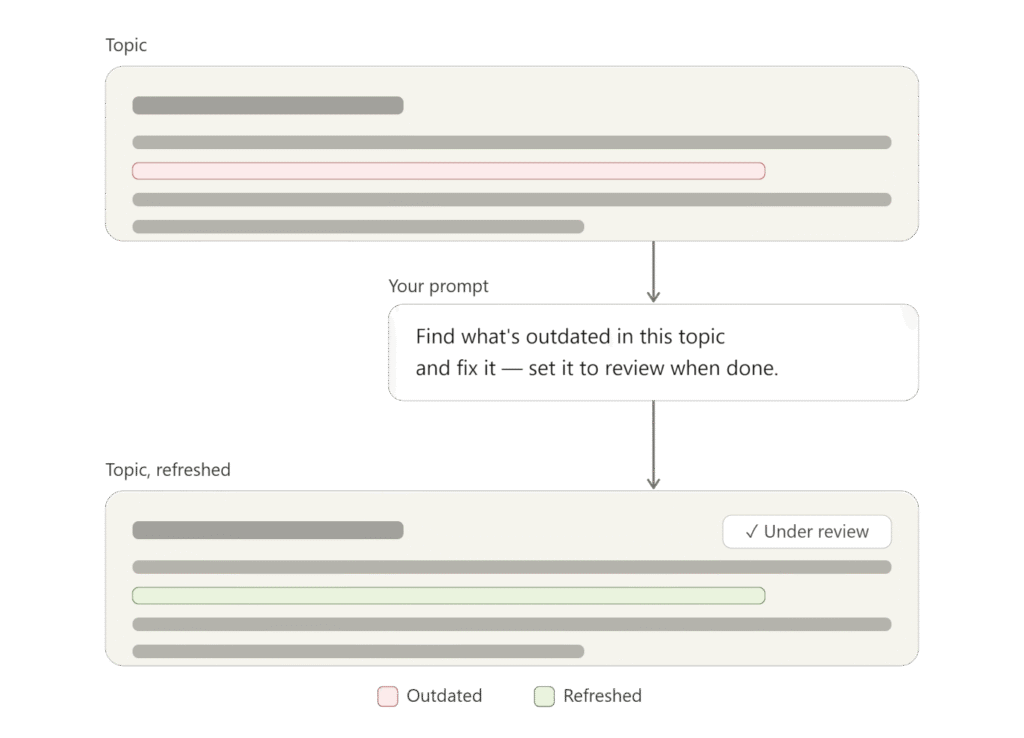
ClickHelp’s Authoring MCP Server lets AI agents read, create, and change content on behalf of a specific user and strictly inherits that user’s permissions and restrictions. The agent never gets unrestricted system access: if the user it works for cannot publish, neither can the agent. WriteAssist fits the L0–L1 pattern: AI assists drafting and editing, while the author retains control. AnswerGenius operates at the delivery stage, where source quality, retrieval boundaries, and monitoring are essential because the system may answer readers directly.
Conclusion
AI changes who writes documentation, but not who answers for it. The organization that publishes the content remains responsible for its accuracy, and that responsibility must be distributed according to the roles.
Governance is not a brake on AI. It is the condition that makes it reasonable to give AI more responsibility: clear boundaries, trustworthy sources, meaningful review where the stakes demand it, and the ability to detect and correct failure quickly. Try ClickHelp to put workflow controls, version history, permissions, and AI-assisted authoring into one documentation environment.
FAQ
Who is legally responsible for errors in AI-generated documentation?
Generally, the company that publishes the content or operates the customer-facing AI system. In Moffatt v. Air Canada, the tribunal treated the chatbot as part of Air Canada’s website and held the airline responsible for its inaccurate information. Accountability for AI-generated content still depends on jurisdiction and circumstances.
Does every AI-generated change need human review?
No. The appropriate level of review depends on the AI’s autonomy and the risk of the content. Low-risk formatting changes may need only sampled checks, while security, pricing, legal, compliance, and breaking-change content should require human approval.
What is the difference between human-in-the-loop and human-on-the-loop?
Human-in-the-loop means that a person approves each change before it takes effect. Human-on-the-loop means AI acts automatically while a person monitors the system and can intervene or stop it.
Who should own AI configuration in a documentation team?
An AI system owner should own source access, agent permissions, prompts, rules, and monitoring. In a small team, this may be the lead technical communicator, provided the responsibility is explicit rather than accidental.
How do you trace an AI error back to its source?
Use an audit trail and version history to identify what AI generated, which sources it used, who reviewed and approved the change, and which page versions were involved. Then determine whether the failure occurred at source, generation, review, publication, or delivery.