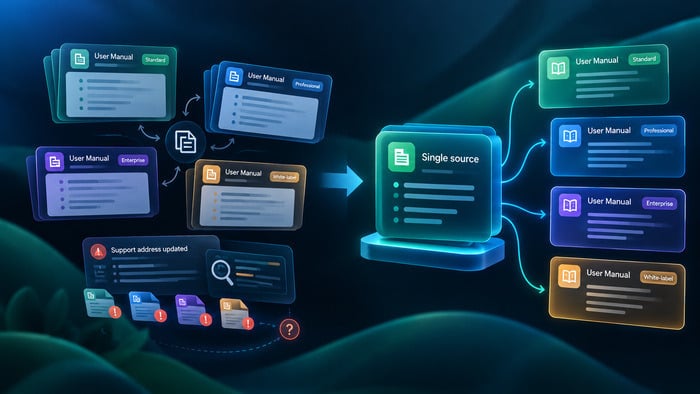
When a company adds its second product, documentation stops being a content problem and becomes a structural one. Someone has to decide what customers see separately, what the team maintains once, and who owns the section that both products depend on.
I spend a lot of time looking at how documentation teams organize their work, and the same split shows up across company sizes and industries. One camp says everything belongs in one place, because otherwise customers get lost and the team maintains the same material twice. The other says the products have different audiences and different brands, and mixing them serves neither. Both argue from experience. Neither can prove the other wrong.
Many teams never settle it on purpose. The structure accumulates instead: a space spun up for the new product because that was the fastest option that quarter, a shared section copied rather than linked because copying took four minutes and the alternative required a conversation. Two years later the portfolio has doubled, nobody can explain why the structure looks the way it does, and rearranging it costs more than building it did.
The argument rarely ends on its own, because the two sides are not actually disagreeing about the same question.
Both camps are right, and both lose
The reason this argument has no natural winner is that separation and reuse pull against each other.
Separate the products and you get clarity for readers. Each audience sees its own material, under its own brand, at its own address. You also get a maintenance problem. Legal sections, security policies, account setup, the mechanics your products share because they run on the same platform — all of it now exists in more than one place. The first time somebody updates one copy and forgets the other, you learn that you did not split documentation. You split the truth.
Keep everything together and you get the opposite trade. Shared material lives in one place and updates once. But your customers now navigate a catalog built for your org chart rather than their problem. Search returns results from products they do not own. The navigation grows a level every time the portfolio does, and at some point people stop scrolling and open a support ticket instead.
What makes this genuinely hard is the size of the overlap.
When the shared portion is that large, neither instinct is safe. Splitting means carrying two thirds of your material twice. Consolidating means asking every reader to work around the other customers’ details.
This is why the decision feels like a dead end. Every gain on one side appears to be paid for on the other. Teams that sense this usually resolve it the same way: they pick whichever pain they have experienced most recently.
The criterion that settles it
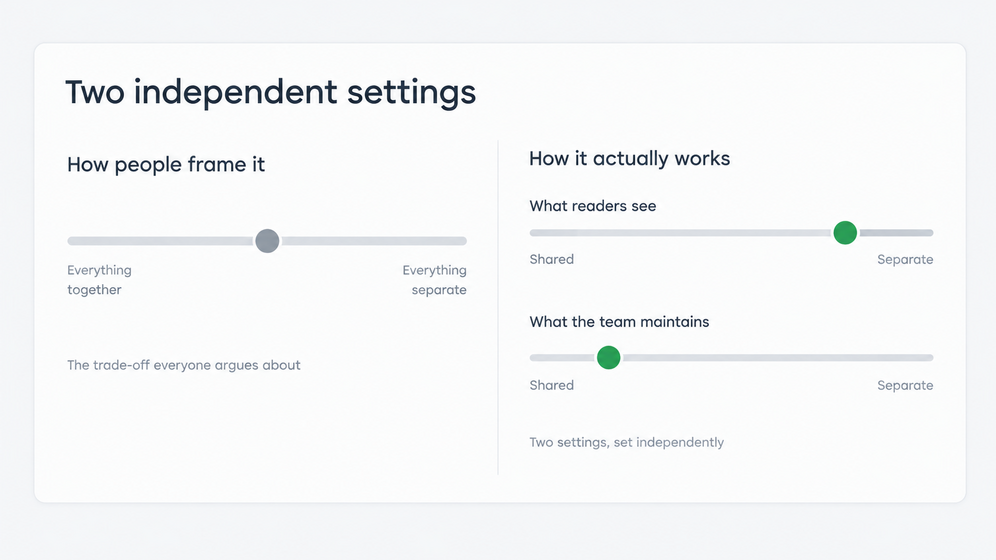
There is a better way to evaluate the options, and it comes down to two questions.
Can a reader stay oriented? Not whether the experience looks uniform, but whether a person landing anywhere in your documentation understands where they are, what it covers, and how to get to the thing they actually came for.
Can the team keep it manageable? Whether a change to shared material takes one edit or several, and whether anyone can say with confidence that all the published versions agree.
Apply those two questions and something useful happens: both extremes fail, and they fail visibly. The single pile fails the first question. The set of isolated islands fails the second. The argument stops being a matter of taste and becomes a matter of evidence.
It also removes a criterion that does more damage than people realize.
Uniformity is not the goal. A product with its own brand, its own visual identity, and its own address is not a problem to be solved. It becomes one only when the reader loses their bearings crossing from one to the next.
A similar principle is now explicit in developer portal practice, and the shift is recent enough to watch happening. The developer portal awards run by Pronovix now include a category specifically for portals that hold large portfolios together — a category that exists because mergers, acquisitions, and fast portfolio growth keep producing the same problem. The jury is made up of practitioners rather than vendors, and it is explicit that it will not prescribe a single architecture, because the right operating model depends on the portfolio. What it evaluates instead is coherence: a federated setup is not penalized for letting different domains look and behave differently, and a centralized one earns no credit simply for looking the same throughout. Looking the same without being clear is not a better experience.
There is even a name now for a focused experience sitting inside a larger portal — a micro-portal, with its own menu and its own flow, still connected to the whole. That vocabulary comes from a different discipline, API developer portals rather than product documentation, but the structural question underneath is the same one, and the fact that the market has started naming it tells you how common it has become.
Once coherence and manageability are the criteria, the real insight follows.
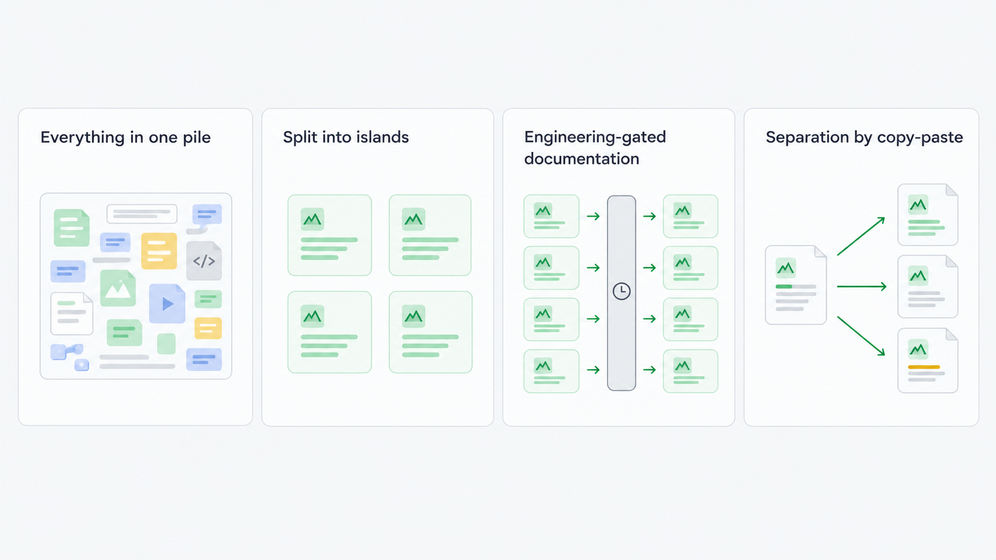
Four starting points teams commonly inherit
In practice, teams arrive at this question from one of four situations. None of them is a mistake. Each one made sense when it started.
Everything in one pile. The material lives in a team wiki, a set of local folders, the support help center, or a stack of PDFs. There is nothing to separate products or audiences with, no single source behind the copies, and search that cannot do much for anyone. It is a common starting point, and it holds up perfectly well until the second product ships.
Split into islands. Each product got its own isolated unit, with its own address and its own branding. The storefronts are genuinely separate, which solves the reader’s problem. But the content, the team, the permissions, and the standards split along with them, so shared material gets maintained twice and the quality bar drifts apart. A documentation lead at a professional services firm put the scale of this plainly: fourteen to seventeen portals, a publication dedicated to every client. Teams in this situation often describe the symptom rather than the cause — they say their documentation is inconsistent, when what they mean is that consistency now requires human vigilance.
Engineering-gated documentation. The split is real and clean, expressed in separate repositories and build pipelines. Plenty of teams run this well: shipping code and docs together is a deliberate practice, not an accident. It turns into a problem when an ordinary content change inherits an engineering queue — when fixing a sentence depends on someone else’s backlog or waits for a release gate. The repository is not the issue. The dependency is.
Separation by copy-paste. One guide per product, market, or customer, produced by duplicating the last one and editing the differences. It is fast at first and it scales terribly, because the divergence is invisible until a customer finds it.
What actually needs to be separate across products
Most of the energy in these arguments goes into deciding how much to separate. The more useful question is what, specifically, has to be apart — because the answer sits at three different levels, and they call for three different things.
| What has to be apart | What that takes, and what stays shared |
| A brand and an address per product or market | Its own site: own domain, look, interface language, and set of published material. Most of what the authors touch can stay shared — topics, reusable blocks, variables, translations, permissions. |
| Audiences inside one site | Audience-specific presentation or access rules: conditional content, scoped navigation and search, roles. Rarely a separate site. One body of content, filtered rather than copied per audience. |
| Data, teams, and permissions between divisions | Genuinely separate accounts. Nothing is shared, by design. This is the isolation option, and the right one when isolation is the actual requirement. |
The first level is what people usually have in mind, and it is the least controversial. The second gets over-solved constantly: teams build separate sites for each audience when presentation rules on a single one would do. The third is where real isolation belongs, and it answers a different question rather than a worse one. The mistake is applying it to the first two levels, where it costs you the shared source without buying anything.
Full isolation is often chosen when it is not the requirement. It is usually just the only mechanism the current tool offers.
What makes the next site cheap or expensive
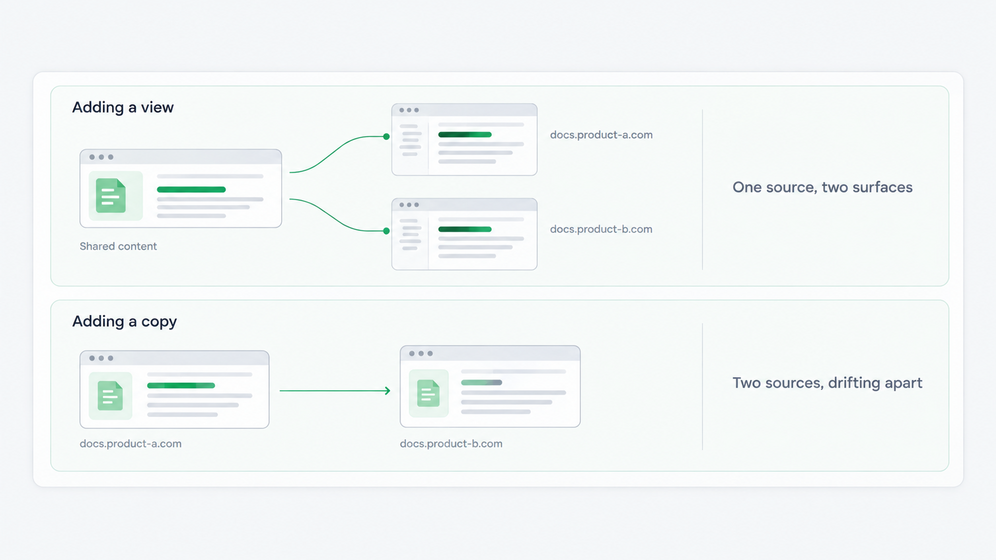
There is a practical question underneath all of this, and it is not about the order of operations. It is whether your setup can share content across sites at all.
If it can share, the sequence hardly matters. Launch the new site when the business needs it, and introduce content reuse when the overlap becomes visible, because the material never left one place. Adding that structure later is editing, not migration.
If it cannot — if separation in your tooling means separate units with separate content — then every new site is a copy from the day it launches. The overlap compounds quietly until somebody has to reconcile versions and decide which one was correct. That reconciliation is the expensive part, and it is not caused by adding a site. It is caused by the site being a copy.
It is worth checking the proportion before investing in either direction. When two products genuinely share very little (which happens, particularly after an acquisition) this matters far less than it does at sixty percent overlap.
Questions worth asking before you commit
If you are heading into this decision, these are the four questions I would put to the team, in this order.
- What in our case genuinely has to be apart, and at which of the three levels does each item sit?
- What has to stay shared, and what specifically in our tooling keeps it shared rather than copied?
- Who owns a shared section once two products depend on it, and who reviews a change to it?
- What happens to this structure when the portfolio doubles — does it extend, or does it need rebuilding?
Those questions are more useful than any feature comparison, because they let you evaluate options against your situation rather than against someone else’s checklist.
They are also the questions we designed around. ClickHelp keeps one account and one authoring team behind as many independent documentation sites as the business needs, with access rules inside each and separate accounts when isolation is the actual requirement. The criteria in this article apply whether or not you get there with us.
One last caution about shortcuts. When teams look for a model, they usually look at a portfolio that is visibly working — Cloudflare’s documentation, or a platform like Monite that presents each product module as its own focused experience. Those are worth a look, but not worth copying: what you can see is the result, and what you cannot see is the constraint that produced it or the size of the team maintaining it.
Copying a structure without knowing why it exists is the most expensive mistake available in this area.
Where this leads
The argument about whether to consolidate or separate cannot be won, because it is the wrong argument. What can be settled is whether readers stay oriented and whether the team can keep the whole thing honest. Those two questions have observable answers, and once you are asking them, the structural choice usually makes itself.
The same question comes back in other forms. It returns when you enter a second language market and have to decide what a localized site inherits from the source — a technical writer at a fintech company described running four publications, one per region, because the terminology differs from country to country. It returns when partners and customers need different views of the same material. The levels are the same, and so is the criterion.
What changes is that you are making the decision deliberately, instead of discovering it two years later in the shape of your own documentation.

Common questions
Should every product have its own documentation site?
Only if the product needs its own brand, address, or audience. A separate site is worth it when readers of one product should not encounter the other. It is not worth it when the only difference is internal ownership. Start from what the reader needs to see apart, not from your org chart.
When do you need separate accounts instead of separate sites?
When the requirement is isolation rather than presentation: data that must stay in a particular region, teams that must not overlap, or different notification rules per legal entity. If none of those apply, separate sites inside one account give you the same reader experience while keeping the content and the team together.
What should stay shared across products?
Anything the authors touch and more than one product depends on: legal sections, security and policy content, shared mechanics, terminology, and the translations of all of it. Stored once and pulled in by reference, so a change lands everywhere at once instead of being copied into each site.
Do you need to set up content reuse before adding a second site?
Not necessarily. What matters is whether your setup can share content across sites at all. If it can, add the site when the business needs it and introduce reuse once the overlap is visible. If separation means separate units with separate content, the new site is a copy from day one, and that is the problem to solve first.