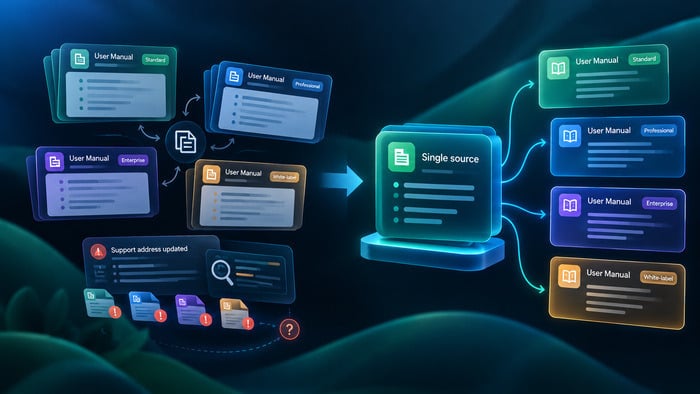
If you work with technical documentation, this situation is familiar: the same warning, installation note, or legal disclaimer appears across dozens of topics. When something changes (a product requirement, a version constraint, or a legal statement) every copy has to be updated manually.
This approach is inefficient and introduces risk. Even small inconsistencies between copies can lead to outdated instructions, support issues, or compliance problems.
Snippet management solves this by introducing structured reuse. Instead of copying content across topics, teams reuse shared content blocks so that updates can be made once and reflected wherever that content is used.
In mature documentation systems, this approach is part of a broader single-sourcing strategy.
Variables vs. Snippets: What’s the Difference
A common point of confusion in documentation systems is the difference between variables and snippets. While both support reuse, they operate at different levels.
Variables
Variables are designed for small, structured pieces of data that are inserted inline into text. They represent values rather than content.
Typical examples include product version, company name, support email, or product title.
A variable is usually used like this:
This feature is available starting from version {{product_version}}.
Variables are best suited for:
- short atomic values
- global consistency requirements
- frequent updates across many topics
- non-structured data replacement
They function as placeholders for dynamic values, not as content containers.
Snippets
Snippets are reusable content blocks. Unlike variables, they contain structured content rather than single values.
A snippet might include:
- installation procedures
- warnings and safety instructions
- legal or compliance statements
- troubleshooting sections
- code samples or configuration examples
A snippet is written once and reused across multiple topics. When the source content is updated, all instances that reference it reflect the updated version after publication.
Key distinction
Variables manage data inside content, while snippets manage content itself.
A variable answers: what value goes here?
A snippet answers: which reusable block of content should be inserted here?
What Should Be Turned into Snippets
Not every repeated sentence or paragraph should be extracted into a reusable block. Effective snippet management depends on identifying content that benefits from centralized control.
Good candidates typically have at least one of the following characteristics:
- They appear in multiple topics across the documentation set.
- They require strict consistency because inconsistencies could confuse users or create support overhead.
- They are likely to change due to product updates, legal requirements, or operational changes.
- Or they carry risk if outdated, especially in safety, compliance, or configuration instructions.
Common examples include installation steps, recurring warnings, compliance statements, API usage patterns, and standard troubleshooting instructions.
A useful rule is simple: if updating one instance of the content would require tracking down many others, it should be a snippet.
At the same time, reuse should not be forced. Very short or highly contextual statements are often better left inline, since excessive modularization can reduce readability and increase maintenance complexity.
How to Organize a Snippet Library
A snippet system only works well if reusable content is easy to find, understand, and maintain. Without structure, reuse quickly turns into fragmentation.
Naming
Snippet names should clearly describe their purpose and content. A good name should allow a writer to understand what the block contains without opening it.
Examples:
- install-windows-prerequisites
- api-authentication-basic-example
- legal-gdpr-consent-statement
Poor naming such as note1, temp_block, or snippet_new creates confusion and slows down reuse over time.
Organization
Snippet organization typically follows the structure of the documentation project. This may include folders, categories, or topic hierarchies depending on the tool or CMS. Common organizational approaches include grouping by content type (warnings, procedures, examples), by product area (API, onboarding, administration), or by audience (end users, administrators, partners).
The goal is not strict taxonomy but predictable retrieval — writers should be able to locate reusable content quickly without guessing.
Ownership
Every snippet should have a clear owner responsible for maintaining it. Ownership includes creating reusable content, updating it when requirements change, validating its accuracy, and retiring it when it becomes obsolete. Without ownership, reusable content tends to drift out of date, especially in fast-changing product environments. Depending on the organization, ownership may sit with technical writers, subject matter experts, or compliance teams.
Snippets and the Release Process
Snippet management becomes especially important during product releases.
When documentation is updated alongside a product change, reusable content must be treated as part of the release scope.
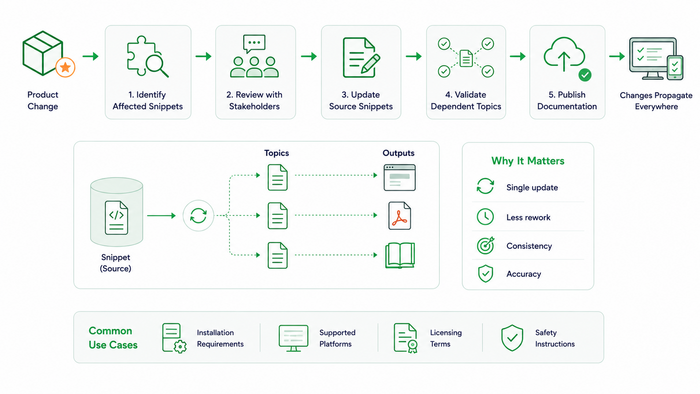
A typical workflow includes identifying affected snippets, reviewing required changes with stakeholders such as engineering or legal teams, updating the source content, and ensuring all dependent topics remain contextually correct.
After updates are completed, the documentation is published so that changes propagate across all reused instances.
This model reduces duplication of effort. Instead of editing multiple copies of the same text, teams update a single source and regenerate output.
It is particularly useful when changes affect installation requirements, supported platforms, licensing terms, or safety instructions.
Snippet Management in ClickHelp
Different documentation systems implement snippet reuse in different ways, but the underlying principle is consistent: centralized content reused across multiple topics.
In ClickHelp, reusable content is implemented through topic-based reuse. A snippet is created as a standalone topic and then inserted into other topics across the project.
When the source topic is updated and the project is republished, the updated version is reflected wherever it is used. This allows teams to maintain consistency without duplicating content.
The system also provides visibility into where reusable content is used, which supports impact analysis before making changes. This is particularly important for shared content such as legal statements or safety instructions.
While the tool supports reuse, effective snippet management still depends on process: clear ownership, consistent naming, structured organization, and controlled updates during releases.
Common Mistakes in Snippet Management
Even well-designed snippet systems can fail if they are applied without clear rules and discipline. Most problems are not caused by the tooling itself, but by how reuse is structured and maintained over time.
- One of the most common issues is over-fragmentation — turning too many small pieces of text into snippets. While reuse is useful, excessive decomposition makes content harder to read, harder to maintain, and more difficult to understand in context. Documentation becomes a collection of disconnected fragments instead of coherent topics.
- Another frequent problem is ignoring context when reusing content. A snippet that works well in one topic may feel unnatural or incomplete in another if it was not designed for multiple contexts. Reuse should not override clarity or readability.
- Lack of ownership is also a critical failure point. When no one is responsible for maintaining a snippet, it tends to become outdated over time. This is especially problematic for content that depends on product behavior, legal requirements, or operational procedures.
- Teams often fail to manage lifecycle properly. Old or deprecated snippets are sometimes left in the system, which leads to confusion about which version is current and which one should be used.
- Finally, there is the issue of overusing snippets where they are not needed. Not every repeated sentence should be extracted. If reuse introduces more complexity than value, it is better to keep the content local.
A healthy snippet strategy balances reuse with readability. The goal is not maximum centralization, but maintainable and consistent documentation.
Conclusion
Snippet management is a core technique in modern technical documentation. It reduces duplication, improves consistency, and makes large documentation sets easier to maintain.
Variables handle small, structured values inside text. Snippets handle reusable content blocks that can be shared across multiple topics.
When applied correctly, this approach reduces manual update effort and prevents inconsistencies across documentation. Instead of maintaining multiple copies of the same content, teams maintain a single source and reuse it wherever needed.
The result is a more scalable and reliable documentation workflow.
Good luck with your technical writing!
Author, host and deliver documentation across platforms and devices
FAQ
What is the main benefit of using snippets in technical documentation?
The main benefit is reducing duplication while improving consistency. Instead of copying the same content across multiple topics, you maintain a single source of truth and reuse it wherever needed. This makes updates more reliable and significantly reduces manual maintenance effort during product changes and releases.
How are snippets different from variables?
Variables are used for small, structured values such as product names, versions, or support emails. They are inserted inline into text and represent data rather than content.
Snippets, on the other hand, are reusable content blocks. They can include full sections such as installation steps, warnings, or troubleshooting instructions. Variables answer “what value should appear here,” while snippets answer “which content block should be reused here.”
When should I avoid using snippets?
Snippets should be avoided when content is highly contextual, very short, or unlikely to be reused meaningfully. Overusing snippets can lead to fragmented documentation, reduced readability, and unnecessary complexity in content structure.
If reuse introduces more maintenance overhead than value, the content should remain local to the topic.
Do snippet updates always apply automatically everywhere?
In most single-sourcing systems, snippet updates are reflected wherever the snippet is reused after the content is republished. However, this depends on the publishing model of the documentation system. In general, changes are not live instantly in the editor view but are applied during the publishing process.
How should snippet ownership be managed?
Each snippet should have a clear owner responsible for maintaining its accuracy and relevance. Ownership typically includes updating content when product requirements change, validating correctness, and retiring outdated snippets. Without ownership, reusable content tends to become inconsistent over time.
Can snippets include variables?
Yes, snippets can include variables inside them. This is common in structured documentation systems where reusable content blocks still need to reflect dynamic values such as product versions or names. This combination allows both structural reuse and data-level flexibility.