
What Is DocOps?
DocOps is an integrated approach that brings documentation into the heart of the software development lifecycle. It mirrors how DevOps unites development and operations. It treats technical writing as code, enabling teams to create, review, update, and publish docs continuously and keep them in line with product changes. This means developers, technical writers, and support teams can collaborate on platforms like GitHub, ensuring corporate knowledge always stays current.
Why does this matter in today’s agile world? Poor documentation leads to frustrated users, delayed support, and compliance risks. DocOps solves this by automating workflows, embedding feedback loops, and making resources accessible via knowledge bases or API guides. For instance, software teams using DocOps can publish updates in minutes, not days, helping customers self-serve while engineers focus on innovation. In essence, DocOps transforms docs from static files into a dynamic asset that evolves with your product.
Origins and Evolution
DocOps emerged together with the DevOps movement of the late 2000s and early 2010s. It was then that teams noticed documentation couldn’t keep up with rapid code releases. Companies pioneering DevOps, such as Netflix and Etsy, inadvertently laid the groundwork for DocOps by applying principles of automation, continuous integration, and collaboration to their engineering workflows — practices that technical writing teams soon adopted. The term “DocOps” itself appeared around 2014.
The evolution accelerated with tools like Git, Markdown, and CI/CD platforms. By 2021–2022, AI tools began meaningfully assisting writers with content generation and formatting. Today, DocOps has matured into a full-spectrum practice, incorporating security checks, multilingual support, and integration with product platforms. This shift from fragmented, siloed writing to collaborative engineering has made DocOps indispensable for modern software teams.
DocOps Core Principles
DocOps rests on a set of agile-inspired principles. They guide how teams work with documentation. The principles ensure the documentation is reliable, scalable, and aligned with development needs:
- Documentation as Code. Store docs in repositories with version control, just like source code, allowing pull requests and code reviews.
- Continuous Approach. Integrate writing into CI/CD pipelines for automated testing, formatting, and publishing right after every change.
- Collaboration Across Teams. Developers, tech writers, and operations should share platforms for real-time feedback. This helps break down information silos.
- Automation First. Use tools to handle repetitive tasks like spell-checking, link validation, and deployment.
- Feedback and Iteration. Collect user input via analytics and surveys to drive continuous improvement.
- Security and Compliance by Design. Embed scans for vulnerabilities, legal compliance, and accessibility standards into workflows.
For example, a team might use branch protection rules to require writer and developer approval before merging doc changes. Branch protection rules in GitHub prevent direct merges to key branches like main until a technical writer and developer both approve the pull request. A writer drafts doc changes on a feature branch, opens a PR (pull request), and it stays blocked until the developer verifies technical accuracy and the writer confirms formatting, ensuring quality before publishing. This enforces DocOps collaboration without errors reaching users.
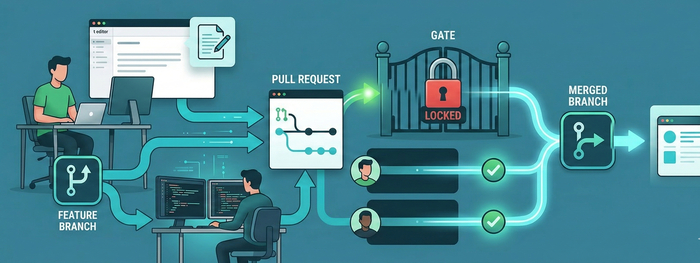
These principles not only make processes more efficient but also foster a culture where everyone contributes to the common knowledge base.
Business Benefits
Adopting DocOps leads to measurable benefits that impact the bottom line and team morale.
- Reduced support costs. Accurate, searchable docs enable users to find answers on their own. This cuts ticket volumes significantly. Atlassian’s Confluence-powered knowledge base reduced their support tickets by 25%, while HubSpot reports that its Academy and Knowledge Base collectively handle over 60% of customer inquiries without human intervention. Atlassian’s DocOps practices also helped them scale documentation for millions of users, which contributed to stronger customer satisfaction scores.
- Faster time-to-market. Continuous publishing means product updates include fresh API guides, reducing release delays. Some teams report up to 80% faster onboarding for new hires, as structured knowledge bases provide all necessary resources from day one.
- Higher team productivity. Collaboration reduces the time developers spend explaining code, freeing technical writers for higher-value tasks.
- Stronger compliance posture. Automated checks ensure documentation meets security and regulatory standards before publishing, reducing legal and operational risk.
Overall, DocOps turns documentation from a cost center into a competitive advantage, helping businesses deliver better products faster.
DocOps Essential Toolchain
A DocOps strategy succeeds only with the right tools. Here’s an essential toolchain for easy adoption:
- Version Control and Collaboration. Git, GitHub, or GitLab track changes, enable pull requests, and facilitate team workflows.
- CI/CD and Automation. GitHub Actions, CircleCI, or Jenkins for building, testing (e.g., link checks, linting), and publishing docs automatically.
- Technical Writing Tools. Markdown-based editors like Obsidian or VS Code extensions; collaborative editors such as Google Docs for initial drafting; help authoring tools like ClickHelp for structured content management, single-sourcing, and conditional publishing into the DocOps stack — capabilities that typically require additional configuration in Git-based static site generators. For teams managing large documentation sets across multiple products or audiences, ClickHelp helps organize content reuse, versioning, and publishing workflows while keeping them accessible to writers who don’t work in code editors daily. It can also integrate with CI/CD workflows as part of a broader DocOps setup.
- Documentation Generators and Hosts. Docusaurus, Sphinx, ReadTheDocs for static sites. API-focused tools like Swagger/OpenAPI for interactive guides.
- AI-Powered Assistance. GitHub Copilot or Grammarly for generating content, suggesting improvements, and automating formatting.
- Knowledge Management. Zendesk or Guru for user-facing bases; analytics tools like Google Analytics for feedback.
- Advanced Integrations. Slack for notifications, Jira for tying docs to tickets, and security scanners like Dependabot.
This stack supports everything from small agile teams to enterprise-scale operations.
Implementation Roadmap
Implementing DocOps requires a phased approach to minimize disruption. Here’s a detailed action plan:
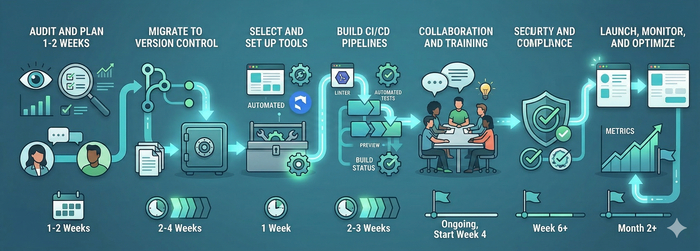
- Audit and Plan (1–2 Weeks). Assess current docs. Check for outdated content, silos, and pain points. Interview developers, writers, and support to define needs.
- Migrate to Version Control (2–4 Weeks). Convert files to Markdown in Git. Train teams on branching strategies.
- Select and Set Up Tools (1 Week). Choose a toolchain based on your platform (e.g., GitHub for simplicity). Configure basic automation. Teams with complex content reuse needs or multiple output formats may find a dedicated help authoring tool like ClickHelp more practical than assembling a static site generator stack from scratch.
- Build CI/CD Pipelines (2–3 Weeks). Automate linting, previews, and publishing. Integrate with your product’s release process.
- Foster Collaboration and Training (Ongoing, Start Week 4). Run workshops on best practices. Set up feedback channels.
- Integrate Security and Compliance (Week 6+). Add scans for vulnerabilities and standards checks.
- Launch, Monitor, and Optimize (Month 2+). Test a pilot project, track metrics, and iterate based on user feedback.
Teams typically complete a full rollout in 2–3 months, achieving quick wins early in the process.
DocOps Success Metrics
To measure ROI, track these key metrics:
- Efficiency. Average time from a documentation change to publication, aiming for under one hour, along with the percentage of workflows covered by automation.
- Quality. Error rates measuring issues like broken links and inaccuracies reported by users. Compliance audit scores ensuring standards are met.
- Engagement. Documentation views and searches per user. Reductions in support tickets directly tied to improved docs.
- Adoption. Team contribution rates comparing commits from writers versus developers. Feedback scores like Net Promoter Score gauging documentation satisfaction.
- Business Impact. Onboarding time for new users. Customer satisfaction levels after product releases.
Tools like Google Analytics or custom scripts make tracking straightforward. Teams with high automation coverage (70–90%) report significant productivity gains per industry benchmarks.
Future Trends
DocOps is set for meaningful advances in the coming years. AI will play a central role, with tools auto-generating docs from code comments, user queries, and structured inputs. Headless CMS platforms — systems that separate content management from its presentation layer — will enable seamless delivery across web, mobile, and other channels.
Expect tighter DevOps fusion as well: real-time doc updates triggered directly by code deploys, powered by GitOps workflows. Security will evolve with AI-driven detection of compliance gaps in documentation content. For global teams, multilingual AI translation will standardize knowledge sharing across regions.
Documentation is evolving toward proactive systems where AI agents can read project documentation, understand requirements, check dependencies, and even predict risks — laying groundwork for ML-driven anticipation of user needs. Teams that embrace these trends will outpace competitors in agile, user-centric development.
Conclusion
DocOps represents a transformative shift in how software teams handle documentation, evolving from siloed technical writing to a continuous, collaborative process integrated with DevOps. Its core principles — automation, feedback, and treating docs as code — help organizations achieve faster releases, reduced support costs, and stronger compliance. With the right toolchain, a clear implementation roadmap, and measurable success metrics, any team can adopt DocOps to create living knowledge resources that scale with product growth.
Good luck with your technical writing!
Author, host and deliver documentation across platforms and devices
FAQ
What is the difference between DocOps and DevOps?
DevOps unites software development and IT operations to accelerate delivery through automation and continuous integration. DocOps applies the same philosophy specifically to documentation, treating written content as code that lives in version control, gets reviewed via pull requests, and publishes automatically through CI/CD pipelines. In practice, DocOps runs inside the DevOps lifecycle rather than alongside it — documentation becomes part of the release process, not a separate afterthought.
Do you need to know how to code to practice DocOps?
Not necessarily. Technical writers working in DocOps environments typically use Markdown, Git branching, and pull requests — none of which require programming skills. Familiarity with command-line basics and platforms like GitHub is helpful, but most modern tools (ClickHelp, Docusaurus, ReadTheDocs) abstract away the complexity. Developers handle pipeline configuration while writers focus on content workflows.
How is DocOps different from traditional technical writing?
Traditional technical writing is typically a linear, siloed process: a writer receives a brief, drafts content, gets it reviewed, and publishes on a fixed schedule. DocOps replaces this with a continuous workflow where writers, developers, and support teams collaborate in shared repositories, documentation updates ship alongside code releases, and quality checks run automatically. The result is content that stays accurate and current rather than going stale between release cycles.
Which teams benefit most from DocOps?
DocOps delivers the highest value to software development teams shipping frequent releases, developer relations and API documentation teams managing large reference libraries, customer support teams looking to reduce ticket volume through self-service content, and technical writing teams working across multiple products or locales. That said, any organization where documentation accuracy directly affects user experience or compliance can benefit from the approach.
What are the biggest challenges when adopting DocOps?
The most common obstacles are cultural rather than technical. Developers may resist contributing to documentation workflows, and writers may find Git-based processes unfamiliar at first. Migrating legacy content from proprietary formats into version-controlled Markdown takes time and planning. Toolchain selection can also become a source of friction if teams lack clear criteria. A phased rollout starting with a pilot project, combined with training workshops, helps smooth the transition.
Can small teams implement DocOps?
Yes. DocOps scales down effectively. A small team can start with a GitHub repository, Markdown files, and a simple GitHub Actions workflow that checks links and deploys to a static site. The investment is low, and even basic automation — automatic publishing on merge, broken link detection — delivers immediate time savings. Teams can add complexity incrementally as needs grow.