So we were chewing on our new Reader UI the other day: how many portals are on it, what to do about the ones still running the old version. Normal, slightly circular product talk.
Somewhere in the middle of that I got curious about a side question and, because I am me, immediately wandered off to test it ¯\_(ツ)_/¯ It wasn’t going to settle the Reader UI discussion, but I just needed to know what an AI actually does when you hand it a plain link to one of those old pages.
So I opened ChatGPT’s desktop app and gave it two links, one at a time, with the same question each time:
Check this link, will you? In a couple words, what’s it about?
The first was a topic from our user-facing docs, served through the Reader UI we recently rebuilt from the ground up. The docs themselves live in a ClickHelp-powered portal, obviously.
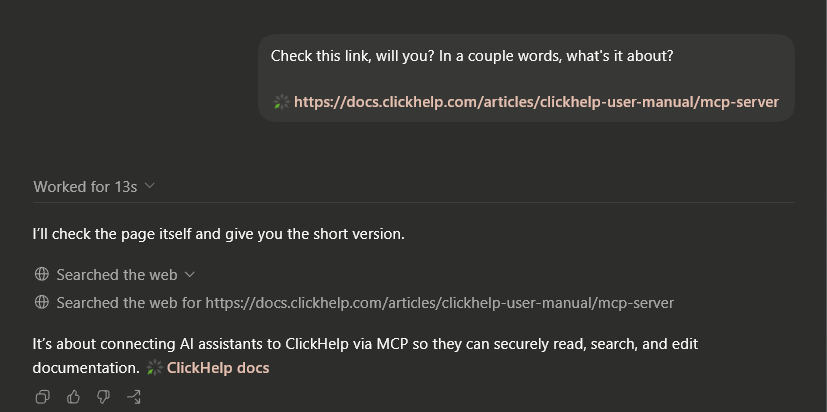
Thirteen seconds, and roughly half of that was spent warming up the agent for the new dialogue. That leaves about five seconds for the actual retrieval.
It fetched the page, read it, and told me it was about connecting AI assistants to ClickHelp over MCP. Great. Next.
The second link came from my older test portal, still running the previous generation of Reader UI.
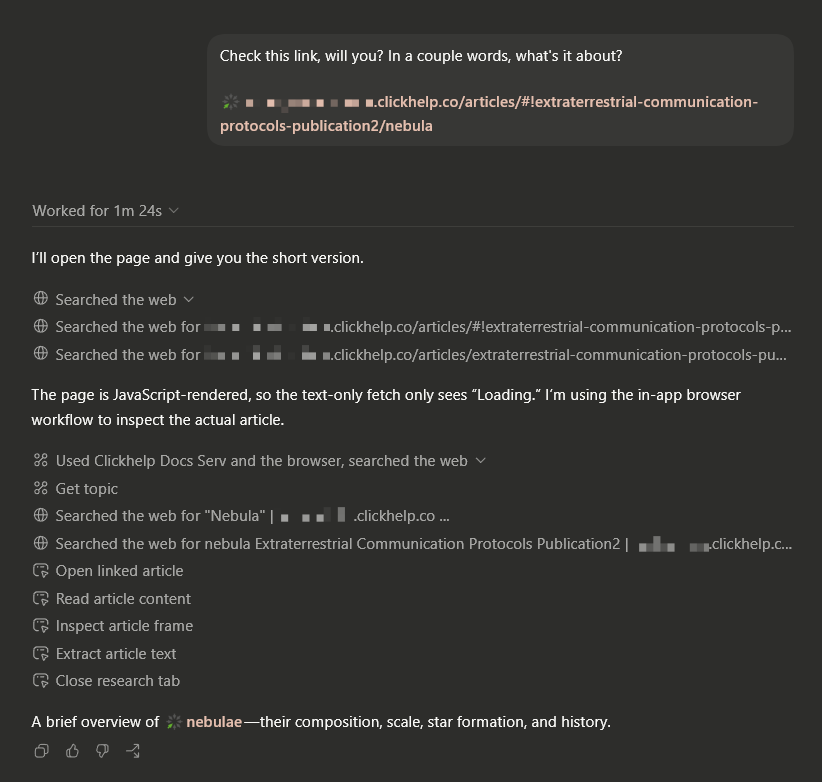
A minute and twenty-four seconds. It got the answer eventually — “a brief overview of nebulae” — but, hoo boy, did it take its sweet time. Long enough for me to make a cup of coffee.
The new page took one fetch. The old link failed at the same step: that fetch returned nothing but “Loading…”.
The agent, helpfully, complained out loud:
The page is JavaScript-rendered, so the text-only fetch only sees “Loading.” I’m using the in-app browser workflow to inspect the actual article.
So it escalated. It ran a web search, opened the page in the browser built into the desktop app, waited for everything to render, then went digging through the resulting pile of HTML until it found the actual article text. Only then did it answer.
That escalation saved it. When I tried the same old link in the regular ChatGPT web version, it didn’t escalate: it saw the empty page and told me it couldn’t get the content.
Obviously, two different topics on two different portals make for a terrible benchmark. Fine: I wasn’t trying to prove that Next was six times faster. I wanted to see what ChatGPT actually had to do after I pasted the URL.
Quite a lot, apparently.
Why the old page makes it work so hard
Warning: boring tech talk incoming. You have been warned.
The old Reader UI uses a hashbang (#!) in its topic URLs. Everything after # is a fragment, and fragments never reach the server.
The browser first gets the generic Reader UI shell. JavaScript then reads the fragment and loads the requested topic. A text-only fetch stops after the shell, which is why ChatGPT got “Loading…” instead of the Nebula article.
For a person opening the page in a browser, all of this happens automatically.
And that’s why our old Reader UI lived with this routing for so long: people opening the documentation in browsers got the documentation. It kept doing its main job.
Search engines mostly don’t hit this wall. Googlebot these days renders JavaScript-heavy pages much like a modern browser does.
Not every bot does. Elsewhere, the same limitation showed up in Slack and LinkedIn: links to different old Reader UI topics could all preview as “Articles”, producing no useful preview.
For a person, the link is still there to click. An AI tool that never reaches the article has nothing to answer with.
Okay, boring tech talk over. Back to the AI stuff.
But don’t we have AI-ready stuff for exactly this?
Fair question. Why did humanity invent (and ClickHelp implement) MCP servers, llms.txt, and a Markdown version of every topic — the whole “make your docs AI-friendly” layer — if none of it kicked in here?
Because it doesn’t kick in on its own. Add .md to a topic URL and ClickHelp gives you clean Markdown (see for yourself). For tools that support it, llms.txt provides a map of the published docs.
ChatGPT did what I had asked: it opened the plain URL.
Fair enough — we build Markdown, llms.txt, and MCP into ClickHelp, and I still paste plain URLs into chat all the time.
That’s the opt-in part. A general-purpose chatbot doesn’t automatically go looking for your llms.txt or guess that adding .md gets it cleaner content. Google Search doesn’t give either special treatment. These routes help when the tool knows they are there.
MCP is a different beast, and we already have a whole post on what it can do. I have opinions of my own, obviously, but not today. If you’d like to read it, feel free to hit me at ian@clickhelp.com.
So no, none of this is snake oil. But in my experiment, it never entered the picture. ChatGPT opened the plain URL, and the whole thing came down to the most boring question in the stack:
Did that request return the article, or “Loading…”?
***
Machines have always read our docs — search crawlers, preview bots, all that. The difference is who notices when they fail. A blank Slack preview is annoying. A chatbot that never reached the article has no answer for the person waiting on the other side.
And yes, this gave me one more answer for that original Reader UI discussion: with Next, the plain URL returns the article on the first try.
Anyway. Grab a real URL from your own docs, paste it into whatever AI you use, and watch how it gets the page.
If nothing interesting happens, perfect. That’s exactly the boring result you want.