Documentation Teams Already Use AI, But the Workflow Is Still Broken
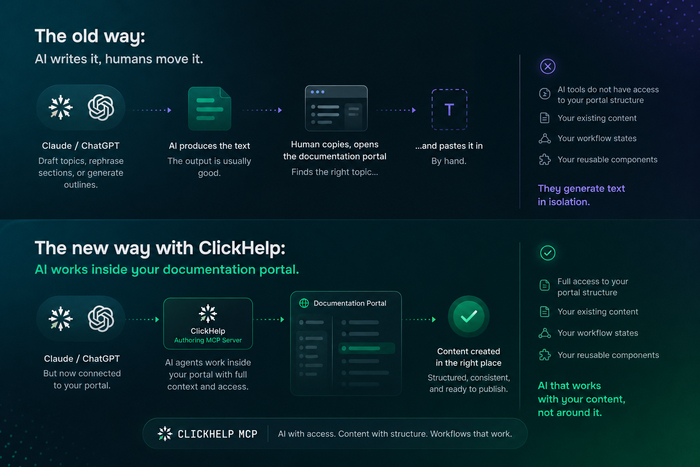
Writers use Claude or ChatGPT to draft topics, rephrase sections, or generate outlines. The output is usually good – and then the same person copies it, opens the documentation portal, finds the right topic, and pastes it in by hand.
The AI produces the text, a human moves it. AI tools do not have access to your portal structure, your existing content, your workflow states, or your reusable components. They generate text in isolation.
With the release of authoring MCP server support in ClickHelp, that gap closes. Instead of working alongside your documentation portal, AI agents can now work inside it: with access to your content, structure, and workflow.
“The combination of structural tools and content tools covers exactly what you need to drive a documentation project programmatically.”
— Emmanuel Vaillant, Product Manager at Efficy
What an MCP Server Changes in Documentation Work
An MCP server connects AI agents directly to the tools your team already uses, including documentation portals.
MCP stands for Model Context Protocol — an open standard developed by Anthropic for connecting AI agents to external data sources and tools. It is supported by AI clients including Claude and Cursor, and is designed to give agents the ability to act inside real systems: read content, navigate structure, and make changes.
Without MCP, an AI agent operates outside your tools. It can only see what you paste into the chat window. With MCP, the agent connects to your portal directly. It can read topics, understand the table of contents, check workflow states, and create or update content: all in response to plain-language instructions, without requiring a human to relay information back and forth.
The protocol handles authentication, permissions, and tool access. The agent works on behalf of a specific user account, with that account’s exact rights. Nothing is bypassed.
Documentation Is More Than Text. It Is Context
Documentation portals become more useful when AI agents can work inside them directly, because documentation is a structured system with layers an external AI cannot see.
When an AI agent operates outside your portal, it does not know your table of contents structure, your topic hierarchy, or which sections belong to which product version. It has no visibility into reusable snippets, variables, or conditional content. It cannot check whether a topic is in draft, under review, or published. It does not know which content is internal-only and which is customer-facing.
With MCP, none of that context needs to be manually explained. The agent queries the portal directly and works with what is actually there: the real structure, workflow states, content relationships.
Documentation becomes a managed source of truth for AI agents, not just for human readers. Agents can navigate it, reason about it, and contribute to it, following the same rules and permissions that govern the rest of your team’s work.
Real Use Cases for Documentation Teams
Updating Documentation After a Release
When a new version ships, documentation needs to catch up. An agent connected to your portal via MCP can receive release notes or a diff, search for the affected topics, and create updated drafts directly inside the portal. The writer reviews and approves instead of starting from scratch. Topics move through the existing draft → review → publish workflow as usual.
Creating Docs from Your IDE
Developers using Cursor or Claude can generate documentation drafts without leaving their coding environment. With MCP configured, the agent creates topics in the portal directly — the content lands in the right place, in the right project, ready for a writer to review. There is no separate export step and no manual upload.
Answering Questions from Internal Documentation
Support teams, sales engineers, and product managers often need information that lives in internal docs. An agent with MCP access can query the portal in response to a plain-language question and return a precise answer based on actual content, including content that is not publicly published. No browser tab required.
Cleaning Up Large Documentation Portals
Documentation accumulates. Over time, portals develop inconsistent topic names, outdated content, and table of contents structures that no longer reflect the product. An agent can audit the portal at scale: identify topics that have not been updated recently, flag inconsistencies in naming, suggest TOC reorganization, and apply changes once a writer confirms the plan.
A product manager at Efficy used the ClickHelp MCP to fully restructure their product documentation that had been accumulating technical debt for years. Starting with 2,915 articles, the cleanup reduced the total to 1,793 (a 38% reduction) with hundreds of articles rewritten and the entire TOC restructured across all major modules.
“This work would conservatively have required a full-time person for 6 months. It was done in a matter of days.”
— Emmanuel Vaillant, Product Manager at Efficy
Style Guide Enforcement
Consistency across a large documentation set is hard to maintain manually. An agent can review topics against a style guide (checking for terminology, tone, sentence structure patterns, and formatting rules), and flag or correct deviations across the entire portal. This works especially well for reviewing contractor work or content migrated from another system.
Creating Specs and Requirements from Existing Docs
Product managers and engineers often need to produce PRDs, RFPs, or technical specifications that overlap with existing documentation. An agent with portal access can pull relevant content, understand the existing product context, and generate a structured spec, using the documentation as a primary source rather than starting from a blank document.
Documenting a Codebase or External Content
An agent can analyze source code, meeting transcripts, architecture diagrams, or other input formats and generate a set of documentation topics from that content. Topics are created directly in the portal with the structure you specify, ready for review.
Restructuring Documentation by Methodology
If a team decides to reorganize documentation around a framework such as Diataxis, an agent can draft a restructuring plan based on the existing TOC and then apply the changes across the project: renaming, moving, and updating topics in sequence.
Documentation Is Becoming a Team Workflow
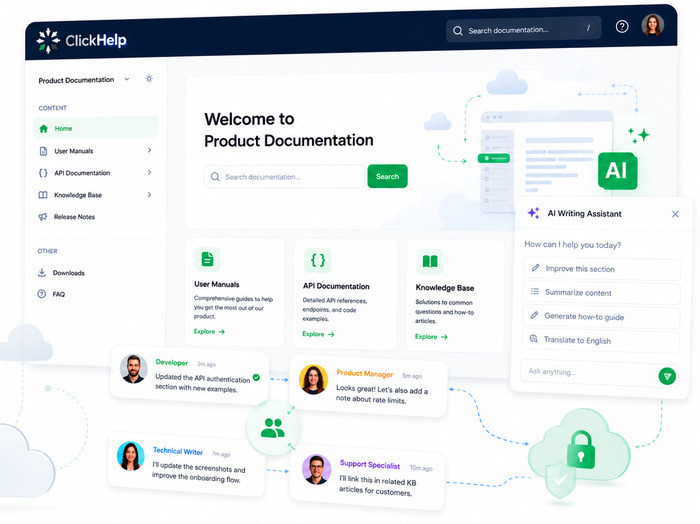
AI agents connected to a documentation portal are useful beyond the documentation team. Different roles interact with the portal differently, and MCP supports all of them:
- Technical writers use MCP to manage documentation at scale: auditing content quality, enforcing style consistency, and reviewing AI-generated drafts within the existing workflow.
- Developers use MCP to create and update documentation from their IDE, without switching tools or learning the portal interface in detail.
- Support teams use MCP to query internal and customer-facing documentation through an AI agent, getting precise answers without manually searching the portal.
- Product managers use MCP to pull context from existing documentation when building requirements, specs, or briefing materials.
Documentation no longer belongs to one role. The technical writer remains the owner of quality and structure, but is no longer the only person whose work connects to the documentation system. MCP makes the portal accessible to the whole team, on their terms and within their own tools.
How ClickHelp Uses MCP for Real Workflows
ClickHelp has implemented the Model Context Protocol to make documentation portals accessible as a workspace for AI agents.
The ClickHelp MCP server exposes the full documentation portal to AI agents: topic content, table of contents structure, project organization, workflow states, and single-sourcing logic including reusable snippets and variables. Agents can read, search, create, and update content using the same underlying system that your team uses every day.
Authentication follows the standard ClickHelp login flow. SSO and 2FA are fully supported — no API keys are required. The agent acts on behalf of an authenticated user account and inherits that account’s exact permissions. Teams can create dedicated contributor or reader accounts for AI agents to maintain clear audit trails and control over what agents can access or modify.
The existing draft → review → publish workflow is preserved. Content created or updated by an agent enters the same pipeline as anything written by a human.
A full list of what agents can do in practice is available in the MCP Server Use Cases guide.
Teams that need custom automation beyond MCP can also use the ClickHelp REST API.
And if you are thinking about how your portal fits into an AI-first workflow more broadly (including how to make content accessible to external AI tools) the AI-friendly documentation guide is a good place to start.
How to Try MCP in ClickHelp
A sandbox environment is available with the MCP server enabled and REST API access included. The customer success team can help with setup, permissions configuration, and connecting your first AI agent.
To try MCP Server in ClickHelp, contact customer success team at success@clickhelp.com.
Good luck with your technical writing!
ClickHelp Team
FAQ
What is an MCP server?
An MCP server is a service that connects AI agents to external tools and data sources using the Model Context Protocol — an open standard developed by Anthropic. Instead of working only with text pasted into a chat window, an agent connected via MCP can read from and write to real systems: documentation portals, project trackers, code repositories, and others. In the context of documentation, an MCP server gives AI agents direct access to portal content, structure, and workflow.
How is MCP different from a REST API?
A REST API is designed for developers building integrations: it requires writing code to define what data to fetch, how to handle responses, and what actions to trigger. MCP is designed for AI agents: the agent decides which tools to use and how to combine them based on a plain-language instruction. The ClickHelp MCP server gives AI agents access to everything the REST API supports, which makes it a flexible foundation for a wide range of workflows.
Do I need a developer to set up MCP in ClickHelp?
Not for basic use. Connecting an AI agent like Claude to the ClickHelp MCP server requires configuring the agent with the portal’s MCP endpoint, which is available in the portal settings under AI integrations. Authentication uses the standard ClickHelp login flow, including SSO and 2FA. No API keys or custom code are required to get started.
What AI tools work with ClickHelp MCP?
Any AI client that supports the Model Context Protocol can connect to the ClickHelp MCP server. This includes Claude, Cursor, and other MCP-compatible tools. The protocol is an open standard, so support is not limited to a specific vendor.
Is my documentation data secure when using MCP?
Access through the MCP server is governed by the same permission system as direct portal access. The agent acts on behalf of an authenticated user account and can only perform actions that account is allowed to perform. Authentication uses OAuth 2.1. Teams can create dedicated accounts for AI agents with limited permissions to control exactly what the agent can read or modify. Note that data passes through the MCP server to the LLM you are using — the choice of LLM and its data handling policies are the responsibility of your organization.
Can AI agents publish content automatically?
No. Publishing is not currently supported through the ClickHelp MCP server. Agents can create and edit topics and update workflow states, but content does not go live without a human completing the publish step. This keeps the existing review and approval process intact.
Have Questions About MCP?
Wondering how MCP works with your documentation portal? Whether you’re exploring AI integrations, evaluating use cases, or planning to connect AI agents to your knowledge base, our team is here to help. Get in touch and we’ll answer your questions.
"*" indicates required fields