
Whether you are planning a product launch, structuring research, or running a brainstorming session with your team, the right mind mapping software can change how you think and work. Visual maps help people organize complex information faster than linear notes, see connections between ideas, and move from scattered thoughts to clear plans.
This guide covers the best mind mapping tools available in 2026 — from lightweight apps for quick idea capture to enterprise platforms with project management and AI features. We explain what to look for, compare the leading options, and help you choose the tool that fits how you actually work.
What Is Mind Mapping
Mind mapping is a visual method for organizing ideas, where a central concept expands into connected branches of related thoughts. Instead of working with linear notes or rigid tables, you create a map that visually represents how information is structured and how different concepts relate to each other.
A mind map usually starts with one core topic placed in the center. From there, subtopics, tasks, or supporting concepts branch out like a network. Each node can expand further, allowing you to explore depth and detail without losing sight of the bigger picture.
Unlike flowcharts, which show steps in a fixed sequence, mind maps work by association — ideas can connect in multiple directions, which is why they are particularly effective for brainstorming, project planning, studying, and creative problem-solving. A flowchart answers the question “what happens next?” while a mind map answers “how does everything connect?”
In practice, teams and individuals use mind maps to structure research, prepare presentations, plan workflows, and break down complex projects into manageable parts. Modern mind mapping tools also make it easy to edit, rearrange, color-code, and export maps into PDFs or images for sharing and documentation.
What Makes the Best Mind Map Software
The best mind mapping software is not just about drawing diagrams. It is about how effectively a tool helps you create, organize, and act on ideas within your real workflow. Good tools combine an intuitive interface with enough depth to support advanced planning, collaboration, and integration needs.
Here are the most important features to evaluate when choosing a mind mapping app:
- Ease of use and node editing: The interface should let users add, move, and connect nodes quickly without friction. Drag-and-drop editing keeps the focus on thinking rather than formatting.
- Templates: Ready-made structures for brainstorming, project planning, or strategy mapping help users get started fast without building everything from scratch.
- Real-time collaboration: Many teams now use mind mapping software together, especially in remote or distributed environments. The ability to co-edit, comment, and react to ideas in real time is increasingly essential.
- AI support: Modern apps include AI features that can generate maps from text prompts, suggest related concepts, or expand existing nodes automatically. This speeds up brainstorming and reduces manual setup time.
- Integrations: The best tools connect with platforms like Google Workspace, Slack, Notion, or Jira so that mind maps function as part of a larger workflow rather than isolated diagrams.
- Export options: Business users often need to convert maps into PDF, image formats, PowerPoint, or Word documents for reporting and sharing.
- Free plans and pricing flexibility: Strong tools offer free plans for individuals and scalable paid options for growing teams, so users can start without commitment and upgrade as their needs grow.
- Security and cross-platform support: Enterprise users require data security features, while all users benefit from consistent performance across web, desktop, and mobile.
Best Mind Map Software for 2026
Below are the most widely used and effective mind mapping tools in 2026. Each has a distinct focus — from broad collaborative whiteboards to structured planning environments and lightweight idea capture apps.
Miro
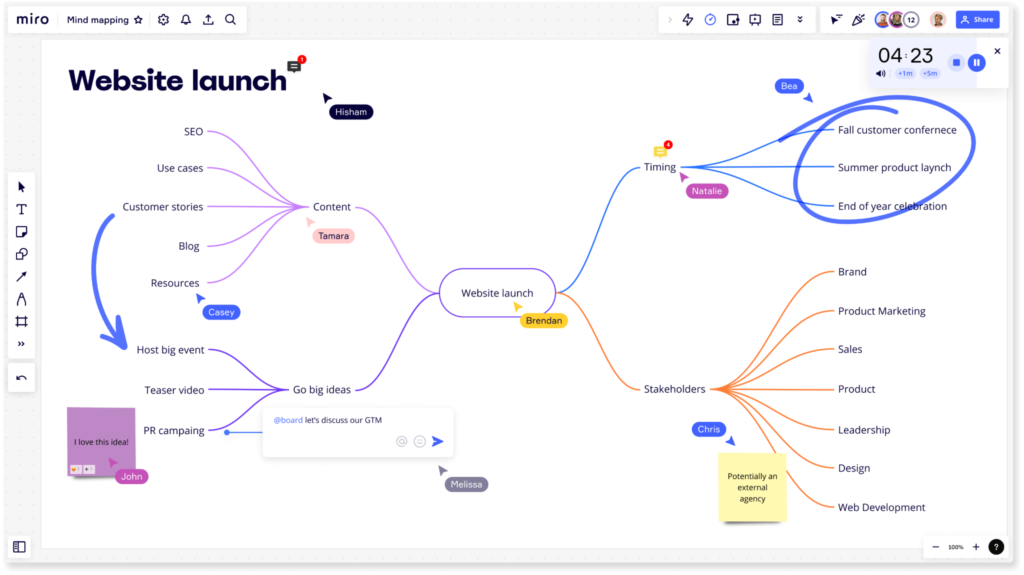
Miro is one of the most popular collaborative whiteboard platforms, and mind mapping is one of many use cases it supports. It is built for teams that need to brainstorm, plan, and visualize ideas together in real time.
Features
- Infinite canvas for building mind maps, diagrams, workflows, and strategy boards in a single shared space.
- Large library of templates for brainstorming sessions, customer journeys, project roadmaps, and more.
- Real-time collaboration with simultaneous editing, inline comments, and emoji reactions.
- AI features that generate map structures from text prompts or help expand existing nodes.
- Integrations with Jira, Trello, Slack, Google Drive, and other productivity tools.
- Export options for presentations, PDFs, and images.
- Free plan available with limited boards; paid plans start at competitive rates for teams.
Pros and Cons
Pros: Miro excels at real-time collaboration and team brainstorming. Its template library is extensive, and its integrations connect ideas directly to active workflows. The canvas-based interface scales well for both small teams and large enterprise workshops.
Cons: The platform can feel overwhelming at first because it includes many features beyond mind mapping. Some advanced AI and collaboration capabilities are only available on paid plans.
XMind
XMind is a focused mind mapping tool designed for users who want clean, organized, and presentation-ready maps. It is widely used for personal productivity, research, and structured analytical work, and it functions well both online and offline.
Features
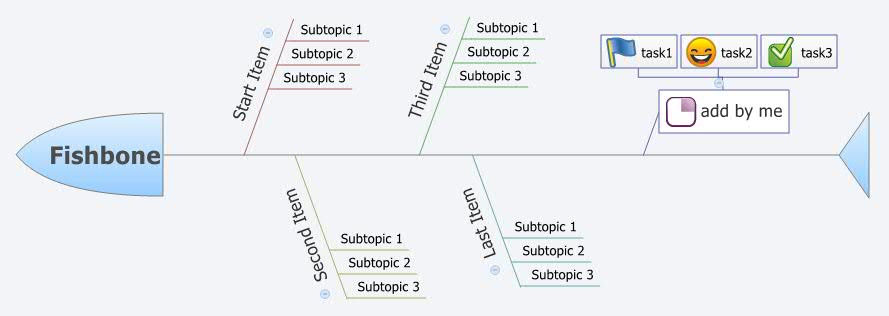
- Multiple diagram styles including tree charts, logic charts, fishbone diagrams, and matrices.
- Full offline capability with cross-device sync, useful for professionals who travel or prefer desktop environments.
- Support for notes, labels, hyperlinks, and file attachments on individual nodes.
- Export to PDF, PowerPoint, Word, and Markdown for documentation and reporting.
- Gantt chart functionality in advanced versions for turning idea maps into structured project timelines.
- Color themes and visual styling options for polished, presentation-ready outputs.
- Free plan available with core features; paid plans unlock advanced structures and export options.
Pros and Cons
Pros: XMind is highly flexible and works well offline. It produces clean, professional visuals and supports advanced diagram structures for planning and analysis. Export options are strong and well-suited for business presentations.
Cons: Real-time collaboration is more limited compared to tools like Miro. Some advanced features, including Gantt charts and certain export formats, require a paid plan.
MindManager
MindManager is an enterprise-focused mind mapping solution built for business users who need structured planning and workflow visualization. It goes well beyond simple idea maps by integrating tasks, data, and timelines into connected visual structures.
Features
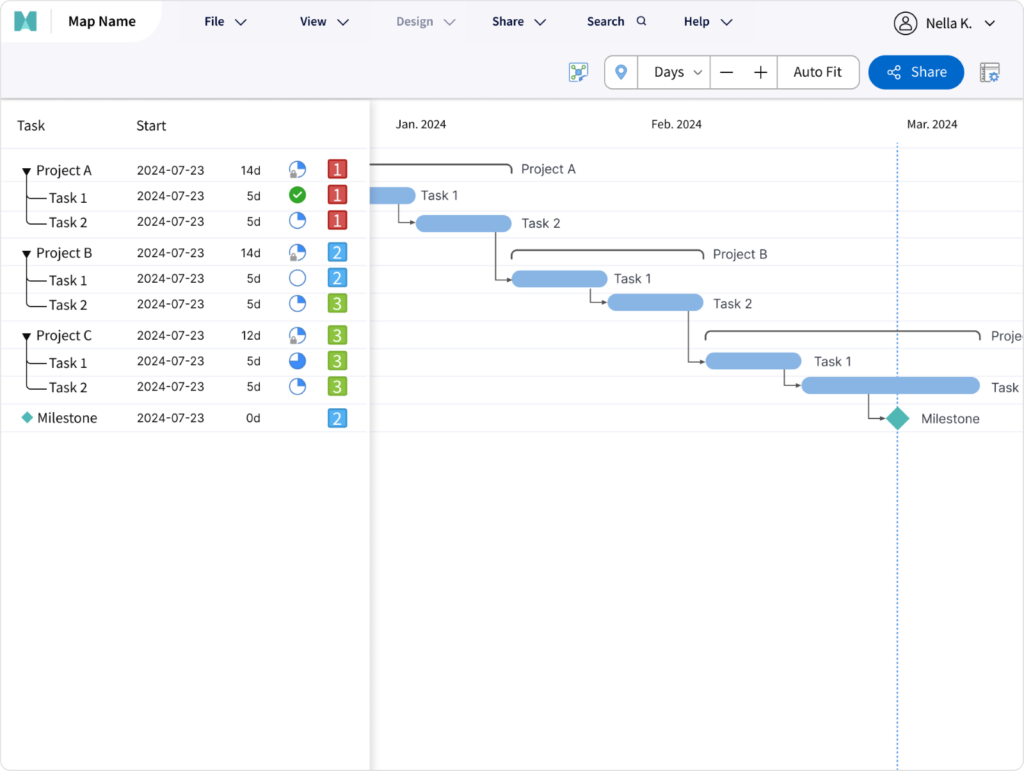
- Project management tools including Gantt charts, task tracking, and resource allocation built into the map.
- Data integration with Excel and other business systems, allowing live data to flow into visual structures.
- Strong Microsoft Office integration with Word, Excel, and PowerPoint for organizations in Microsoft ecosystems.
- Workflow visualization that supports execution planning, not just brainstorming.
- Security features suited to enterprise environments and compliance requirements.
- Paid-only product with business and enterprise licensing tiers.
Pros and Cons
Pros: MindManager is a strong choice for structured project planning and enterprise workflows. Its data integration capabilities and Microsoft Office compatibility make it a natural fit for corporate environments.
Cons: The learning curve is steep, and the tool is less suitable for casual users or simple brainstorming. It has no free plan, which makes it harder to evaluate before committing.
Coggle
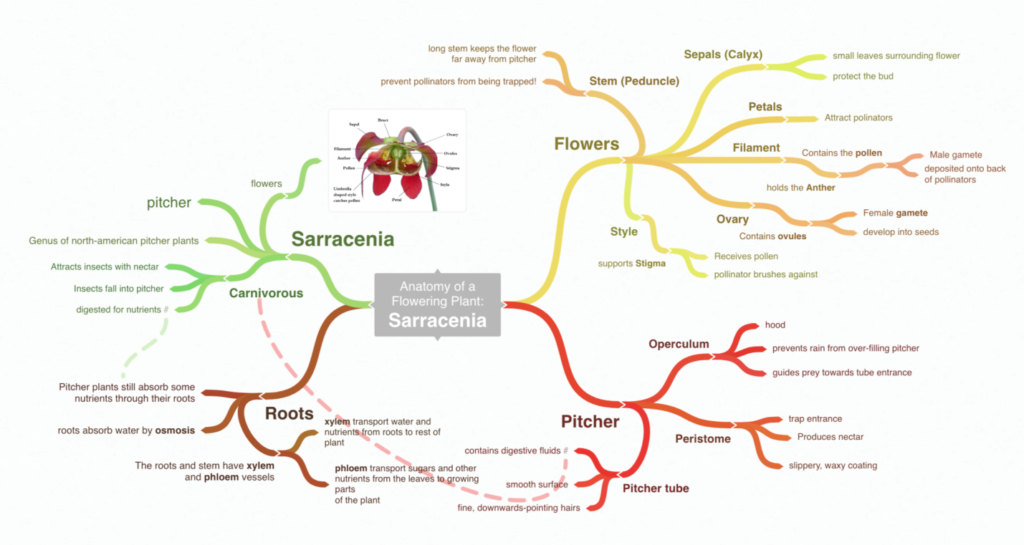
Coggle is a lightweight, web-based mind mapping tool designed for quick brainstorming and easy collaboration. Its main function is simplicity: users can start creating maps immediately, with almost no setup or training required.
Features
- Minimal interface that keeps the focus on capturing and connecting ideas without distractions.
- Real-time collaboration allowing multiple users to work on the same map simultaneously.
- Version history so teams can track changes and revert to earlier states of a map.
- Export to PDF and image formats for sharing and documentation.
- Free plan available for basic use with a limited number of private diagrams; paid plans lift these restrictions.
Pros and Cons
Pros: Coggle is extremely easy to use and fast to get started with. It is ideal for quick brainstorming and collaborative idea sharing. The free version covers basic needs without requiring a credit card.
Cons: Coggle lacks advanced features such as project management tools, Gantt charts, deep integrations, or AI assistance. It is best suited as an entry-level or supplementary tool rather than a primary productivity platform.
MindMeister
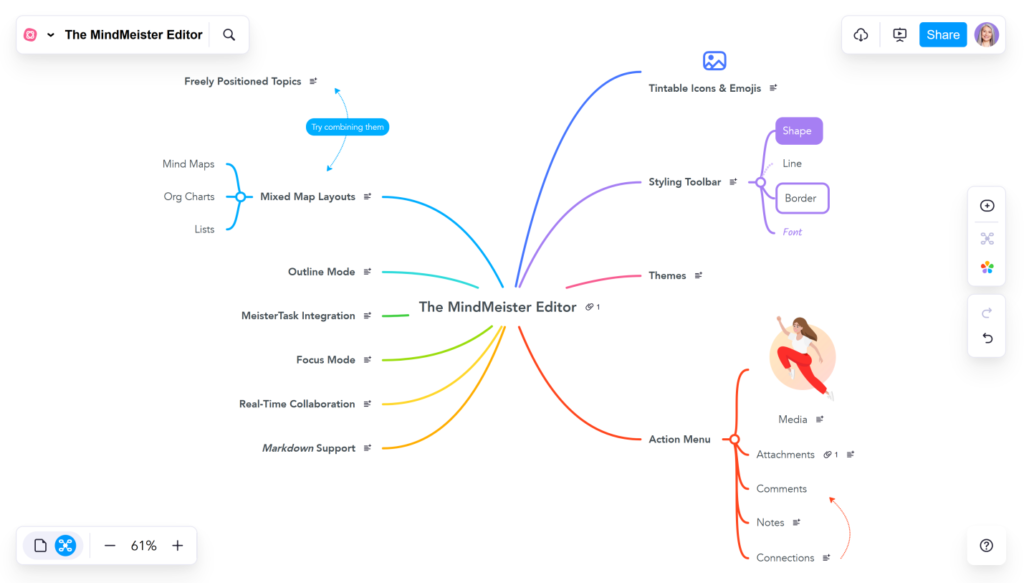
MindMeister is a web-based mind mapping tool focused on collaboration and idea management. It is widely used by teams that want to brainstorm visually and convert ideas directly into actionable tasks.
Features
- Real-time collaborative editing with multi-user access, inline comments, and change tracking.
- Integration with MeisterTask, allowing teams to turn map nodes directly into tasks and project workflows.
- Presentation mode for sharing maps with stakeholders in a structured, slide-like format.
- Templates and styling options for organizing different types of maps visually.
- AI features for generating maps from text input and expanding existing ideas automatically.
- Strong mobile app support for editing and reviewing maps on the go.
- Free plan available with up to three maps; paid plans remove limits and unlock team features.
Pros and Cons
Pros: MindMeister is easy to use, works well for distributed teams, and bridges idea creation with task management through its MeisterTask integration. Mobile support is reliable.
Cons: Unlimited maps and advanced team features require a paid plan. Offline functionality is limited compared to desktop-first tools like XMind.
What About AI Mind Mapping Software
AI-powered features are now a standard part of many leading mind mapping tools. Instead of manually building every branch, users can generate entire map structures from a short text prompt or a brief description of their topic.
Tools like Miro and MindMeister already include AI assistants that can produce a structured map from a few sentences of input, suggest related concepts, or automatically expand existing nodes. Miro’s AI layer works directly on the canvas, while MindMeister focuses on turning text input into ready-to-edit idea trees. Standalone AI-first tools like Mapify and Whimsical AI take this further, with map generation as their primary function rather than an add-on feature.
AI can suggest related ideas, group similar concepts, and summarize large or complex maps into simplified overviews. This is particularly useful in the early stages of brainstorming, when the goal is to quickly generate a broad set of ideas before narrowing down.
The most practical AI function in current tools is map generation from input text: users paste in a document, meeting notes, or a rough description, and the software produces a structured visual map automatically. This reduces setup time significantly and helps teams get to the substance of a discussion faster.
AI works best as a support layer rather than a replacement for human judgment. It accelerates idea generation and structure creation, but the final logic, organization, and priorities still benefit from being reviewed and shaped by the people who understand the context. According to industry analysts, deeper AI integration, including conversational editing through natural language, is an active development direction across most major platforms.
ClickHelp’s Capabilities for Using Mind Maps
ClickHelp is a modern platform for technical documentation built around topic-based authoring and a structured Table of Contents. While it does not include native mind mapping tools, it supports embedding visual diagrams and external content from third-party services such as draw.io, Lucidchart, or Gliffy through Custom HTML snippets.
Teams can use these embedded visuals inside documentation topics to help explain complex systems, workflows, or product architectures to end users. Content organization in ClickHelp relies on an intuitive tree-like TOC that functions as a practical alternative to visual mapping for structuring large documentation projects. Collaboration features include review comments and ToDo lists for editorial workflows.
Finished manuals can be published as interactive Web Help portals or exported as professional PDF documents, making visual maps embedded within topics available to readers across formats.
Conclusion
Choosing the best mind mapping software depends on how you work with ideas and what your team needs from a tool.
- For real-time collaboration and flexible visual planning, Miro is the strongest choice.
- For structured offline work and polished outputs, XMind stands out.
- For enterprise-level project management with data integration, MindManager leads.
- For simplicity and fast idea capture, Coggle is the most accessible option.
- For idea-to-task workflows with strong team features, MindMeister is a reliable platform.
In 2026, mind mapping has become a core part of how teams plan, brainstorm, and manage complex projects visually. With AI features deepening and integrations expanding, these tools are evolving into full productivity platforms — worth evaluating carefully against your actual workflow rather than choosing by name alone.
Good luck with your technical writing!
Author, host and deliver documentation across platforms and devices
FAQ
How does mind mapping help productivity?
Mind maps organize ideas visually, reduce mental overload, and make complex information easier to understand at a glance. They support faster planning, clearer decision-making, and more structured creative thinking compared to linear notes.
Can teams use mind maps for project management?
Yes. Tools like Miro and MindManager allow teams to assign tasks, track progress, and manage workflows directly within maps. XMind and MindMeister also support project planning features in their paid tiers.
What integrations do mind mapping tools offer?
Most tools integrate with platforms such as Google Drive, Slack, Notion, Jira, and Microsoft Teams. These integrations connect visual maps to everyday workflows so ideas can move into action without switching tools.
Is there mobile support for mind mapping apps?
Yes. XMind, Miro, and MindMeister all offer mobile apps for editing and reviewing maps on the go. Feature parity with desktop versions varies by platform.
How do I choose between web-based and desktop tools?
Web-based tools are better suited for collaboration and real-time editing with distributed teams. Desktop tools offer stronger offline functionality and tend to support more advanced structuring and export options. The right choice depends on whether collaboration or deep individual work is your primary use case.
Do mind mapping tools offer free plans?
Yes, most leading tools offer free plans with some limitations. Coggle, MindMeister, and Miro all have free tiers for individual users. XMind offers a free version with core features. MindManager is the exception and is available on paid plans only.