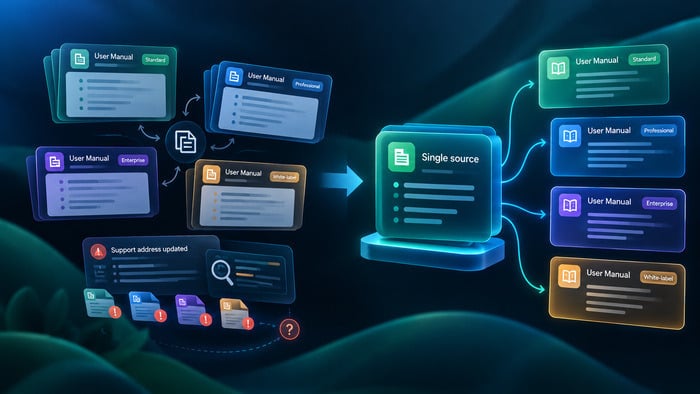
Here is a situation most documentation teams recognize. The product ships its first release, the manual is written, everything is in order. Then a Professional edition appears. Someone duplicates the manual, makes the relevant edits, and moves on. Then an Enterprise edition. Then a customer asks for a white-label version. Each time, the copy-and-edit approach seems like the fastest path.
Six months later, a support address changes. The team now has to track down every instance across four manuals and two languages. One copy gets missed. A user calls support with the wrong number.
The copy-and-paste approach solves a short-term problem and creates a long-term one. This article explains a more scalable alternative: maintaining one source of documentation and publishing multiple manuals from it.
Why Copying Manuals Is a Bad Strategy
Copy-based documentation tends to start as a practical decision. A team has one manual, a new edition is released, and duplicating the file feels faster than restructuring the source. For a single copy, it works. As the number of copies grows, the model breaks down.
The first problem is duplication of information. When the same installation instructions, interface explanations, troubleshooting steps, or legal notices appear across several manuals, each copy must be updated independently. The team is no longer managing one piece of content — it is managing several versions of it simultaneously.
This multiplies effort at every stage. Writers edit the same content more than once. Reviewers verify the same text across multiple instances. Localization teams translate repeated fragments separately. Every additional manual adds proportional overhead.
Copy-based workflows also introduce update errors. If a procedure changes in one manual and the same change is missed in another, the documentation set becomes inconsistent. Users following different manuals receive different instructions. That inconsistency risks reducing trust and increases the load on support.
Over time, copied manuals drift apart in small, cumulative ways. Terminology shifts in one version but not another. A warning is updated in one file and forgotten elsewhere. A feature description is rewritten for one edition but left unchanged in the rest. The gap between copies widens until no single manual can be called the source of truth.
Localization amplifies every one of these problems. Each copied paragraph must be translated, reviewed, and kept in sync. When source manuals are already inconsistent, translators work with conflicting material, which slows the process and increases cost.
The conclusion is straightforward: the more copies exist, the more expensive and error-prone the documentation becomes to maintain.
What Single-Sourcing Means
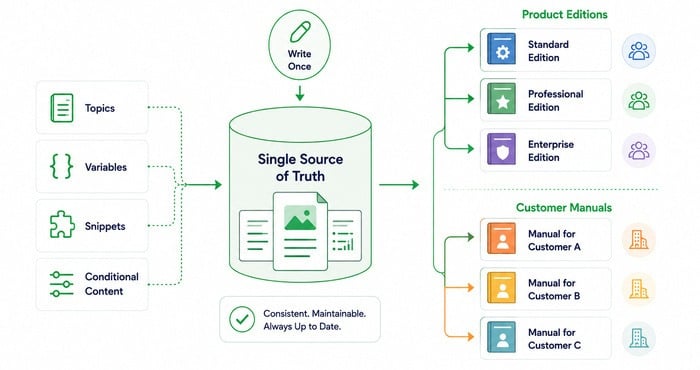
Single-sourcing is a documentation approach in which one content base is used to produce multiple manuals or output variants. Instead of maintaining separate documents for every edition or customer, the team creates one structured source and uses reusable topics, variables, snippets, and conditional content to generate the required publications.
The principle is: write once, publish many times.
This is especially useful when a product exists in multiple editions:
- Standard Edition
- Professional Edition
- Enterprise Edition
The same approach works for customer-specific documentation:
- Manual for Customer A
- Manual for Customer B
- Manual for Customer C
In both cases, most of the content is shared. The installation process may be identical. The core interface may be the same. Only certain sections vary — advanced features, licensing terms, screenshots, or audience-specific instructions. Single-sourcing handles that variation without requiring separate files.
The key shift is separating content creation from content presentation. The writer maintains one source of truth. The publishing system produces the appropriate version for each audience. That separation is what keeps documentation consistent and maintainable as it grows.
Mechanisms That Prevent Duplication
Single-sourcing works when documentation is built from reusable components rather than monolithic pages. Four mechanisms make this possible.
Reusable Topics
A reusable topic is a complete piece of content — a page, a procedure, an explanation — that can be included in more than one manual without modification. When the same instruction applies across multiple outputs, it should be written once and reused wherever needed.
Reusable topics work especially well for:
- Installation and setup instructions
- Standard configuration steps
- Common workflows
- Troubleshooting guides
- General feature descriptions
The value extends beyond reduced writing time. Because the same source is used everywhere, consistency is automatic. When the procedure changes, the update is made once and reflected in every publication that includes that topic.
Variables
Variables are placeholders for values that differ between publications but remain consistent within each one. They are ideal for information that would otherwise be hardcoded across many topics.
Typical variables include:
- Product name
- Version number
- Company name
- Support email or address
- Website URLs
- Legal entity names
The practical impact becomes clear when something changes. In a copy-based model, a new support address must be found and updated manually in every topic, every manual, and every language. In a variable-based model, the value is changed once and every publication picks it up automatically.
Variables reduce human error, save time, and ensure all documents stay in sync — especially in environments where documentation is published frequently or maintained across multiple editions.
Conditional Content
Conditional content makes it possible to show or hide specific sections depending on the edition, audience, customer, or output type. This allows one topic to serve multiple publications without creating duplicate versions.
Typical uses include:
- Enterprise-only features
- Administrator instructions
- Premium capabilities
- Customer-specific notes
- Region-specific requirements
For example, a topic may include an administrator section that appears only in the Enterprise manual, or a premium feature description visible only where the license includes it. Conditional content handles these distinctions within a single source file.
One important constraint: conditional content must be used carefully. Too many conditions make the source difficult to read, review, and maintain. The best practice is to apply conditions where the difference is meaningful and unavoidable — not as a way to patch a poorly structured content model.
Snippets
Snippets are short, reusable fragments inserted into multiple topics. They are ideal for standard text that must remain exactly the same wherever it appears.
Common uses include:
- Warnings and safety notices
- Notes and tips
- Legal notices
- Compliance statements
- Standard procedures
In a copy-based workflow, a legal notice that appears in multiple sections must be copied manually each time. A snippet ensures the wording stays controlled and consistent, and when the notice needs updating, the change is made in one place.
Working With Images
Images are a less obvious source of duplication, but in multi-manual projects they often become a significant maintenance problem. Screenshots, diagrams, logos, and interface visuals can vary by edition, customer, or product version — and without a clear management approach, they quickly become outdated and hard to track.
Three scenarios come up repeatedly.
Edition-specific interfaces. A Standard edition and an Enterprise edition may share many screens but differ in menu structure, available controls, or dashboard layout. A single screenshot cannot accurately represent both.
Customer-specific branding. Some organizations deliver software with different logos, product names, or visual identity elements for different clients. Image assets must be versioned alongside the documentation.
Product evolution. As the interface changes, older screenshots may remain in use long after they no longer reflect the current product. Without versioned image storage, outdated visuals are easy to miss.
A practical image management approach should include:
- Separate image variants for different editions or customers
- Dedicated folders for versioned assets
- Clear naming conventions for all screenshots and diagrams
- Rules for archiving obsolete visuals
- Conditional display of images tied to output tags
When the dashboard layout differs between Standard and Enterprise, the topic can remain shared while the images change depending on the output. That combination — shared text, conditional images — is often the most efficient way to handle edition-specific visuals.
A Practical Example
Consider a software company publishing documentation for three product editions: Standard, Professional, and Enterprise. At first, this might seem to require three separate documentation projects. In practice, most of the content is shared.
The following table shows what is common across all editions and what differs:
| Content area | Standard | Professional | Enterprise |
| Installation process | ✅ shared | ✅ shared | ✅ shared |
| Main interface | ✅ shared | ✅ shared | ✅ shared |
| Core functionality | ✅ shared | ✅ shared | ✅ shared |
| Basic troubleshooting | ✅ shared | ✅ shared | ✅ shared |
| Advanced features | — | ✅ included | ✅ included |
| Admin instructions | — | — | ✅ included |
| Integrations | — | Partial | ✅ full |
| Licensing information | Edition-specific | Edition-specific | Edition-specific |
| Screenshots | Shared base | Shared base | Some differ |
The shared rows are written once and reused across all three manuals. The differing rows are handled through conditional content, separate image variants, and variables for edition-specific values.
The documentation team structures the single source as follows:
- Shared topics cover installation, navigation, and standard workflows — included in all three outputs unchanged.
- Variables handle product name, version, company information, and support contacts — set per publication.
- Conditional content displays Professional and Enterprise features only in the relevant manuals.
- Separate image variants ensure the correct screenshots appear for each edition.
From that one source, the publishing workflow generates three distinct manuals — each tailored to its audience, each maintained from a single content base.
Best Practices
A reusable documentation model works best when the structure is planned before the content base grows too large. Retrofitting reuse into an existing copy-based system is possible but harder.
The following practices help from the start:
- Write small, independent topics that focus on one task or one concept. Topics that try to cover too much become hard to reuse without modification.
- Reuse procedures whenever the same instruction applies in multiple manuals. If installation steps are the same, they belong in one topic, not three.
- Use variables for recurring values — product names, addresses, links, version numbers. Never hardcode values that might change.
- Keep conditional content limited to genuine differences. Every condition added to a topic makes it harder to read and review. When conditions become too numerous, the content model usually needs restructuring, not more conditions.
- Plan the structure early. Decisions about what will be shared and what will vary are much easier to make before writing begins than after.
- Apply consistent naming conventions to topics, variables, folders, snippets, and images. Inconsistent naming makes reuse harder to discover and easier to misuse.
Typical Mistakes
Most problems with single-sourcing appear when teams try to preserve copy-based habits within a structured system.
- Creating complete copies of entire manuals. This recreates every problem of a duplicate-driven workflow while offering none of the benefits of reuse. The result is the same inconsistency and maintenance cost, now wrapped in a more complex system.
- Overusing conditional content. When a topic contains multiple layers of conditions, it becomes difficult to read, review, and troubleshoot. Heavy conditional logic is often a sign that the content model needs simplification, not more conditions.
- Using variables for large text blocks. Variables represent small, repeated values — not entire explanations or lengthy instructions. If a whole section needs to vary by edition, a reusable topic with conditional content is the right approach, not a variable holding a paragraph.
- Poor image management. Screenshots stored without clear naming conventions and version structure cause the documentation team to spend unnecessary time finding the right file — or to publish an outdated visual without noticing.
- Mixing shared and unique content without clear separation. When common material and edition-specific material are not structurally distinguished, updates become uncertain. Writers spend time deciding what belongs where instead of improving the content.
Choosing a Documentation Platform
A documentation platform built for multi-manual workflows needs to support the full reuse model, not just basic text authoring. The essential capabilities are:
- Single-sourcing
- Reusable topics
- Variables
- Conditional content
- Snippets
- Version control
- Collaboration
- Publishing multiple documentation variants from one source
These capabilities make it possible to maintain one authoritative source and produce different manuals without duplicating work. They also support more reliable review and release processes — particularly for teams managing multiple product editions, frequent updates, or customer-specific deployments.
ClickHelp is built around this model, with native support for content reuse, versioned publishing, and multi-output documentation from a single source.

Conclusion
As product lines grow, maintaining separate manuals for each edition or customer becomes progressively harder to sustain. What starts as a single copied file becomes a sprawling set of inconsistent documents that require more effort to maintain with each release cycle.
Single-sourcing addresses this directly. By combining reusable topics, variables, conditional content, snippets, and organized image management, documentation teams can maintain one content base and publish multiple manuals from it — with changes made once and reflected everywhere.
The investment is in structure, not volume. A well-organized single source takes more thought to set up than copying a file. But it scales in a way that copies never do.
Good luck with your technical writing!
Author, host and deliver documentation across platforms and devices
FAQ
When does it make sense to use a separate manual rather than single-sourcing?
When two products share less than 50–60% of their documentation, maintaining a single source often creates more complexity than it solves. If the conditional logic required to handle the differences becomes hard to read or explain to a new team member, separate projects are usually the better choice.
What is the difference between a reusable topic and a snippet?
A reusable topic is a complete page or section — an installation procedure, a configuration guide, a full feature description. A snippet is a short, self-contained fragment: a warning, a legal notice, a standard note. Reusable topics structure the manual; snippets handle the recurring elements within it.
Can variables contain formatted text?
No. Variables are designed for plain text values — a product name, a version number, a support address. If the content that needs to vary includes formatting, list items, or multiple sentences, use a reusable topic or a snippet instead.
How do you handle screenshots when the interface differs between editions?
The most common approach is to keep the topic shared and use conditional image display — showing a different screenshot depending on the active output tag. This requires that each image variant is clearly named and stored in a versioned folder structure. The topic text can often remain identical; only the image changes.
How many conditions are too many in a single topic?
There is no fixed number, but a practical signal is this: if a new writer cannot understand what the published output will look like by reading the source, there are too many conditions. A topic with more than two or three active condition layers usually needs to be restructured — either split into separate topics or simplified.
How do variables interact with localization?
Variables are typically translated once per language and then referenced throughout the localized documentation, the same way they are used in the source. This means a product name change only needs to be applied once per language, not across every translated topic individually.
Does single-sourcing require a specialized documentation platform?
Not strictly. Single-sourcing principles can be applied in simpler tools using manual includes and templating. However, managing variables, conditional content, and multi-output publishing at scale is significantly easier in a platform designed for it. Without native support for these mechanisms, the maintenance overhead of reuse can approach the overhead of maintaining copies.