What Is ClickHelp?
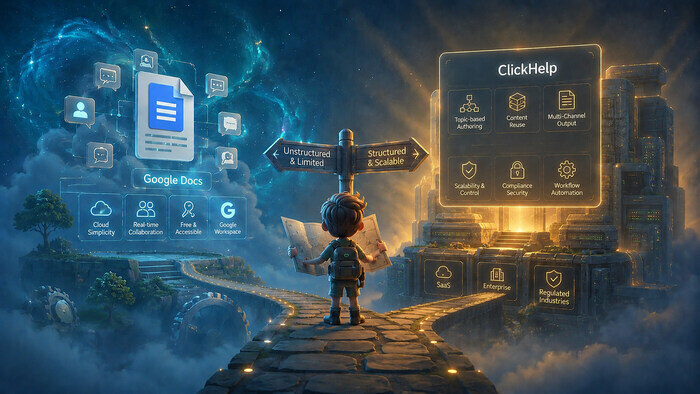
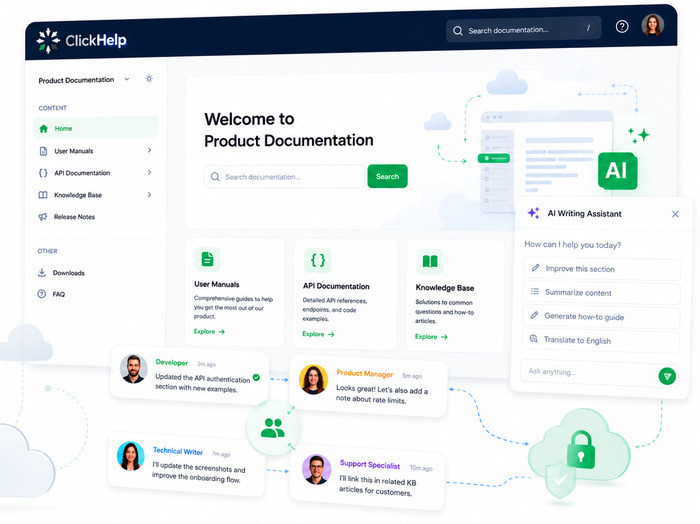
ClickHelp is a cloud-based documentation platform that helps product teams create, host, and publish technical documentation (from user manuals and API references to knowledge bases and customer-facing portals) without installing software. The editor works like Google Docs, an AI layer handles authoring assistance and reader-facing Q&A, and the whole team contributes: product managers, developers, support, and technical writers alike. Built by a company founded in 2010 in Yerevan, Armenia, ClickHelp is used by teams in 100+ countries.
Offering a good documentation tool is not just a job for us, it is an important mission. The value of our work is to simplify the labor of technical writers and give them tools to create efficient online documentation.
— Alexander Muravyov, CEO of ClickHelp
Key Features of ClickHelp
ClickHelp combines authoring, hosting, analytics, and AI tooling in a single platform. These are its core capabilities:
- AI Suite (AnswerGenius, WriteAssist): Launched in 2025, the AI Suite includes three tools — AnswerGenius embeds an AI assistant directly into the documentation portal so readers get instant answers without leaving the page; WriteAssist helps authors draft, rewrite, and improve content.
- MCP Server & AI-Friendly Documentation: ClickHelp provides an MCP server (Model Context Protocol) that lets AI agents (Claude, Gemini, ChatGPT, and others) connect directly to a documentation portal, search content, and create or update topics in response to natural language requests. Beyond MCP, every topic is accessible as clean Markdown by appending .md to any topic URL, and the portal supports llms.txt — a standard index file for AI agents. These features mean AI tools can read and cite documentation accurately without parsing HTML.
- Documentation Analytics: ClickHelp tracks reader search queries, AnswerGenius conversations, and topic views, turning documentation into a live product sensor: product teams can see which features generate the most questions, where users get stuck, and what to prioritize in the next release cycle.
- Single-Sourcing & Content Reuse: Content is written once and reused across topics through snippets, variables, and conditional content, so when a product changes, authors update one source, not twenty pages.
- Multi-Channel Publishing: From a single source, ClickHelp publishes responsive HTML5 portals and exports to PDF, DOCX, CHM, and ePub, covering both online readers and teams that need offline or printed deliverables.
- Patented Full-Text Search: ClickHelp’s search algorithm is patented and optimized specifically for technical documentation; it handles typos and incomplete search queries, so readers find the right content even when they don’t know the exact term.
- Authoring & Collaborative Workflows: A visual WYSIWYG editor lets product managers, developers, and support teams contribute without training, while technical writers manage standards, statuses, and final output. Authors, reviewers, and translators work in parallel with role-based permissions, inline comments, and a full audit trail; development teams can integrate ClickHelp into CI/CD pipelines via API.
- Security & Compliance: ClickHelp is SOC 2 Type II certified and compliant with GDPR and CCPA. It supports SSO, IP allowlisting, and two-factor authentication. The Reader UI meets WCAG 2.2 AA accessibility standards. Data is hosted in your choice of region — United States, Europe, or Australia.
Who Uses ClickHelp?
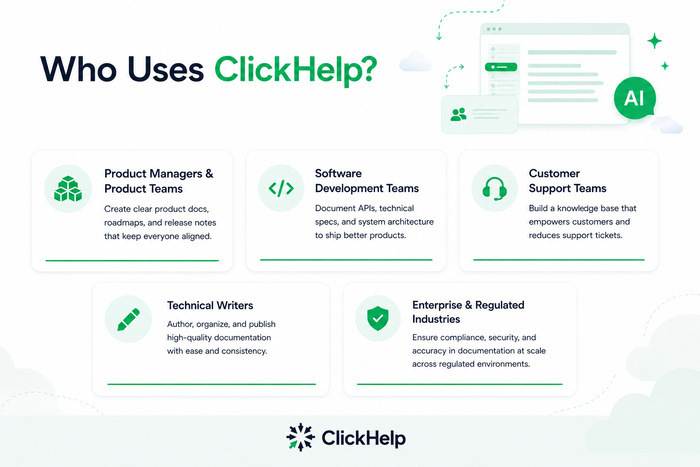
ClickHelp is built for any team that creates and maintains documentation as part of a product:
Product Managers & Product Teams
ClickHelp gives product teams a single place to maintain product documentation, release notes, and internal knowledge bases. Analytics from AnswerGenius conversations and reader search queries feed directly into roadmap decisions: if users consistently ask the same question, that’s a product signal, not just a documentation gap.
Software Development Teams
Development teams create API documentation using the built-in OpenAPI/Swagger import, developer portals, and technical guides. The ClickHelp API enables CI/CD integration so documentation updates can be part of the same release pipeline as code. Through the MCP server, AI agents connected to GitHub or Jira can reference the documentation portal directly, finding relevant topics and suggesting updates when a ticket is closed. Coding assistants like Cursor or Claude Code can access content via native Markdown URLs without any HTML parsing.
Customer Support Teams
Support teams build customer-facing knowledge bases and FAQ portals. AnswerGenius, embedded in the portal, deflects common questions by answering them from the documentation directly, reducing support ticket volume without requiring support agents to write and maintain content manually.
Technical Writers
Technical writers get a full professional HAT (help authoring tool) environment: single-sourcing, conditional content, multi-output publishing, translation workflows with DeepL and Microsoft Translator integration, and XLIFF export — all in a browser, with no desktop software to install or maintain.
Enterprise & Regulated Industries
ClickHelp covers SOC 2 Type II, GDPR, CCPA, WCAG 2.2 AA, SSO, IP allowlisting, regional data hosting, and automatic audit trails, meeting compliance requirements without additional configuration from IT or legal teams.
Is ClickHelp Right for You?
ClickHelp fits any team (technical writers, product managers, or developers) that needs a single platform to author, host, and publish documentation without managing a stack of separate tools. Unlike wikis or desktop authoring tools, ClickHelp treats documentation as a live product asset: built-in analytics and an embeddable AI assistant create a feedback loop between readers and the teams that build the product. It replaces the common combination of Word or Google Docs, Confluence, and a separate hosting solution, and serves as a SaaS alternative to desktop tools like MadCap Flare or Adobe RoboHelp.
ClickHelp Pricing
ClickHelp offers three plans. Pricing information below is provided for reference only — for current plans and exact pricing, visit clickhelp.com/pricing.
| Plan | Starting Price | Key Limits |
| Starter | $185/month | 500 topics, 2 contributors, 5 GB storage |
| Growth | $310/month | Unlimited topics, 5 contributors, 15 GB storage |
| Professional | $610/month | Unlimited topics, 10 contributors, 30 GB storage |
All plans include unlimited readers. A 14-day free trial is available without a credit card.
ClickHelp Alternatives
ClickHelp competes with both desktop HAT tools and wiki-style platforms. The right choice depends on team size, technical requirements, and how the documentation will be used.
| Alternative | Strength | Limitation vs. ClickHelp |
| MadCap Flare | Powerful desktop HAT, DITA/XML support | Requires software installation; no SaaS option; steeper learning curve |
| Confluence | Familiar to Atlassian teams, tight Jira integration | Not a HAT — limited single-sourcing, weak for external documentation portals |
| Document360 | Simple onboarding, clean UI | Fewer enterprise and compliance options; less publishing flexibility |
| Notion | Highly flexible, low barrier to entry | Not designed for technical documentation; no multi-output publishing |
Teams migrating from MadCap Flare or RoboHelp will find ClickHelp covers the same core HAT capabilities: single-sourcing, conditional content, multi-output publishing, in a cloud environment, without the per-seat desktop license or IT overhead.
Get Started with ClickHelp
Try ClickHelp free for 14 days — no credit card required.
If you’d prefer a guided walkthrough, book a 30-minute demo and we’ll show you the key features live.