Why Tech Writers Need to Know Their Reader
In the industry of technical writing, ignoring the reader can be compared to professional malpractice. “Universal documentation” is a term that does not actually exist, as IT readers range from fresh graduates tackling their first SSH login to principal engineers designing fault-tolerant microservice architectures across multi-cloud environments.
Neglecting reader profiling creates several compounding problems:
- Complexity Overload for Entry-Level Readers: Consider a comprehensive guide to hybrid cloud migrations that launches into VPC peering and transit gateways without foundational AWS/Azure primers. General tech doc studies note high drop-off from cognitive overload in online learning, as cognitive load exceeds working memory capacity.
- Redundancy Fatigue for Seasoned Experts: Enumerating “what is a subnet?” in a guide for CCIE-certified network engineers prompts immediate disengagement. Research into enterprise knowledge management found that adoption rates of self-service systems remain low, in part because content fails to match the reader’s actual expertise level.
- Terminological Misdirection: Introducing “gRPC bidirectional streaming” to a team familiar with RESTful APIs but unfamiliar with protocol buffers creates significant confusion — compounded further when no bridging explanation is provided.
Errors in audience definition also increase support load. Misprofiled technical documentation creates vicious support cycles that burden IT teams and inflate operational costs.
This misalignment cascades across the organization. Novice support staff exhaust cycles on elementary queries they shouldn’t handle, mid-level engineers waste time deciphering mismatched assumptions, and senior architects bypass documentation entirely — opting instead for tribal knowledge or external forums.
Profiling breaks this cycle by delivering appropriately targeted content. Industry analyses suggest that well-structured self-service documentation can meaningfully reduce inbound support tickets, transforming support from cost center to efficiency engine.
What Is Remote Audience Profiling?
Remote profiling reconstructs the reader’s image using indirect data sources without interviews or direct contact. This method proves essential for tech writers creating standalone IT documentation — like API references, SaaS admin guides, or firmware release notes — where live user feedback remains unavailable.
Data sources for reader personas in technical documentation include product type, entry points, task abstraction levels, domain terminology, and regulatory requirements:
- Product type and usage scenarios: Identify the tool’s primary function and users. For example, a SIEM tool serves security analysts during threat hunting, while a CI/CD pipeline tool supports DevOps teams in building automation workflows.
- Entry point: Analyze how readers arrive. Those searching “resolve 503 error” need urgent troubleshooting fixes, whereas onboarding portal visitors follow structured learning paths.
- Task abstraction level: Match content depth to roles — high-level architecture overviews for strategists, granular CLI commands for operations staff.
- Domain terminology: Use role-specific language. DevOps teams expect Prometheus query syntax, while compliance docs match NIST 800-53 standards.
- Regulatory/standards requirements: Incorporate mandates like GDPR data minimization principles or SOC 2 control mappings to meet compliance needs.
This multi-source approach builds comprehensive reader personas quickly, enabling precise documentation that scales across IT contexts.
Remote profiling encounters two primary pitfalls that technical writers must address. The first, single-source bias, arises when authors overweight one data category (typically product type) while underutilizing complementary signals such as user search queries or regulatory requirements. The second involves static personas that fail to adapt to IT role evolution — a profile built for “Jenkins-familiar DevOps engineers” loses relevance as teams shift to GitLab CI/CD or platform engineering models.
Who Are We Writing For?
The starting point of effective technical documentation is describing the target audience in a single sentence. For example: “a platform engineer encountering our serverless platform for the first time amid quarterly OKR deadlines.” This formulation covers role, context, and motivation — ensuring content alignment from the first word to the last.
Reader roles demand granular consideration:
- end-users who view metrics dashboards daily,
- system administrators handling etcd backups during maintenance windows,
- developers authoring custom Kubernetes operators,
- or integrators wiring Terraform modules into enterprise stacks.
Context further sharpens the picture: baseline operations, incident command scenarios like chaos engineering drills, pedagogical environments such as CKAD certification preparation, or attestation processes tied to ISO 27001 control A.12.4. Motivations typically cluster into expediency (P1 outages requiring fast resolutions) or mastery (career pivots demanding conceptual depth).
Documentation might target “a compliance analyst extracting audit trails to satisfy FedRAMP Moderate requirements” or “a field integrator connecting edge nodes to legacy SCADA systems under connectivity constraints.” Each sentence becomes a governing tool, dictating tone, depth, and structure.
Modern technical writing platforms can streamline reader persona implementation in documentation workflows. Look for features such as predefined role libraries (sysadmin, DevOps, integrator), role-based content tagging, AI-assisted tone adjustment by audience type, role-specific preview modes, and metadata export for version control. This kind of tooling ensures consistency and scalability across large documentation sets without excessive manual overhead.
What Do We Know About the Reader?
Approach this question through document telemetry — usage heatmaps, bounce rates, search queries — to build a nuanced profile that anticipates real-world IT constraints.
Start with technical proficiency, mapped to a four-tier ladder:
- Level 1 readers manage GUIs comfortably but shy from command lines;
- Level 2 handles CLI routines;
- Level 3 crafts API calls;
- Level 4 dives into source modifications.
Prior product exposure matters too: does the Consul user need onboarding to your service mesh? Communication preferences factor in — REST versus GraphQL patterns, neutral phrasing for multilingual teams in global deployments.
The table below operationalizes these insights:
| Domain | Assumption | Evidence Source | Profiling Action | Fallback Content |
| Linux/Unix | Knows advanced commands | Deployment logs | Conditional “basics” branch | Quick-reference sidebar |
| Our Platform | Zero prior knowledge | New user cohorts | Full onboarding tour w/ prereqs | Embedded video tutorial |
| Cloud Providers | AWS partial, Azure none | Subscription data | Cross-provider comparison notes | Vendor-agnostic paths |
| Programming Langs | Python required, Go optional | Role postings | Dual-language code snippets | No-code alternatives |
| Monitoring Tools | Prometheus fluent | Tool adoption rates | Skip intro. Focus on integration | Glossary hyperlink |
Deploy the documentation and monitor metrics like bounce rates exceeding 50%, which signal flawed persona assumptions. Refine the profile and iterate. This empirical cycle ensures evolving accuracy, particularly vital for dynamic IT environments handling multilingual stacks.
What Does the Reader Know About the Subject?
This question allows you to precisely map the reader’s existing domain knowledge against your product’s implementation. Getting it right prevents the most common IT doc failures — where writers either drown readers in redundant basics or abandon them without explanation.
The core challenge lies in navigating the gap between general subject knowledge and specific mechanics. Readers might grasp publish-subscribe messaging theory from years of RabbitMQ experience, but still need guidance on your platform’s partitioned streams, serialization formats, and exactly-once delivery guarantees. Misjudging this gap causes novices to flounder while over-serving experts causes them to tune out.
A structured 5-stage knowledge progression model serves as a good guide to content adjustment:
| Stage | Reader State | Content Strategy |
| 0: Void | No prior concept | Analogy + purpose + simplified steps |
| 1: Concept | Basic awareness | One-paragraph recap + your differentiator |
| 2: Practitioner | Analog experience | Key differences + configs + common pitfalls |
| 3: Power User | Deep analog fluency | Performance optimizations + extensions |
| 4: Guru | Domain authority | Source code insights + contribution paths |
Mastering this question ensures docs empower rather than overwhelm, turning subject knowledge gaps into seamless learning paths.
How Profiling Influences the Text
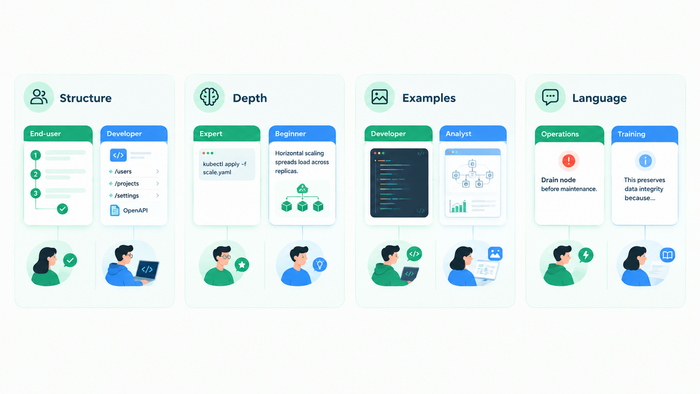
Reader profiling reshapes technical documentation into precision tools tailored for IT contexts. The impact spans structure, depth, visuals, and language — yielding measurable efficiency gains.
Structure guides users based on their roles. End-users handling daily tasks benefit from intuitive flows: clear problem statements, numbered steps, verification checks, and FAQs. Developers favor modular setups with endpoints grouped by resource type, including OpenAPI schemas, authentication details, and plugin extensions.
Explanation depth adapts to knowledge levels. Experts see direct commands with minimal background (“Apply YAML to scale pods”), while beginners get context first (“Horizontal scaling spreads load across replicas. Here’s how”).
Examples match user needs. Code-heavy snippets for developers versus annotated screenshots and diagrams for analysts.
Language tone sharpens focus. Use urgent verbs for operations (“Drain node before maintenance”) versus explanatory phrasing for training (“This preserves data integrity because…”).
Checklist for Tech Writers
This 10-item checklist ensures reader-profiled IT docs are production-ready. Verify each with supporting evidence.
- Reader profile sentence: Document a single-sentence reader description (e.g., “Sysadmin deploying monitoring stack first-time under SLA pressure”) to guide all content decisions.
- Explicit knowledge baseline: State assumed starting knowledge upfront (e.g., “Requires Linux CLI; excludes product familiarity”) in the introduction or prerequisites section.
- Completed “Knows/Doesn’t Know” table: Map reader assumptions across domains (OS, product, business context) using the table framework for balanced coverage.
- All terms defined/linked: Ensure every technical term receives a definition or glossary hyperlink on first occurrence to eliminate barriers.
- No complexity jumps verified: Scan and resolve abrupt difficulty shifts via manual review and tooling, maintaining smooth progression.
- Tool diagnostics finalized: Run full audits confirming no profiling mismatches.
- Standards compliance confirmed: Align phrasing and structure with relevant regulations (NIST, GDPR) and safety standards (ANSI Z535).
- Timed task tests passed: Validate key procedures complete within target time (e.g., <5 min for admins).
- Analytics integration active: Embed tracking (GA4, doc platform metrics) for post-launch usage and refinement data.
- Global/SEO readiness achieved: Optimize for translation (neutral terms) and discoverability (keywords, headers).
Action guide: 10 checks = Deploy. 7–9 = Targeted fixes. <7 = Re-profile.
Conclusion
Reader profiling transforms technical documentation from static references into dynamic, high-impact tools that drive IT success. By systematically answering “Who?” and “What do they know about the subject?”, tech writers minimize support burdens, accelerate resolutions, and empower diverse audiences – from time-pressed sysadmins to compliance auditors.
Implement the checklist, iterate via analytics, and watch your docs become indispensable. In the IT field, reader-informed writing isn’t just best practice. It is a competitive advantage.
Good luck with your technical writing!
Author, host and deliver documentation across platforms and devices
FAQ
What’s the difference between a reader profile and a persona?
A persona is usually a broader, semi-fictional identity — a name, a background, a day-in-the-life narrative — built once and reused across a product. The reader profile described here is narrower and cheaper to maintain: a single sentence covering role, context, and motivation for one piece of documentation, rebuilt whenever that audience shifts.
What if I can’t interview my readers directly?
That’s what remote profiling solves. Product type, entry points (like the search query that landed someone on the page), domain terminology, and regulatory context all signal who’s reading and why, without needing direct contact — this is the standard approach for standalone IT docs like API references or firmware release notes.
How often should a reader profile be updated?
Whenever the underlying audience shifts — a new user segment, a tool migration like Jenkins to GitLab CI/CD, or a bounce rate spike on a page that used to perform well. A static persona is one of the two most common profiling failures; treat the profile as something to revisit, not a one-time deliverable.
Does this apply to short content like a single API reference page, or only long guides?
It applies to any documentation, short or long. Even one reference page has a task abstraction level and an assumed proficiency floor. A one-sentence profile takes a minute to write and prevents mismatches like introducing gRPC streaming to a REST-only team with no bridging explanation.
Where does the “Knows/Doesn’t Know” table fit into an existing workflow?
Run it at review, not just at the outline stage — it’s the fastest way to catch an abrupt complexity jump or an undefined term before a reader does, and it maps directly onto the checklist item for verifying no complexity jumps remain.