Knowledge management in B2B customer support is challenging in its own way. B2B teams handle complex products with multi-system integrations, require lengthy onboarding for agents to master technical details, and face situations where clients simply don’t tolerate slow or inconsistent responses.
The productivity cost is measurable. According to Pryon’s research, 47% of professionals spend between one and five hours per day searching for specific information. Salesforce data adds another dimension: 58% of agents at underperforming organizations toggle between multiple screens to find what they need, compared to 36% at high performers. That gap — between organizations with strong knowledge infrastructure and those without — translates directly into resolution times, agent burnout, and customer satisfaction.
Yet many B2B support teams still operate with fragmented documentation, outdated articles, and knowledge locked in individual experts’ heads. This article provides a practical roadmap to diagnose KM problems, establish strong principles, select the right tools, and implement a sustainable knowledge management system specifically designed for B2B support complexity.
Why B2B Differs from B2C in the Context of Knowledge Management
B2B and B2C customer support operate under fundamentally different conditions, which makes knowledge management strategies that work for one ineffective for the other.
| Dimension | B2C Support | B2B Support |
| Technical depth | Generic product FAQs, basic troubleshooting | Deep technical knowledge requiring multi-step investigation across backend systems |
| Volume vs. complexity | High volume, low complexity per interaction | Lower volume, higher complexity per interaction |
| Customer configurations | Standardized products for mass market | Custom configurations unique to each client |
| Knowledge needed | Static knowledge base with universal answers | Context-specific knowledge tied to each customer’s account |
| Error cost | Minor inconvenience, possible refund | One incorrect answer means risking to lose a multi-year contract |
B2B queries frequently involve complex software configurations, multi-system integrations, custom workflows, and compliance-sensitive data. Resolution often requires multi-step investigation across backend systems, not a single knowledge base article. Unlike B2C where a customer asks “How do I reset my password?”, B2B agents face questions like “Why does our API integration fail when Client X’s custom authentication token expires during their tier-2 workflow?”
The price of error in B2B is exponentially higher. In e-commerce, a wrong instruction might cost a $50 refund. In B2B enterprise support, an incorrect configuration recommendation could disrupt a client’s entire production pipeline, violating SLAs and jeopardizing a substantial annual contract.
Diagnosis: How to Know Your KM Doesn’t Work
You don’t need complex analytics to recognize knowledge management problems. These signs are familiar to anyone working in B2B support:
- Agents ask colleagues instead of searching the knowledge base. When your Slack channel floods with “Does anyone know how to fix error E203 for Client Y?” instead of agents checking the knowledge base, the system isn’t serving them.
- The same questions get solved repeatedly from scratch. If your team resolves the same integration issue weekly without ever documenting the solution, you are accumulating “knowledge debt” — and it shows up as longer resolution times and inconsistent customer responses.
- New agents take months to reach full productivity. In B2B, multi-week onboarding on complex products is the norm. But if structured KM is in place, that ramp-up time shortens significantly.
- Knowledge is localized in individual heads. When only one person knows how to troubleshoot a specific edge case, and they are on vacation during a critical incident, your KM has failed.
- Documentation is outdated and nobody updates it. Traditional knowledge bases often cannot keep pace with fast-moving B2B products. When your article library hasn’t been touched since last year’s product release, agents stop trusting it.
- Search yields zero results or irrelevant articles. Each zero-result query is an article that needs to be written. High-bounce searches — users click an article but leave immediately — indicate the content doesn’t answer their actual question.
If you recognize three or more of these signs, your knowledge management system needs intervention.
Strategy: 5 Principles of Good KM in B2B Support
1. Single Source of Truth
Consolidate all documentation into one centralized platform — not scattered across Slack, Confluence, personal Notion files, and email attachments. When information lives in multiple places, agents waste time guessing which system holds the answer.
Practical implementation:
- Audit every data source. List every system storing customer information, product documentation, or support procedures.
- Decide which platform becomes the system of record. One platform must be the central truth; everything else refers to it.
- Standardize terminology. Ensure all teams use the same language for products, error codes, and customer tiers.
For B2B teams, this means choosing a documentation platform that supports collaborative workflows, role-based permissions, and API integration with your help desk and CRM.
2. Knowledge Capture at the Point of Resolution
Document the solution immediately while resolving the ticket — not as a post-factum task added to an already-full queue. Most teams are reactive, waiting for complaints before addressing documentation gaps. The solution is to capture knowledge while solving.
Practical implementation:
- Build a ticket-to-documentation workflow. When closing a ticket, add a step: “Create KB article if this is a repeat issue.”
- Prioritize repeats. If an issue appears more than twice per week, it deserves an article.
- Use templates. Structure saves time: “Problem → Symptoms → Steps → Fix.”
- Make it a team metric. Track KB contributions alongside ticket closes.
For B2B support, this means documenting not just the technical fix but also the customer context: which integration version was affected, what custom configuration triggered the issue, and any account-specific constraints.
3. Tiered Content Structure
Separate internal instructions for agents from external documentation for customers, with further tiering by agent experience level.
An external knowledge base is customer-facing: how to use the product, solve common issues, and follow best practices. An internal knowledge base is team-facing: escalation rules, edge cases, internal tools, account policies, and troubleshooting notes that should not be published publicly.
Practical implementation:
- Build the external layer first if your support queue is full of repeat questions.
- Build the internal layer as support complexity grows.
- Create content for each agent level. Tier-1 agents need quick-reference guides and decision trees. Tier-2 agents need deeper technical documentation and troubleshooting frameworks.
- Where appropriate, both layers should reference the same underlying information rather than duplicate it.
For B2B, tiered content also means organizing by customer tier. Enterprise clients may need access to advanced API documentation and integration guides, while SMB customers see only basic setup tutorials.
4. Ownership and Maintenance Cadence
Assign explicit owners to documentation sections and implement regular audits. Without clear ownership, articles drift out of date because updating them is nobody’s specific responsibility.
Practical implementation:
- Assign every article an owner.
- Set review cadences: update related articles with every product release; review your ten most-viewed articles monthly; run a full archive audit quarterly.
- Create a content plan with consistent tagging, update schedules, and a strategy for expanding coverage.
- Use a style guide to maintain consistency across the entire knowledge base.
For B2B teams, ownership should align with product areas or customer segments. The engineer responsible for the API integration owns all API documentation — this ensures accountability and accuracy.
5. Feedback Loop from Support to Docs
Agents must have a simple, built-in mechanism to signal outdated content, request new articles, and suggest improvements.
Practical implementation:
- Add a “Submit feedback” link to every article.
- Use search analytics to find gaps: zero-result queries are article opportunities.
- Route feedback to specific article owners with deadlines, not into a shared inbox that nobody monitors.
For internal agent feedback, integrate a “This article is outdated” flag directly into your help desk interface. When an agent marks content as outdated while resolving a ticket, that flag should automatically notify the article owner — not create a backlog item that gets lost.
Tools: Categories That Fit Your Stack
Don’t chase tool rankings — choose categories that match your existing infrastructure. Below are the essential KM tool categories for B2B support.
| Category | Examples | When You Need It |
| Knowledge base / documentation portal | ClickHelp, Confluence, Archbee | You need a centralized platform for authoring, hosting, and publishing documentation with collaborative workflows, AI tooling, and analytics. |
| Help desk with built-in KM | Zendesk, Freshdesk, Intercom | Your agents need to search the knowledge base directly within the ticket interface without switching tabs. |
| AI-powered search across knowledge base | Glean, Guru, Notion AI | Agents need instant answers without reading full articles. AI search understands natural language and pulls context from multiple sources. |
| Customer-facing self-service portal | ClickHelp, HelpJuice | You want to reduce support ticket volume by enabling customers to resolve common issues independently. |
Knowledge base platforms are the foundation. When your documentation lives in one place with proper access controls, search, and publishing workflows, agents stop guessing and start finding. ClickHelp is built specifically for technical documentation — it supports single-sourcing and content reuse, so when a product changes, you update one source rather than twenty pages.
Help desk integrations matter when your team already lives in Zendesk or a similar platform. A knowledge base in a separate tab is significantly less effective than one surfaced automatically based on ticket content. The fewer context switches agents make per ticket, the faster resolution gets.
AI search tools become necessary when your knowledge base grows beyond 100+ articles and agents spend more than two minutes per ticket searching. Semantic search handles the gap between how agents phrase questions and how documentation is written.
Self-service portals directly reduce inbound ticket volume. Customers who can find answers independently don’t open tickets. For B2B, this means well-structured external documentation that covers common integration questions, configuration scenarios, and troubleshooting paths — not just basic getting-started guides.
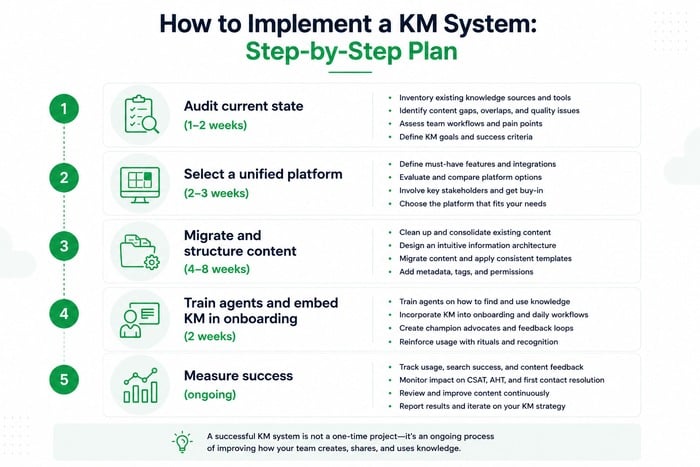
How to Implement a KM System: Step-by-Step Plan
Step 1 — Audit current state (1–2 weeks). Map where knowledge lives now: Slack channels, Confluence spaces, personal Notion files, email attachments, CRM notes. Identify gaps: which customer issues have no documentation? Which articles are outdated? Calculate the cost: how many hours per week do agents spend searching instead of resolving?
Step 2 — Select a unified platform (2–3 weeks). Choose one documentation platform as your single source of truth. For B2B teams that need collaborative authoring, AI tooling, and customer-facing self-service under one roof, evaluate platforms like ClickHelp that are built for technical documentation at scale.
Step 3 — Migrate and structure content (4–8 weeks). Prioritize highest-volume topics first. Create a tiered structure separating internal agent documentation from external customer documentation. Use consistent article templates. Assign owners to every section before migration, not after.
Step 4 — Train agents and embed KM in onboarding (2 weeks). Make KB contributions a team metric alongside ticket closes. Include KM training in new agent onboarding — not as an afterthought, but as a core skill alongside product knowledge and escalation procedures.
Step 5 — Measure success (ongoing). Track:
- Time-to-resolution — should decrease as agents find answers faster
- Self-service % — percentage of tickets deflected by the customer-facing knowledge base
- Onboarding speed — time for new agents to reach full productivity
- Search analytics — zero-result queries (new article opportunities) and high-bounce searches (content gaps)
- Article freshness — percentage of articles updated within the last quarter
Conclusion
Knowledge management in customer support is an ongoing process, not a one-time project. Companies that invest continuously in KM win on resolution speed, support quality, and customer retention — because enterprise clients notice when support teams have institutional memory and when they don’t.
For B2B teams facing complex products and high-stakes clients, strong knowledge management is the foundation of scalable, expert-level support. The investment pays off in measurable ways: faster resolutions, shorter agent onboarding, and fewer escalations driven by missing documentation.
Start with an honest audit of where your knowledge currently lives. That list will tell you everything you need to prioritize.
Good luck with your technical writing!
Author, host and deliver documentation across platforms and devices
FAQ
What is knowledge management in customer support?
Knowledge management in customer support is the practice of systematically capturing, organizing, maintaining, and delivering the information that agents need to resolve customer issues — and that customers need to help themselves. It includes internal documentation (troubleshooting guides, escalation procedures, account-specific notes) and external content (help centers, self-service portals, API documentation). The goal is to make the right information findable by the right person at the right moment, without requiring them to ask a colleague or search across multiple systems.
Why is KM harder in B2B support than in B2C?
In B2C, most support interactions are standardized: password resets, shipping questions, return policies. The same article covers hundreds of similar cases. In B2B, each customer often has a unique configuration, integration setup, or compliance requirement. A knowledge base article that works for one client may actively mislead another. This means B2B KM requires not just a library of articles, but a system for capturing and surfacing customer-specific context — which is a significantly harder problem to solve.
How do I know if our knowledge base is actually being used?
Search analytics are the most direct signal. Most knowledge base platforms show you which articles get views, which searches return zero results, and which articles have high bounce rates (users opened the article but left quickly). If your zero-result rate is high, your documentation has gaps. If bounce rates are high, your articles aren’t answering the questions they’re supposed to answer. A secondary signal: if agents are still asking colleagues in Slack for answers that should be documented, the knowledge base isn’t delivering on its promise.
How often should we update knowledge base articles?
The frequency depends on how fast your product and processes change. A practical baseline: update related articles with every product release, review your ten most-viewed articles monthly, and run a full archive audit quarterly. The most important discipline is assigning every article an explicit owner — without ownership, articles drift out of date because updating them is nobody’s specific job. Freshness metrics (percentage of articles updated in the last 90 days) are worth tracking as a team KPI.
What is the difference between an internal and external knowledge base?
An internal knowledge base is for your support team: escalation rules, account-specific notes, edge-case troubleshooting guides, internal tool documentation, and anything that should not be visible to customers. An external knowledge base (or self-service portal) is customer-facing: product guides, setup tutorials, common troubleshooting steps, and API documentation. In B2B, both layers are necessary, and they often reference the same underlying information — the difference is audience, depth, and access control, not separate content silos.
When does it make sense to add AI search to a knowledge base?
AI search earns its cost when two conditions are true: your knowledge base has grown large enough that keyword search regularly fails (typically 100+ articles across multiple products), and agents are spending meaningful time per ticket reformulating search queries trying to find the right article. AI and semantic search close the gap between how agents phrase questions informally and how documentation is formally written. Before investing in AI search tooling, it is worth fixing the underlying content quality first — AI search on a poorly maintained knowledge base surfaces irrelevant articles faster, not better ones.