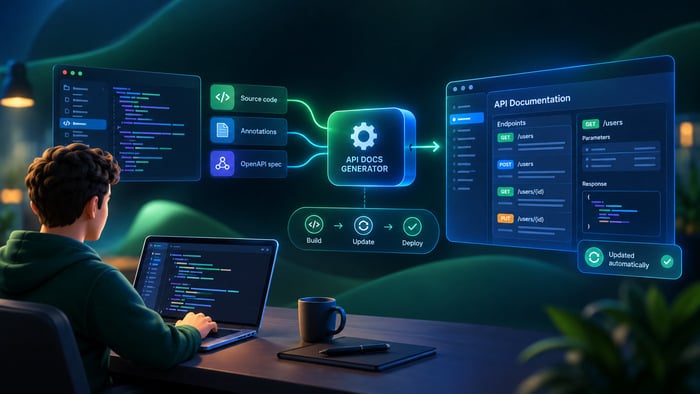
Keeping API documentation accurate is harder than writing it. Code evolves while documentation lags behind, resulting in outdated, inconsistent references. Developers end up reverse-engineering endpoints, implementing incorrect integrations, or abandoning APIs entirely because the docs don’t reflect reality.
API documentation generators solve this by auto-generating API docs directly from source code, annotations, or OpenAPI specifications. When a developer modifies an endpoint’s parameters or response structure, the documentation updates automatically during the build process. This is particularly valuable in agile environments where APIs change frequently across multiple release cycles — teams reduce documentation maintenance time, improve developer onboarding speed, and see fewer support tickets related to integration errors.
What Are API Documentation Generators?
API documentation generators are automated tools that create comprehensive API reference documentation by parsing source code annotations, OpenAPI specifications (formerly Swagger), or raw code structures. These tools transform structured metadata into human-readable formats: HTML, Markdown, PDF, and interactive web interfaces.
How they work — three primary approaches:
- Annotation Parsing. Tools scan source code for special comments or decorators (Javadoc, Python docstrings, Go doc comments) that describe endpoints, parameters, and responses. The generator extracts this metadata and formats it into documentation.
- OpenAPI Specification Processing. Developers write or auto-generate an OpenAPI YAML/JSON file describing the API’s structure. The generator renders this into interactive documentation with try-it-out functionality, schema visualizations, and code examples.
- Code Reflection. Some tools analyze compiled code or runtime behavior to infer API structures without explicit annotations — less common due to limited flexibility.
Brief history:
- Javadoc (1990s). The pioneer of automated documentation, built for Java. It parsed /** */ comments to generate HTML, establishing the annotation-based paradigm still in use today.
- Swagger (2010–2015). Introduced API-first design with a dedicated specification language. Swagger UI provided the first widely adopted interactive documentation interface, letting developers test APIs directly from the browser.
- OpenAPI Standardization (2016–present). The Linux Foundation adopted Swagger as the OpenAPI Specification (OAS) in 2016, creating a vendor-neutral standard. This enabled multiple tools to work with the same specification, growing the ecosystem significantly.
- Modern Solutions (2020–present). Tools like Redoc, Docusaurus, and Stoplight combine OpenAPI parsing with modern static site generators, enhanced UX, multi-language support, CI/CD integration, and AI-assisted content generation.
Overview of Popular Tools
1. Swagger / OpenAPI (Swagger UI)
Swagger UI is the industry-standard tool for rendering OpenAPI specifications into interactive HTML documentation. It works with any language that supports OpenAPI — Go, Python, Java, Node.js, C#, PHP, Ruby, and more — and is particularly common in backend REST API development.
Pros:
- Industry standard: nearly every API tool supports OpenAPI export
- Interactive sandbox: built-in “Try it out” functionality for testing APIs directly from documentation
- Language-agnostic: works with any stack
- Free and open-source: active community, no licensing costs
- Extensive ecosystem: integrates with Postman, Stoplight, Redocly, and hundreds of other tools
Cons:
- Limited customization: default styling is generic; heavy CSS work required for branding
- Complex setup for advanced features: custom plugins require JavaScript expertise
- Performance issues: large specifications (100+ endpoints) can render slowly
- No built-in versioning: requires external tooling for API version management
Output: Swagger UI generates a two-column interface — a left sidebar with endpoint categories and a main content area with endpoint details, parameters, and request/response schemas. The interface includes collapsible sections, syntax-highlighted code examples (curl, Python, JavaScript, Go), and an “Authorize” button for API key authentication.
Sample OpenAPI YAML:
openapi: 3.0.3
info:
  title: User API
  version: 1.0.0
paths:
  /users:
    get:
      summary: List all users
      responses:
        '200':
          description: Successful response
          content:
            application/json:
              schema:
                type: array
                items:
                  $ref: '#/components/schemas/User'
components:
  schemas:
    User:
      type: object
      properties:
        id:
          type: integer
        name:
          type: string
        email:
          type: string
This minimal OpenAPI 3.0.3 specification defines a single GET endpoint returning an array of user objects. The $ref syntax demonstrates how OpenAPI promotes modularity — schemas defined once and reused across multiple endpoints. In a production spec you’d add more endpoints (POST, PUT, DELETE), authentication schemes (API keys, OAuth2), error responses (400, 401, 404, 500), and field-level validations.
Note on code generation: If you need to auto-generate client libraries or server stubs from your OpenAPI spec (40+ languages), that’s the job of OpenAPI Generator — a separate tool in the ecosystem, not Swagger UI itself.
2. Redoc (Redocly)
Redoc is an open-source tool specialized in generating clean, three-column API documentation from OpenAPI specifications. Language-agnostic, it works best with React-based static site setups.
Pros:
- Superior readability: three-column layout (navigation / documentation / API reference) optimized for scanning
- Beautiful default styling: professional appearance without custom CSS
- Lightweight: fast rendering even with large specifications
- Free open-source tier: Redoc CE is completely free
- React-based: easy integration with modern frontend frameworks
- Schema visualizations: interactive tree views for complex data structures
Cons:
- No interactive sandbox: “Try it out” requires Redocly Enterprise
- Limited customization in free version: advanced theming needs an enterprise license
- JavaScript dependency: requires bundling with Webpack or Vite
- Smaller ecosystem: fewer integrations compared to Swagger
Output: A clean, minimalist interface with a sticky navigation sidebar on the left, descriptive documentation in the center, and API reference details (parameters, schemas, examples) on the right. Schema diagrams use collapsible tree structures with color-coded data types.
Minimal HTML setup:
<!DOCTYPE html>
<html>
  <head>
    <title>API Docs</title>
    <meta charset="utf-8"/>
    <meta name="viewport" content="width=device-width, initial-scale=1">
  </head>
  <body>
    <redoc spec-url='openapi.yaml'></redoc>
    <script src="https://cdn.redoc.ly/redoc/latest/bundles/redoc.standalone.js"></script>
  </body>
</html>
Point spec-url at your OpenAPI YAML or JSON file, open the HTML in a browser, and Redoc renders the full three-column documentation with no build step required. For production, swap the CDN script for a bundled version via npm (npm install redoc) to avoid the external dependency.
3. Docusaurus
Docusaurus is a static site generator maintained by Meta, optimized for documentation websites. With the @docusaurus/preset-classic and OpenAPI plugins (such as docusaurus-plugin-openapi-docs), it becomes a full API documentation platform supporting Markdown, MDX, and OpenAPI. Best for teams building comprehensive documentation sites — not just API references.
Pros:
- Full documentation platform: combines API docs with tutorials, guides, and blogs in one site
- Versioning support: built-in API versioning with multiple documentation versions
- i18n localization: multi-language support out of the box
- SEO-optimized: generates search-friendly static HTML with proper metadata
- Active maintenance: backed by Meta, regular updates
- Plugin ecosystem: 100+ plugins for search (Algolia), analytics, and more
Cons:
- Steep learning curve: React/Node.js knowledge needed for customization
- Overkill for API-only docs: better suited for comprehensive documentation sites
- Configuration complexity: OpenAPI plugin setup requires YAML/JSON expertise
Output: A modern documentation site with a collapsible sidebar, search bar, and responsive design. API endpoints appear as Markdown pages with embedded Swagger/Redoc components. Supports dark/light mode, version selectors, and breadcrumb navigation.
Integration setup (package.json):
{
  "dependencies": {
    "@docusaurus/core": "^3.1.0",
    "docusaurus-plugin-openapi-docs": "^3.0.0",
    "@docusaurus/preset-classic": "^3.1.0"
  }
}
Save this as package.json in your project root and run npm install. The core package provides the Docusaurus framework; preset-classic adds the default site template; and docusaurus-plugin-openapi-docs handles OpenAPI parsing and rendering. After installation, configure the plugin in docusaurus.config.js and point it at your OpenAPI YAML files.
4. Postman API Docs
Postman API Docs is a SaaS platform that auto-generates documentation from Postman collections. It supports REST, GraphQL, and gRPC APIs and operates at the collection level rather than the source code, so it works with any language. Best for teams already using Postman for API testing.
Pros:
- Zero-setup generation: documentation auto-syncs from Postman collections
- Interactive console: built-in sandbox with authentication support
- Collaboration features: real-time editing, comments, and team workspaces
- GraphQL support: native GraphQL schema visualization
- CI/CD integration: automated publishing via Postman CLI
Cons:
- SaaS pricing: free tier has user and feature limits (check current pricing at postman.com/pricing before committing)
- Vendor lock-in: tightly coupled to the Postman ecosystem; exporting to other tools is difficult
- Internet dependency: no self-hosting option
- Limited customization: branding options restricted on lower-tier plans
Output: A polished, single-page documentation site with a left sidebar for endpoint groups, an integrated request tester with authentication fields, and response examples showing JSON/XML schemas.
Minimal Postman Collection (v2.1):
{
  "info": {
    "name": "User API",
    "schema": "https://schema.getpostman.com/json/collection/v2.1.0/collection.json"
  },
  "item": [
    {
      "name": "List all users",
      "request": {
        "method": "GET",
        "header": [
          {
            "key": "Authorization",
            "value": "Bearer {{api_key}}"
          }
        ],
        "url": {
          "raw": "{{base_url}}/users",
          "host": ["{{base_url}}"],
          "path": ["users"]
        },
        "description": "Returns an array of all users in the system."
      }
    }
  ]
}
Save this as collection.json and import it into Postman. The {{base_url}} and {{api_key}} placeholders are environment variables — define them under Environments in the Postman UI. Once imported, enable View Documentation on the collection to auto-generate the public docs page. Any changes to the collection sync to the docs automatically.
5. Stoplight
Stoplight is an enterprise API design platform with a visual OpenAPI editor, documentation generator, and mocking tools. It supports OpenAPI 3.0/3.1 and targets teams that need API-first design workflows with governance and compliance features.
Pros:
- Visual editor: drag-and-drop OpenAPI designer, no-code interface
- Enterprise features: role-based access control, approval workflows, audit logs
- Mocking: auto-generates mock servers from OpenAPI specs
- Quality checks: linting rules enforce API design best practices
- Multi-format export: outputs to Swagger UI, Redoc, HTML, PDF
- Version control integration: native GitHub/GitLab/Bitbucket sync
Cons:
- Learning curve: full feature set requires onboarding time
- Over-engineered for small teams: complex setup for simple APIs
- Limited open-source: only basic CLI tools are free; verify current pricing at stoplight.io/pricing
Output: Enterprise-grade documentation with customizable branding, embedded mock server testers, and comprehensive schema visualization. Includes API governance dashboards, changelog automation, and multi-version side-by-side comparison.
Stoplight linting config (.stoplight.yml):
extends:
  - spectral:oas

rules:
  operation-summary:
    description: Every operation must have a summary.
    severity: error
    given: "$.paths[*][*]"
    then:
      field: summary
      function: truthy

  info-contact:
    description: API must include contact information.
    severity: warn
    given: "$.info"
    then:
      field: contact
      function: truthy

  no-http-verbs-in-path:
    description: Avoid HTTP verbs in path names (use /users, not /getUsers).
    severity: warn
    given: "$.paths[*]~"
    then:
      function: pattern
      functionOptions:
        notMatch: "/(get|post|put|delete|patch)/i"
Place this file in your project root. Stoplight picks it up automatically and runs these rules against your OpenAPI spec on every save. The extends: spectral:oas line inherits the full set of OpenAPI best-practice rules maintained by the Stoplight team — you only need to add custom rules on top.
6. Slate
Slate is a static documentation generator that creates three-column API docs from Markdown source files. It doesn’t parse OpenAPI — it uses its own Markdown format. Best for teams that prefer manual documentation control or are working with legacy APIs that don’t have OpenAPI specs. Ruby-based build system.
Pros:
- Elegant design: publication-quality three-column layout (navigation / docs / code examples)
- Pure Markdown: familiar syntax, no spec files to maintain
- Multi-language examples: automatically tabs curl, Python, JavaScript, Go side by side
- Static hosting: generates pure HTML/CSS/JS, deploys anywhere (GitHub Pages, S3)
- Free and open-source
- Mobile-responsive
Cons:
- No OpenAPI parsing: documentation must be written manually
- Ruby dependency: requires Ruby 3.x for building (can be tricky on Windows)
- No interactive testing: no “Try it out” sandbox
- Less active maintenance: update cadence slower than Swagger/Redoc
Output: A sleek documentation site with a fixed left navigation panel, central documentation column, and a right column with code examples in multiple languages. Resembles a well-typeset technical book, with smooth scrolling and anchor links.
Sample Slate Markdown:
# Authentication

> Include the API key in every request header:

```shell
curl -X GET https://api.example.com/users \
  -H "Authorization: Bearer YOUR_API_KEY"
```

```javascript
fetch('https://api.example.com/users', {
  headers: { 'Authorization': 'Bearer YOUR_API_KEY' }
});
```

Obtain your API key from the dashboard under **Settings → API Keys**.
Obtain your API key from the dashboard under **Settings → API Keys**.
Slate converts code blocks into language tabs automatically. Blockquotes (>) become styled notes. This manual approach gives full content control at the cost of the auto-sync you get with OpenAPI-based tools.
Comparison Table
This table summarizes the six major API documentation generators across six key decision criteria, helping you quickly identify which tool matches your project’s requirements.
| Tool | Input Format | Supported Languages | Hosting | Free/Paid | Best For |
| Swagger UI | OpenAPI YAML/JSON | All (language-agnostic) | Self-hosted | Free | Industry standard, interactive testing |
| Redoc | OpenAPI YAML/JSON | All | Self-hosted | Free CE (Free Community Edition) | Beautiful static docs, readability |
| Docusaurus | Markdown + OpenAPI | All | Self-hosted | Free | Full documentation sites, versioning |
| Postman | Postman Collections | All | SaaS only | Freemium | Teams using Postman, GraphQL |
| Stoplight | OpenAPI YAML/JSON | All | SaaS/Self-hosted | Paid ($29+/user) | Enterprise, API governance |
| Slate | Markdown | All | Self-hosted | Free | Manual docs, publication quality |
Five of six tools are free, so cost is rarely the deciding factor. The real differentiators are workflow fit, interactivity needs, and team size.
How to Choose for Your Project
Selecting the right API documentation generator requires evaluating these critical criteria against your project’s specific constraints:
Technology Stack Compatibility
If your team practices API-first development, Swagger UI, Redoc, or Stoplight are natural fits — they all parse OpenAPI specifications directly. For code-first teams (writing implementation before documentation), look at tools with annotation parsing: Swagger via Swashbuckle (.NET) or springdoc-openapi (Java), which auto-generate OpenAPI specs from your code.
Team size
- Small teams (1–5 developers): Open-source tools (Swagger UI, Redoc, Slate) minimize costs and complexity. Self-hosting on existing infrastructure avoids SaaS overhead.
- Medium teams (5–20 developers): Docusaurus handles versioning and i18n for growing documentation needs. Postman’s collaborative workspaces work well here too.
- Large teams (20+ developers): Stoplight’s enterprise features — RBAC, approval workflows, audit logs — become essential. SaaS hosting reduces DevOps burden.
Interactive sandbox requirements
If developers need to test APIs directly from the docs, prioritize tools with built-in sandboxes: Swagger UI (full “Try it out” with auth), Postman (most powerful console with environment variables), or Stoplight (includes mock server testing). Redoc, Slate, and basic Docusaurus lack this unless augmented with plugins.
Open-source vs. SaaS
Open-source (Swagger UI, Redoc, Slate, Docusaurus) gives you zero licensing costs, full customization, no vendor lock-in, and self-hosting for data sovereignty. SaaS (Postman, Stoplight) eliminates server management, provides built-in CDN and backups, and includes ready-to-use collaboration tooling. Choose open-source if you have DevOps capacity and need customization. Choose SaaS to get to market faster without infrastructure overhead.
A practical starting path
Begin with Swagger UI (free, industry standard, zero lock-in). If you need better aesthetics, layer in Redoc. If you need a full documentation site with versioning and guides, adopt Docusaurus. If enterprise governance becomes a requirement, evaluate Stoplight.
Conclusion
API documentation generators have evolved from basic annotation parsers to platforms that support full API-first development workflows. The core value remains the same: eliminate the gap between what the code does and what the docs say.
Swagger/OpenAPI is the de facto standard — backed by broad industry adoption, extensive tooling, and vendor-neutral governance under the OpenAPI Initiative. For most projects it’s the right place to start: free, interactive, language-agnostic, and integrates with everything else in this list. Whichever renderer you choose on top of it, maintaining the OpenAPI spec as your single source of truth makes switching tools straightforward as your needs change.
Good luck with your technical writing!
Author, host and deliver documentation across platforms and devices
FAQ
Do I need an OpenAPI spec to use these tools?
Not for all of them. Swagger UI, Redoc, Docusaurus, and Stoplight require OpenAPI YAML/JSON as input. Postman works from its own collection format. Slate works from plain Markdown — no spec at all. If you don’t have an OpenAPI spec yet, you can generate one from code using Swashbuckle (.NET), springdoc-openapi (Java), or drf-spectacular (Django).
What’s the difference between Swagger and OpenAPI?
Swagger was the original name of both the specification and the toolset. In 2016, the specification was donated to the Linux Foundation and renamed OpenAPI Specification (OAS). The tools kept the Swagger name — so Swagger UI, Swagger Editor, and Swagger Codegen are still called Swagger, but the spec they work with is now called OpenAPI.
Can I use Redoc and Swagger UI together?
Yes, and it’s a common pattern. You maintain one OpenAPI spec and render it with both tools: Swagger UI for internal developers who need the “Try it out” sandbox, Redoc for the public-facing documentation where readability matters more.
Is Slate still worth using in 2024–2026?
For most new projects, no — the lack of OpenAPI parsing means you’re maintaining docs by hand, which is exactly the problem generators exist to solve. Slate still makes sense for legacy APIs without a spec, or for teams that need full editorial control over every sentence in the documentation.
What happens to my docs when the API changes?
With OpenAPI-based tools (Swagger UI, Redoc, Stoplight, Docusaurus), the docs regenerate from the spec on every build — so if your CI/CD pipeline runs the generator on each merge, the docs stay in sync automatically. With Postman, docs update when the collection updates. With Slate, nothing updates automatically — you edit Markdown by hand.
Can these tools handle authentication in the sandbox?
Swagger UI and Postman both support API key, Bearer token, OAuth2, and Basic Auth directly in the interface. Stoplight supports the same via its mock server. Redoc’s sandbox is enterprise-only. Slate and basic Docusaurus have no sandbox at all.