
With AI, creating a new documentation page is often faster than finding and updating an existing one. That convenience is exactly how AI-generated documentation starts to sprawl: duplicate topics, near-identical pages for different audiences, outdated facts copied into new articles, and content nobody owns. Each of these pages looks harmless on the day it is created, and each one adds to the maintenance load from then on. This article provides practical criteria for deciding when to generate content, when to reuse it, and when not to create it at all.
- AI makes documentation pages cheap to create but not cheap to maintain: every generated page still needs fact-checking, updates after product changes, and eventual retirement.
- AI saves time when it shapes facts that are already verified, such as drafting release notes from tickets or API text from a specification, and creates risk when it has to supply facts nobody has validated.
- If a fact already exists in the documentation, reuse it through a snippet, variable, conditional content, or a link instead of generating a new copy.
- Before generating a page, answer five questions: does it already exist, is there a single source of truth, who will own it, how stable are the facts, and is verification cheaper than writing.
- Searching before generating, assigning an owner and review date, recording the source of facts, and running periodic cleanup keep AI from adding to content debt.
Cheap to Create, Expensive to Maintain
Content debt is the accumulated cost of documentation that is duplicated, outdated, inconsistent, or no longer needed.
AI has changed the economics of content creation. Before AI-assisted authoring, writing a page took time and effort, and that acted as a filter. Now a first draft can be produced in seconds, so the filter is gone.
Today, the real cost of a documentation page is not just its creation. It is the sum of drafting, fact-checking, editing, updating after every product change, translating or localizing where applicable, and eventually retiring the page. AI reduces only the first part – the cost of content creation. It does not remove the need for someone to verify claims, maintain accuracy across releases, or decide when content should be deleted.
This is why AI-assisted authoring can accelerate content debt rather than reduce it. If every question produces a new page, every product change requires updates in more places, and every outdated statement becomes the source for another generated article. The answer is to keep using AI and decide deliberately what deserves to exist.
Where Generation Genuinely Saves Time
AI is most useful when it shapes content whose facts are already verified. It can structure, rephrase, summarize, translate, or format material that already has an authoritative source. These use cases deliver real value:
| Task | Why AI helps | Condition |
| Draft from a structured source (release notes from tickets, API descriptions from a specification, troubleshooting steps from a known-issue record) | The source already contains the facts; AI only shapes them | The source is current, and the content owner verifies the result |
| Rewrite, simplify, or change tone | The task is about wording and structure, not facts | A reviewer confirms that meaning, scope, and technical accuracy have not changed |
| Short summaries and introductions | AI can condense an existing page into an overview or lead paragraph | The summary supplements the original page, not replaces it |
| Metadata, descriptions, and alternative text | These are repetitive tasks based on completed content | A human editor spot-checks terminology, accuracy, and accessibility |
| First-pass translation | AI accelerates the initial conversion of text between languages | Terminology is controlled, and a qualified translator or reviewer checks the result |
| Initial outline for a new topic | AI helps overcome the blank-page problem | An expert supplies and verifies the facts before publication |
The common principle is simple: AI saves time when it transforms verified facts into a useful form. It creates risk when it is asked to supply facts that no one has validated.
For example, generating API reference text from an OpenAPI specification can be efficient because the specification is the source of truth. Generating an architecture guide from a vague prompt is different: the model may produce a coherent-looking explanation that does not match the actual system. In the first case, AI is formatting known information. In the second, it is guessing.
Teams should also distinguish between a draft and a final decision. AI can propose a structure, but it cannot decide whether the topic is needed, who the reader is, which product version applies, or whether an existing page should be updated instead.
Most documentation teams recognize at least one of these patterns. Which ones show up in yours?
Which of these patterns do you run into most often in your documentation?
Does your team search existing documentation before creating a new page?
Thank you for your feedback!
One fragment stored once and reused everywhere means one place to update. Read how to set this up: Snippet Management in Technical Documentation: Stop Copy-Pasting, Start Reusing
One page with conditional content can replace several almost identical ones. See how it works in practice: ClickHelp Single-Sourcing Techniques
AI repeats whatever your sources say, so clean the sources first. Here is where to start: Paying Off Content Debt Before AI
Ownership is the first thing to fix when AI writes part of your docs. Learn how to assign it: Who Is Responsible When AI Gets Documentation Wrong? A Governance Model for AI-Assisted Docs
Snippets and links keep one explanation instead of many slightly different ones. Read more about reusing content: Snippet Management in Technical Documentation
Good. The next step is making sure every new page also gets an owner and a review date (see the guardrails below).
A search that depends on memory gets skipped under deadline pressure. The decision framework below turns it into a routine step.
That speed is borrowed from future maintenance. Watch the webinar recording to see how teams replace repeated text with reusable snippets: Single-Sourcing with AI: From Repeated Text to Reusable Snippets
Where Generation Creates Debt
AI-generated content becomes debt when it adds another piece of content that someone must later verify, edit, or retire. Several patterns appear repeatedly.
- Duplicates. Teams often generate a new page because it is faster than searching for the existing one. Later, the team finds two pages that explain the same feature with different terminology, examples, and screenshots, sometimes for different product versions. This is how duplicate content in documentation usually appears: users do not know which page to trust, and maintainers must update both.
- Near-duplicates for different audiences. Instead of one instruction with conditional content, teams generate separate versions of the same text for administrators, end users, and developers. The pages look different, but most of their steps are identical. When the procedure changes, one version gets updated and the others quietly diverge, because whoever updates the procedure doesn’t know the other versions exist.
- Multiplication of outdated facts. AI may retrieve an old page and use it as the basis for a new article. The original error is reproduced in new wording and in one or more new places. This makes the error harder to detect and more expensive to correct.
- Pages without owners. Content created “just in case” often has no clear owner, no review date, and no connection to a product area. Nobody notices when it becomes obsolete because nobody was responsible for it.
- Generation instead of linking. A definition, prerequisite, or installation step is rewritten in every new article rather than linked to a source page. Each copy becomes a separate maintenance object, even if the wording differs slightly.
In each case, the organization treated generation as a substitute for search, reuse, ownership, and editing.
Reuse vs. Generation: Choosing the Right Tool
Reuse prevents the same information from being maintained in multiple places. Before generating new text, whoever is responsible for new content – technical communicators, developers, or managers – should ask whether a single-source mechanism can do the job better.
| Situation | Right tool | Why not generation |
| The same warning, step, or requirement appears in several topics | Snippet | One edit updates every place where the snippet is used |
| A value changes frequently, such as a product name, version, limit, or URL | Variable | There is no risk that an old value remains in one location |
| One procedure serves different audiences or product editions | Conditional content | One page can show only the relevant variant instead of maintaining several nearly identical pages |
| A concept is already explained elsewhere | Link | The reader gets one original explanation instead of a second, potentially divergent version |
| The information is genuinely new | AI-generated draft plus review | — |
The governing rule is: if a fact already exists in documentation, reuse it. Do not generate a new copy of it.
Generation remains appropriate when there is a reliable source of information and a person is accountable for reviewing and maintaining the result.
Should This Be Generated? A Decision Framework
Before asking AI to create a page, teams should answer five questions. The answers determine whether the right action is to reuse, update, generate, write manually, or skip the task altogether.
1. Does this content already exist?
Search the documentation project first, including drafts and unpublished material. If a page already covers the topic, the likely action is to update it, improve its structure, or link to it. Do not create a competing version.
This question protects against the most common form of AI-driven debt: the duplicate page. A search before generation should be as routine as a spell check before publishing.
2. Is there a single source of truth elsewhere?
Some facts should not be written manually at all. API details may come from an OpenAPI specification, release information from a ticketing system, configuration values from product settings, or legal terms from an approved source. If such a source exists, the documentation should derive new content from it or link to it.
3. Who will own and maintain it?
Every page needs an owner: a person accountable for its accuracy, scope, and retirement. The owner does not have to write every update, but they must know when the page needs review. Without an owner, documentation maintenance turns into guesswork.
4. How stable are the facts?
Facts that change often (product names, version numbers, limits, URLs, pricing plan names, or repeated warnings) should be managed through variables and snippets. This makes updates predictable and reduces the chance that one page quotes an obsolete value.
5. Is verification cheaper than writing?
AI drafting is only efficient if reviewing the output is faster than writing the content from scratch. If the draft contains technical claims that require research, interviews, testing, or expert interpretation, generation may not save time.
For complex conceptual, architectural, security, or legal content, manual writing with expert input is often the better path.
Five outcomes
| Outcome | When to choose it |
| Reuse | The fact already exists. Connect it through a snippet, variable, or link |
| Update existing content | A page exists but is incomplete, outdated, or poorly structured |
| Generate draft | The information is new, a reliable source exists, and an owner will review it |
| Write manually | The content requires expertise and has no structured source, especially for architecture, security, legal, or conceptual topics |
| Don’t create | There is no clear reader need, no owner, and no maintenance plan |
The decision tree below turns the five questions into a sequence: run them top to bottom and stop at the first outcome that fits.
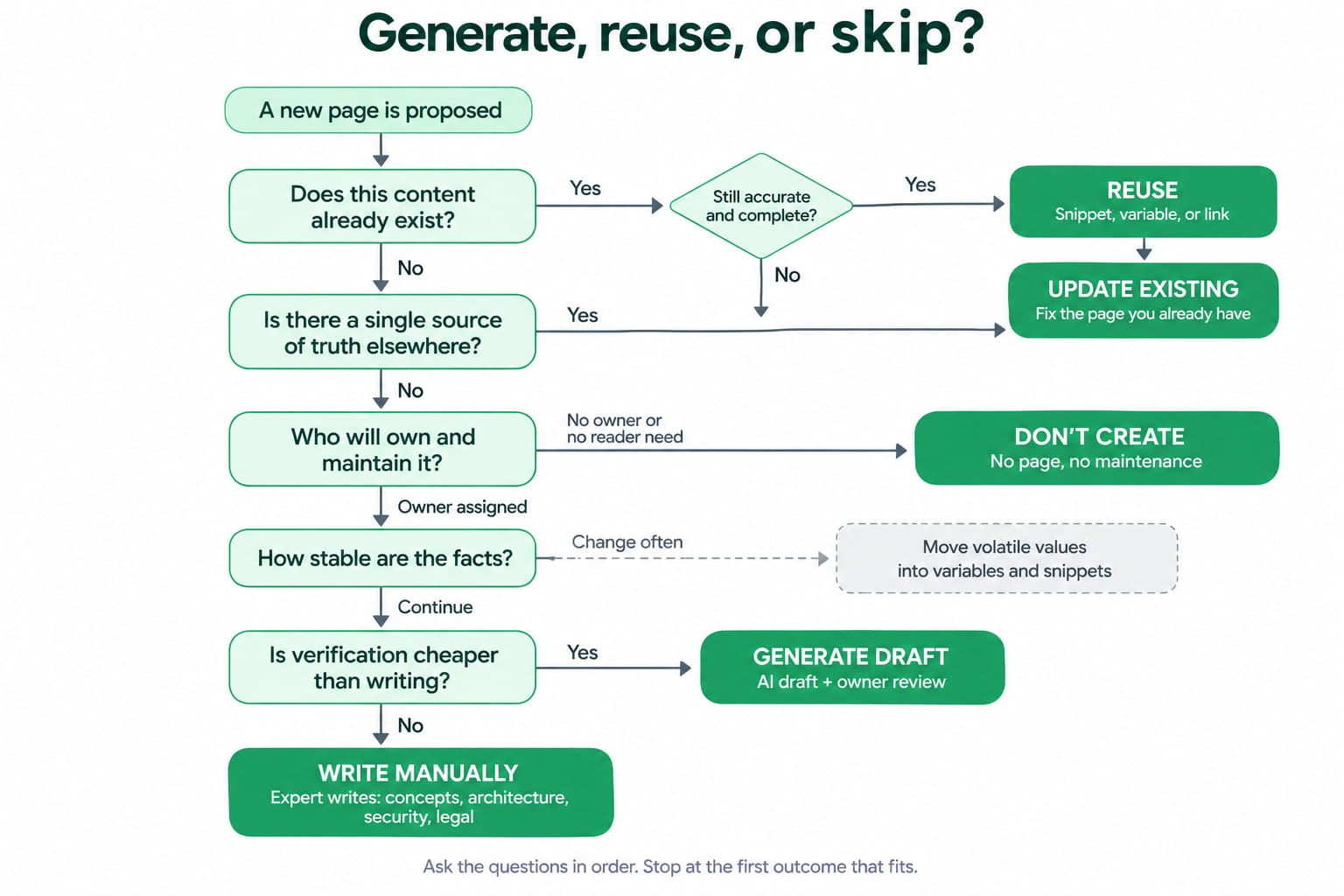
The framework is for anyone who decides whether a new documentation page should exist: technical communicators deciding whether to draft by hand or with AI, product and engineering teams requesting new pages, and documentation leads reviewing what enters the knowledge base. Use it at the moment a page is proposed: when a ticket asks for new content, when a product change makes an existing page incomplete, or when someone reaches for AI to “just write it.” The framework keeps duplicates out of the documentation, routes facts to their real source, and ensures every new page has an owner and a maintenance plan.
Guardrails: Building the Decision into the Workflow
The criteria only work if they are built into the authoring workflow. Otherwise, “search first” and “assign an owner” remain good intentions.
- Search before generating. Require a project-wide search before creating a new topic, including unpublished drafts and archived material.
- Assign an owner and review date. Every new page should have a named owner and a scheduled review point tied to the product area or release cycle.
- Record the source reference. For an AI-generated draft, document the source of the facts: specification, ticket, product page, interview, or approved internal document.
- Run periodic cleanup. Review pages with no recent views, no owner, no review date, or overlapping coverage. Retire, merge, or consolidate them deliberately.
These guardrails do not slow down good documentation. They prevent teams from paying later for the speed they gained today.
How ClickHelp Helps You Generate Less and Reuse More
A documentation tool can make reuse the default path. ClickHelp supports snippets, variables, conditional content, and single-sourcing, so teams can maintain one authoritative fragment or value and apply it across topics. This directly reduces the duplicate-page problem that AI can amplify.
WriteAssist, the AI writing assistant built into the ClickHelp topic editor, fits the safe side of this framework. Select a passage and ask it to improve the writing, simplify it, make it shorter or longer, adjust the tone, or fix spelling and grammar. In each case, AI works with the form of text whose facts are already verified, which is exactly where generation saves time. WriteAssist can also draft a new topic from scratch, and that is the moment to run the five questions first. To check whether a topic already exists, contributors can also ask Ask Your Docs (beta), which answers questions from your projects, including drafts and unpublished topics.
Topic statuses, assignees, Custom Workflow, and version history give each page an identifiable owner and review path. The principle is simple: generate a draft only when reuse is not possible, and keep humans accountable for facts, publication, and maintenance.
Conclusion
The best way to use AI in documentation is to generate less, but more precisely. A page that is never created does not need to be reviewed, updated, translated, or retired. AI is a strong drafting tool, but snippets, variables, links, and conditional content are often the better documentation tools.
FAQ
Does AI-generated content always create content debt?
No. AI-generated content creates debt when it is produced without checking the existing documentation, without a verified source of facts, or without an owner responsible for its future maintenance.
What should never be fully generated by AI?
Content containing facts without a verified source should never be fully generated by AI. The same applies to safety or legal guidance and to architectural or conceptual explanations that require expert validation.
What is the difference between content reuse and AI generation?
Reuse takes one existing source and shows it in several places through snippets, variables, links, or conditional content. Generation creates a new text that must be reviewed and maintained separately.
How do you find duplicates before generating new content?
Search the documentation project before drafting, include unpublished material, and perform periodic content audits to identify overlapping, unused, or outdated pages.
Should AI-generated pages be labeled internally?
Yes. At minimum, record the source of the facts and the content owner so reviewers can understand where the material came from and who is accountable for keeping it accurate.