In large organizations, documentation tends to grow faster than anyone plans for. Content gets copied between products, teams maintain their own versions of the same feature description, and no one is entirely sure which page is “the source of truth.” This duplication makes updates slow and risky, especially when you support multiple product lines and dozens of markets.
Structured authoring offers a way out. Instead of formatting text directly in tools like Word or Google Docs, writers create small, self-contained topics with clear semantics, then assemble and publish them in different formats. This approach allows teams to manage documentation as content components rather than monolithic documents — improving consistency, reuse, and translation quality.
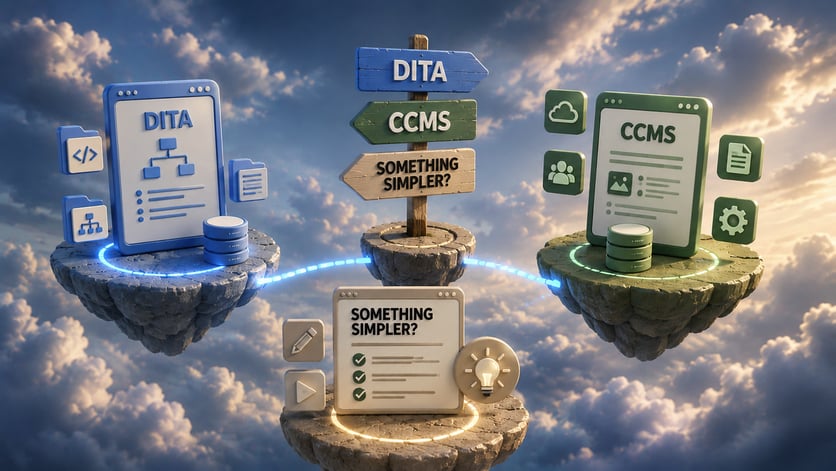
For tech writers, the key question is not “DITA or not DITA?” but rather: what level of structure and what class of tools (editor, CCMS, or publishing engine) matches the actual scale and constraints of your project?
What Is Structured Authoring?
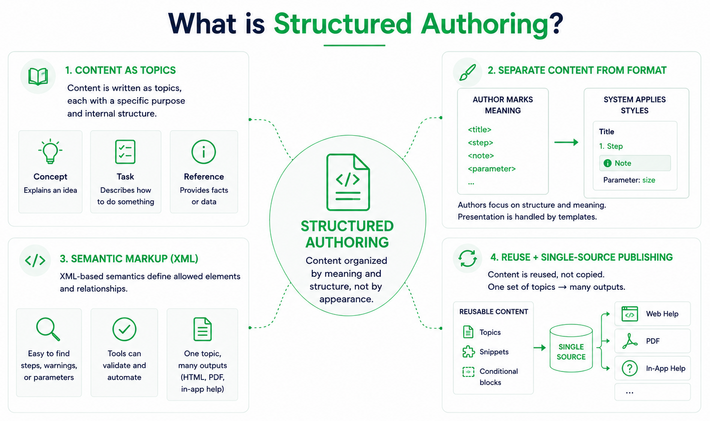
Structured authoring is a way of writing where content is organized into predictable, well-defined units instead of free-form pages. Writers work with topics (concepts, tasks, and references) each with a specific purpose and internal structure. This consistency makes content easier to manage, review, and reuse across outputs.
The core principle is separating content from formatting. Instead of manually styling headings, lists, and warnings, authors mark up structure and meaning (title, step, note, parameter) using a schema, and the system applies visual styles during publishing. This keeps presentation rules centralized in templates or stylesheets and prevents writers from “designing in the editor.”
Most structured authoring in technical documentation uses XML-based semantics. DITA and similar models define allowed elements and relationships so that tools can validate content and automate processing. With semantic markup, it becomes straightforward to search for all “steps,” all “warnings,” or all mentions of a specific parameter, and to transform the same topic into HTML, PDF, or in-app help.
Another cornerstone is reuse. Instead of copying text, writers reference components: snippets, topics, or conditional blocks. Combined with single-source publishing, this lets teams maintain one set of source topics that can be filtered and assembled into multiple outputs for different products, versions, or customer segments.
DITA in a Nutshell
DITA (Darwin Information Typing Architecture) is an XML standard built around modular topics and maps. It defines topic types (concept, task, and reference) along with a specialization mechanism that lets organizations extend the model for their own needs. Writers create small, stand-alone topics, then use maps to assemble them into deliverables like guides or knowledge bases.
DITA is designed for high levels of reuse, conditional content, and sophisticated publishing pipelines, which is why it is common in large, regulated, or heavily localized environments.
A Minimal DITA Example
To make the structure concrete, here is a short DITA task topic. Even this minimal example shows the key principles: semantic element names, a strict content model, and no inline formatting.
<?xml version="1.0" encoding="UTF-8"?>

<!DOCTYPE task PUBLIC "-//OASIS//DTD DITA Task//EN" "task.dtd">

<task id="install_plugin">

  <title>Install the Plugin</title>

  <shortdesc>

    Install the analytics plugin to enable usage tracking in your project.

  </shortdesc>

  <taskbody>

    <prereq>

      <p>You must have administrator rights and an active internet connection.</p>

    </prereq>

    <steps>

      <step>

        <cmd>Open the plugin manager from the <uicontrol>Tools</uicontrol> menu.</cmd>

      </step>

      <step>

        <cmd>Search for <userinput>analytics-plugin</userinput> and select the result.</cmd>

      </step>

      <step>

        <cmd>Click <uicontrol>Install</uicontrol> and wait for the process to complete.</cmd>

        <stepresult>A confirmation message appears when installation is successful.</stepresult>

      </step>

    </steps>

    <result>

      <p>The plugin is now active and will begin collecting data on the next project build.</p>

    </result>

  </taskbody>

</task>
The <cmd> element marks the action the user must take; <stepresult> describes what happens next. A publishing engine like DITA-OT can transform this single source into a numbered HTML procedure, a PDF step list, or a tooltip — without touching the XML itself.
What Is a CCMS and Why Use One?
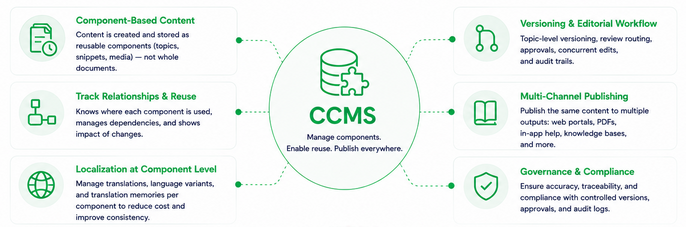
A component content management system (CCMS) is built to manage content as discrete components (topics, snippets, media) instead of whole documents. Unlike a generic CMS that focuses on web pages or blog posts, CCMS software tracks relationships and reuse at the topic or element level, which is essential for serious structured authoring at scale.
Key functions typically include topic-level versioning, editorial workflow, and localization support. Writers can route individual topics for review, manage concurrent edits, and see where each component is reused. Localization workflows often integrate translation memories and track language variants at the component level, minimizing redundant translation costs. Publishing modules distribute content across multiple channels (web portals, PDFs, in-app help, or knowledge bases) all from the same repository.
A CCMS becomes hard to avoid when documentation volume is large, teams are distributed, and compliance matters. Industries such as medical devices, aviation, heavy industrial equipment, and telecom often require precise control over versions, translations, and approval chains. In these contexts, managing DITA documentation in simple file-based repositories quickly becomes error-prone and difficult to audit.
Understanding where structured authoring, DITA, and CCMS fit conceptually is one thing — finding the right tool is another. The market offers everything from open-source publishing engines to enterprise platforms with significant implementation costs, and vendor naming conventions are inconsistent enough that the lines between categories often blur. The next section maps out the main options and what each one actually does.
Tools Overview
The tools available for structured authoring fall into three distinct categories, and it is worth being clear about them before comparing products:
- Editor — the authoring environment where writers create and edit XML content
- CCMS — the repository and workflow layer that manages components at scale
- Publishing engine — the transformation layer that converts structured source into output formats
These categories are not interchangeable, and many teams need more than one. An editor without a CCMS works fine for a small team managing files in Git; a CCMS without a good editor is painful to use daily; a publishing engine alone produces nothing without content upstream of it. Some products bundle two of these layers together, which is worth checking before you evaluate pricing.
Oxygen XML Editor
Oxygen XML Editor is a desktop and web-based XML editor that supports DITA, DocBook, and other structured authoring frameworks. It provides visual authoring views, map editors, validation, and integrated publishing scenarios.
Key features:
- schema-aware editing,
- topic and map management,
- DITA-specific authoring helpers (keys, conrefs),
- collaboration options via Oxygen Content Fusion or the web authoring interface.
Built-in transformation scenarios let teams generate HTML, PDF, and other outputs without scripting everything from scratch.
Pros:
- powerful DITA support,
- strong validation,
- flexibility for custom publishing pipelines.
Teams that want to own their content architecture often pair Oxygen with Git rather than committing to a full CCMS.
Cons: can feel heavy for beginners, and you still need to design repository structures and workflows yourself.
Best for: small to medium teams comfortable with XML who want professional structured authoring without immediately investing in enterprise CCMS software.
Adobe Experience Manager Guides
Adobe Experience Manager (AEM) Guides is a cloud-native CCMS module within the AEM ecosystem focused on managing structured content such as DITA documentation at scale. It provides a central repository for topics and maps, combined with authoring, review, translation, and omni-channel publishing.
Key features:
- topic-level version control,
- role-based editorial workflows,
- integrated translation management.
Pros:
- tight integration with the wider Adobe stack,
- strong enterprise governance,
- robust localization support.
Cons: licensing and implementation costs are substantial. Organizations without existing AEM infrastructure may find the overhead difficult to justify.
Best for: large enterprises with multi-channel delivery needs and regulatory or branding constraints, particularly those already using AEM.
Paligo
Paligo is a cloud-based CCMS designed specifically for structured authoring and multi-channel publishing. It offers a browser-based editor with topic-based content management, reuse, and built-in workflows.
Key features:
- variant and conditional content,
- translation workflows,
- publishing to HTML5 help, PDF, and various third-party platforms including Zendesk and Salesforce Knowledge.
Pros:
- relatively quick to adopt compared with on-premise CCMS solutions,
- an accessible UI,
- strong focus on technical documentation scenarios.
Cons: less suited to highly customized XML architectures, and teams may run into constraints with the platform’s built-in content models and publishing options.
Best for: small to mid-sized enterprises that want an all-in-one cloud CCMS without building their own infrastructure.
Heretto
Heretto is a cloud-native, DITA-first CCMS that combines a structured authoring environment with a central repository and cloud-based publishing via DITA-OT.
Key features:
- DITA topic and map management,
- reuse and variant handling,
- review workflows,
- a publishing service that offloads transformation jobs to the cloud, enabling parallel output generation.
Pros:
- strong alignment with DITA standards,
- scalable publishing,
- tooling built specifically for component-level content management.
Cons: the DITA-only focus can be a barrier if your team prefers a lighter-weight model. Subscription and onboarding costs are comparable to other enterprise CCMS platforms.
Best for: organizations committed to DITA that need a scalable cloud CCMS without managing publishing infrastructure themselves.
Ixiasoft DITA CMS
Ixiasoft DITA CMS is an enterprise CCMS specialized in managing DITA-based documentation for complex, regulated environments.
Key features:
- versioning and branching at the topic and map level,
- workflow management,
- detailed reuse tracking so teams can see every location where a component is used.
The system is built to support large localization programs and compliance requirements.
Pros:
- mature DITA support
- enterprise-grade content governance.
- Organizations can fully exploit DITA’s reuse and specialization capabilities.
Cons: significant implementation effort is required. The investment is typically justified only when documentation is business-critical and tightly regulated.
Best for: large enterprises in aerospace, telecom, and heavy manufacturing where DITA reuse and strict version control are non-negotiable.
DITA Open Toolkit
DITA Open Toolkit (DITA-OT) is an open-source publishing engine for transforming DITA content into output formats such as HTML5, PDF, and others. It operates as a processing layer: given valid DITA topics and maps, it generates deliverables based on configurable transformation types.
Key features:
- support for standard DITA output formats
- extensibility via plug-ins, allowing teams to customize templates and add new formats.
Many CCMS solutions, including Heretto, run DITA-OT under the hood.
Pros:
- free,
- widely adopted,
- flexible — a standard publishing engine across the DITA ecosystem.
Cons: DITA-OT is not an editor or CCMS. Teams must handle authoring tools, repository structure, and build automation separately.
Best for: organizations that want control over their DITA publishing stack, whether used directly with editors like Oxygen or embedded in a CCMS.
Tool Categories at a Glance
| Tool | DITA support | Type (editor / CCMS / engine) | Hosting | Price (high level) | Best suited for |
| Oxygen XML Editor | Full DITA authoring and maps | Editor | Desktop + web | Per-license / per-user commercial | Small–mid teams wanting powerful XML/DITA editing |
| Adobe AEM Guides | DITA and structured content | CCMS (enterprise) | Cloud / AEM-based | Enterprise licensing | Large enterprises on AEM needing governed CCMS |
| Paligo | Topic-based structured authoring, with reuse | CCMS (cloud) | SaaS cloud | Subscription per user | Small or mid enterprises who want turnkey cloud CCMS |
| Heretto | DITA-native management and publishing | CCMS (cloud, DITA-native) | SaaS cloud | Enterprise/SaaS licensing | Organizations committed to DITA needing scalable cloud CCMS |
| Ixiasoft DITA CMS | Deep DITA standard support | CCMS (enterprise) | Typically on-prem / managed | Enterprise licensing | Large regulated enterprises with heavy DITA reuse |
| DITA Open Toolkit (DITA-OT) | Processes DITA content into outputs | Publishing engine | On-prem / integrated / cloud | Open source (free), services extra | Teams who need a DITA publishing engine, often via other tool |
How to Choose for Your Project
Small team, no strict structure requirements.
A combination of Oxygen XML Editor and DITA Open Toolkit lets you practice structured authoring without committing to CCMS software. This path gives you full control over your content architecture and publishing pipeline at relatively low cost. If DITA feels like too large a step, tools like ClickHelp offer topic-based writing and single-source publishing with a gentler learning curve and less XML overhead.
Mid-sized enterprise, cloud-first, fast time to value. Paligo or Heretto are strong candidates here. Paligo suits teams that want an all-in-one SaaS CCMS with minimal infrastructure work; Heretto is the better fit if you plan to standardize on DITA throughout the organization.
Large enterprise with complex localization, regulatory pressure, and cross-channel delivery. Adobe AEM Guides or Ixiasoft DITA CMS are more appropriate at this scale. AEM Guides fits organizations already using the Adobe ecosystem; Ixiasoft targets environments where DITA reuse and strict governance are central to operations. In these scenarios, the investment in a full CCMS pays off through reduced risk, better traceability, and more efficient global publishing workflows.
Conclusion: When CCMS and DITA Pay Off
Structured authoring (whether DITA-based or not) gives documentation teams real management capabilities: content reuse, consistent semantics, and single-source publishing. But not every team needs a full CCMS or a complete DITA stack. For small teams, heavy investment in DITA tooling may not deliver enough return to justify the ramp-up. A solid editor paired with DITA-OT, or a simpler structured authoring tool, is often a more pragmatic first step.
As documentation volume, localization complexity, and compliance requirements grow, CCMS software becomes progressively easier to justify. Enterprise platforms like AEM Guides, Ixiasoft, Paligo, and Heretto show their value when you manage thousands of topics across multiple languages and strict review workflows. The key is matching your choice of editor, CCMS, and publishing engine to the real constraints of your project — not the most impressive feature list.
Good luck with your technical writing!
Author, host and deliver documentation across platforms and devices
FAQ
What is the difference between DITA and a CCMS?
DITA is a content standard — it defines how topics are structured and how they relate to each other. A CCMS is a software platform that manages content built to that standard (or others). You can write DITA in a text editor and publish it with DITA-OT without ever using a CCMS; conversely, some CCMS platforms support non-DITA structured authoring models. The two concepts are related but independent.
Do I need DITA to use a CCMS?
No. Paligo, for example, uses its own XML-based model rather than strict DITA. What CCMS platforms share is component-level management — versioning, reuse tracking, and workflow at the topic or snippet level — regardless of the underlying standard. That said, DITA is the most common structured authoring format in enterprise CCMS deployments.
When is structured authoring not worth the investment?
When your documentation is small in volume, rarely reused across products, and published in a single format. In those cases, the overhead of XML tooling, schema validation, and publishing pipelines outweighs the benefits. A well-organized wiki or a single-source help authoring tool is often a more practical choice until content scale justifies the switch.
Can I migrate from a simpler tool to DITA later?
Yes, but it takes effort. Tools with proprietary content models require manual restructuring or scripted conversion. The cleaner and more consistent your source content, the easier the migration. If you anticipate moving to DITA eventually, it is worth adopting topic-based writing habits early — even in a simpler tool — to reduce the conversion work later.
What is DITA-OT and do I need it separately?
DITA Open Toolkit is the open-source engine that transforms DITA source files into output formats like HTML5 and PDF. Many CCMS platforms and editors bundle it internally, so you may never interact with it directly. If you are building a custom publishing pipeline or need fine-grained control over output templates, running DITA-OT separately gives you more flexibility.