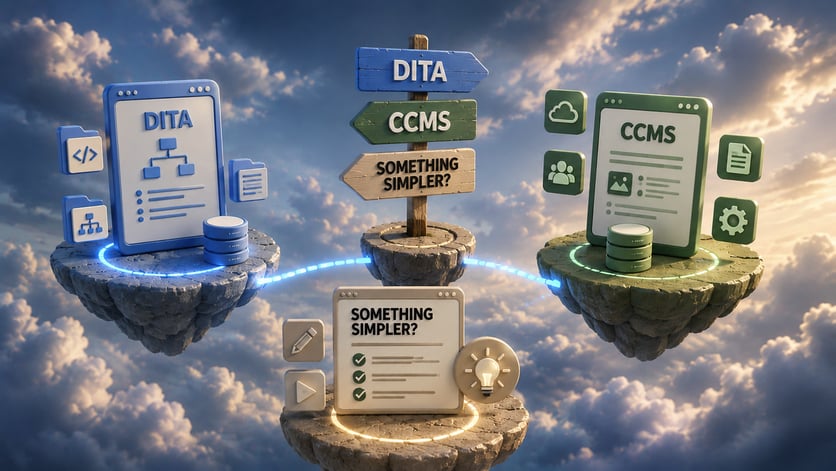
Imagine you have a large user guide for a game or an application. You can create it the old-fashioned way — in Word, emailing files back and forth, arguing about which version is the latest, and manually merging changes.
Or you can manage documentation the same way developers manage source code.
This idea is exactly what led to the Documentation as Code (Docs as Code) approach.
What Is Documentation as Code?
Documentation as Code is an approach where documentation is created, stored, reviewed, and published using the same workflows and principles as software development.
Instead of treating documentation as a separate artifact, teams manage it alongside source code.
In practice, this means:
- documentation is written in plain text formats such as Markdown or AsciiDoc;
- files are stored in version-controlled repositories (most commonly Git);
- changes are made through branches and pull requests;
- documentation updates go through peer review before publication;
- publishing is automated, often via CI/CD pipelines.
As a result, documentation becomes an integrated part of the product lifecycle rather than a set of disconnected files.
Why Documentation as Code Matters
As software projects grow, documentation often struggles to keep up. It is updated late, stored in different places, or maintained by people who are not closely involved in development.
Documentation as Code addresses this problem by embedding documentation directly into the development workflow.
In large engineering-driven organizations such as Microsoft and Google, documentation-as-code practices are widely adopted across many teams, especially where documentation must evolve rapidly alongside the product.
How Documentation as Code Works
At a high level, Documentation as Code follows the same lifecycle as software development.
An author creates or updates documentation in a plain text format such as Markdown. Instead of sending files by email or storing them locally, the content lives in a shared repository alongside the source code.
When changes are needed, the author creates a branch, proposes updates, and submits them for review. Reviewers — developers or technical writers — examine the changes just as they would review code. After approval, the updates are merged into the main branch.
From there, automation takes over. A CI/CD pipeline builds the documentation site, runs validation checks (such as link or style validation), and deploys the updated version. Within minutes, users can access the latest content.
Instead of existing as static files, documentation becomes part of a continuous, controlled workflow. Changes are automatically published once approved, ensuring users always see the latest version.
Advantages of Using Documentation as Code
Documentation as Code offers several important benefits for engineering-driven teams. Below is a concise overview of the main advantages, what they provide, and practical examples of how they apply in real workflows:
| Docs as Code Advantage | Benefit for Teams | Example in Practice |
| Seamless collaboration | Teams work together in a shared Git environment using pull requests and issue trackers | Developers, technical writers, and product owners collaborate without endless email threads |
| Strong version control | Every change is tracked, reversible, and linked to specific releases | Audit trail ensures compliance and easy rollback to previous versions |
| Higher documentation quality | Peer review identifies technical errors, inconsistencies, and broken links | Fewer support queries and faster onboarding for new team members |
| Rapid, automated updates | CI/CD pipelines automatically build and deploy documentation after approvals | Docs site updates within minutes of merge, always showing the latest content |
| Tight integration with code | Documentation evolves alongside features and infrastructure | API guides, configuration manuals, and architecture diagrams stay in sync with code changes |
Tip: This table highlights the core benefits of Docs as Code and provides concrete examples of how they manifest in everyday team workflows. It’s a quick reference for teams evaluating whether this approach fits their project.
Why Your Team Might Need Documentation as Code
Many teams begin considering Docs as Code when documentation starts falling behind product changes. Files are scattered, ownership is unclear, and updates are delayed because no one is sure which version is current.
In fast-moving software environments, this gap becomes risky. Outdated configuration guides, missing API updates, or inconsistent instructions can increase support load and slow down onboarding.
By embedding documentation directly into development workflows, Docs as Code reduces this friction. Updates happen in the same place as code changes. Reviews are structured. Publishing is automated. The result is a documentation system that keeps pace with product evolution instead of reacting to it.
For engineering-driven teams, this shift often transforms documentation from a secondary task into a predictable and integrated process.
Tools and Tech Stack for Documentation as Code
A Docs as Code setup typically includes:
Authoring formats
- Markdown for simplicity and readability
- AsciiDoc for richer structure and reuse
- reStructuredText for Sphinx-based projects
Static site generators
- MkDocs for fast builds and simple navigation
- Docusaurus for versioned documentation and React-based themes
- Sphinx for API-heavy documentation
- Hugo for large, high-performance documentation sites
- VuePress for JavaScript-centric teams
Version control and collaboration
GitHub, GitLab, and Bitbucket provide repositories, pull requests, and CI integration.
CI/CD pipelines
GitHub Actions, GitLab CI, Jenkins, CircleCI, or Azure DevOps automate builds, checks, and deployment.
Additional tools such as Vale for prose linting, Mermaid for diagrams, or Netlify for hosting are often used to extend the stack.
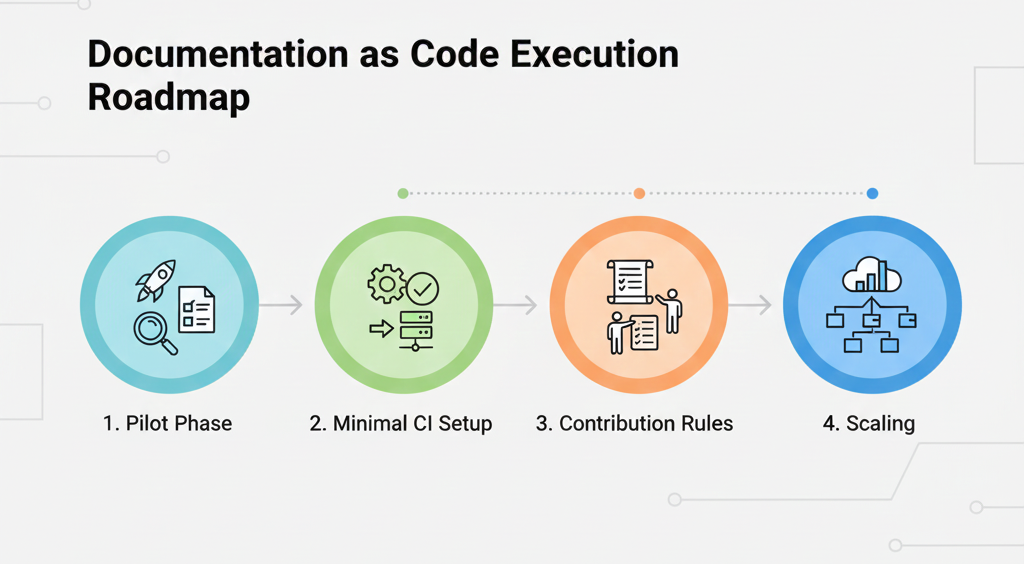
Execution Roadmap
Teams usually adopt Documentation as Code gradually:
- Pilot phase. Choose a small documentation set, write it in Markdown, and store it in a Git repository.
- Minimal CI setup. Add a simple pipeline to build documentation, check links, and deploy previews on pull requests.
- Contribution rules. Define branch naming conventions and pull request templates with documentation checklists.
- Scaling. Introduce shared style guides, centralized navigation, and search as documentation grows.
This phased approach helps teams avoid over-engineering early while still building a scalable system.
Roles and Responsibilities
Clear ownership helps Docs as Code workflows succeed:
- Developers update technical details, examples, and configuration references.
- Technical writers focus on structure, clarity, terminology, and user flows.
- DevOps engineers maintain pipelines, hosting, and integrations.
- Product owners identify documentation gaps and validate completeness.
When roles are well-defined, documentation becomes a shared responsibility rather than an afterthought.
Real-Life Adoption Examples
Many well-known projects rely on Docs as Code, demonstrating tangible benefits in both open-source and enterprise environments:
- The Kubernetes documentation site is built from Markdown files stored in GitHub and generated with Hugo. Over 1,000 contributors submit updates via pull requests. Docs updates go live within minutes after merge, keeping operator guides and tutorials always current.
- GitLab teams use MkDocs and CI pipelines to keep documentation aligned with product releases. Every new release triggers automated builds and deployment of docs, greatly reducing manual publishing effort. Distributed teams contribute without conflicting changes, cutting review cycles.
- Developer communities frequently publish Docs as Code setups using Docusaurus and automated previews. Changes appear on preview sites within 2–5 minutes, allowing faster feedback loops. Clear versioning reduces user confusion; multi-version docs maintained simultaneously for multiple product releases.
These examples show that Docs as Code scales from open-source projects to enterprise systems.
Best Practices and Guidelines
Documentation as Code succeeds when it is treated as part of the product — not as a side task.
First, documentation should evolve together with code. Feature releases and documentation updates must be aligned to avoid gaps between product behavior and published instructions.
Second, establish clear ownership. Developers maintain technical accuracy, technical writers ensure clarity and structure, and DevOps teams maintain pipelines and automation.
Third, require structured reviews. Every documentation update should go through at least one technical review and one editorial review to maintain both accuracy and readability.
Automation is equally important. Use CI/CD pipelines to validate links, enforce style guidelines, and prevent broken builds. Automated checks reduce manual effort and increase reliability.
Finally, maintain governance as documentation grows. Use consistent navigation structures, shared style guides, and periodic audits to archive outdated content.
When these principles are applied consistently, Docs as Code remains scalable rather than becoming difficult to manage.
Conclusion
Documentation as Code bridges the gap between software development and technical writing by embedding documentation into structured engineering workflows.
It delivers clear benefits in automation, traceability, and collaboration — especially in environments where documentation must evolve quickly alongside code. At the same time, as documentation grows and contributor roles expand, maintaining this model can require additional governance and tooling.
In the next article, we’ll explore where Documentation as Code begins to face practical limitations — and how hybrid documentation approaches can balance developer workflows with usability for broader documentation teams.
Good luck with your technical writing!
Author, host and deliver documentation across platforms and devices
FAQ
Is Documentation as Code only for developers?
No. While Documentation as Code originated in developer-driven environments, it is not limited to developers. Technical writers, DevOps engineers, and product teams can all participate in the workflow. However, contributors typically need basic familiarity with tools like Git and Markdown, which may require onboarding for non-technical team members.
Do you need to know Git to use Docs as Code?
In most implementations, yes. Since documentation is stored in Git repositories and updated through branches and pull requests, understanding basic Git concepts (commits, branches, merges) is important. Some platforms provide user-friendly interfaces, but the underlying workflow usually relies on version control systems.
Is Markdown the only format used in Documentation as Code?
No. While Markdown is the most common format due to its simplicity, other formats such as AsciiDoc and reStructuredText are also widely used. The choice depends on project complexity, publishing requirements, and the static site generator being used.
How is Documentation as Code different from using Google Docs or Word?
Traditional tools like Google Docs or Word focus on collaborative editing and formatting. Documentation as Code focuses on version control, automation, integration with development workflows, and structured publishing pipelines. Instead of manual version tracking and file sharing, changes are managed systematically through Git and automated deployment processes.
Does Documentation as Code work for large documentation portals?
It can — but complexity increases as the documentation grows. Large portals with multiple versions, languages, and contributor roles often require additional tooling, automation, and governance. Without proper structure, navigation and maintenance can become challenging.
Is Docs as Code suitable for non-technical contributors?
It depends on the team setup. For engineering-heavy teams, it works very well. For organizations with content managers, SMEs, localization specialists, or external contributors, the Git-based workflow may feel technical and less intuitive compared to visual editors.
Is Documentation as Code expensive to implement?
The tooling itself is often open-source and free. However, implementation requires time, process changes, CI/CD setup, governance rules, and team training. The main cost is organizational, not technical.
Is Documentation as Code a universal solution?
No. It is highly effective for engineering-driven teams and products that evolve quickly. But it may not be ideal for every organization, especially where contributors are not comfortable with developer workflows or where advanced content management features are required.